

Contractors are slipping on deadlines, producer prices for non-residential construction inputs rose 8.9 percent from August 2025 to August 2026, according to an Associated General Contractors analysis, and the U.S. industry still needs about 349,000 more workers in 2026, according to Associated Builders and Contractors (ABC). If you fund capital programs, you shoulder that weight. In this guide, we rank eight live AI tools built to lift it, showing exactly how each one taps cost-schedule-risk data and where its limits start. We stay focused on owners managing multiple contractors under board scrutiny. Expect verifiable capabilities, clear trade-offs, and a single aim: a connected record that spots trouble before change orders bite.
How we ranked the top AI tools for construction management
Why we chose an owner lens
Most “best AI construction” lists speak to general contractors. You, the owner, fund multi-billion-dollar programs, juggle several contractors, and must deliver one auditable record that ties estimate, schedule, cost, and risk together. Our scoring asks three owner-specific questions:
- Can the platform absorb contractor data without losing fidelity?
- Does it surface portfolio-level risk before it reaches the balance sheet?
- Will executives, auditors, and regulators trust the source trail?
Our five-point scorecard
We weighted each vendor on five criteria mapped to those pain points:
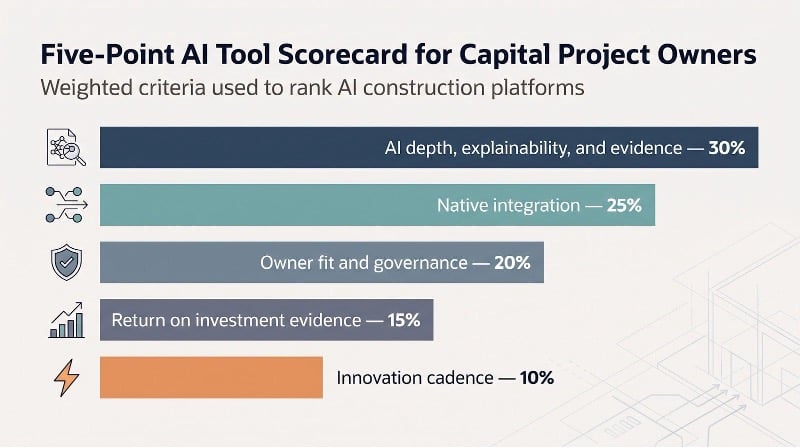
- AI depth, explainability, and evidence (thirty percent). Live, permission-aware AI that cites its sources outranks flashy demos still in beta.
- Native integration (twenty-five percent). Estimate, schedule, cost, documents, risk, and field data must live in one schema, or you inherit re-work.
- Owner fit and governance (twenty percent). Points go to platforms that support contractor oversight, portfolio roll-ups, and audit trails a forensic team can trust.
- Return on investment evidence (fifteen percent). Quantified customer outcomes or independent analyst validation carry more weight than marketing claims.
- Innovation cadence (ten percent). Features that reached general availability in the past twelve months score higher than roadmap promises.
These weights push “cool factor” aside and reward platforms that strengthen governance while saving real hours on live projects.
The eight tools at a glance
Here is a quick view before we dive into each contender. The rankings follow the weighted scorecard above.
| Rank | Tool | Best for | Core AI mode | Platform breadth | Pricing metric | Main trade-off |
| 1 | InEight | Integrated owner controls | Predictive + document AI | Estimate-to-field suite | Enterprise quote or per-user | Implementation effort |
| 2 | Procore | Agentic workflows & field UX | Source-citing agents | Broad construction cloud | Annual construction volume + AI packages | AI add-on cost; lighter CPM depth |
| 3 | Autodesk Forma | BIM-connected projects | Contextual assistant + risk ML | Design-to-build cloud | $800 to $1,404 per user per year (tiered) | Highest value inside Autodesk stack |
| 4 | Oracle C&E | P6/Aconex enterprises | Conversational analytics + safety prediction | Multi-app suite | Project or enterprise license | Suite complexity |
| 5 | nPlan | Schedule assurance | Predictive delay risk + generated schedules | Specialist overlay | Quote | No cost or document backbone |
| 6 | ALICE | Optioneering & recovery | Generative schedule optimization | Specialist overlay | Quote | Model preparation required |
| 7 | Hexagon EcoSys | Portfolio EVM & governance | Conversational assistant | PPM / project controls | Enterprise quote | Steep learning curve |
| 8 | Trunk Tools | Specs, drawings, RFIs | Multimodal document agents | Overlay | Quote | GC-centric; verify integrations |
1. InEight: best overall for capital project owners
Most owners ask the same question on every megaproject: Why can’t one system show cost, schedule, risk, and documents in one place? InEight’s project controls platform comes closest. It links estimating, CPM scheduling, cost, document control, change, and field progress in a single data model, so contractor files arrive already aligned.

InEight integrated project controls platform for capital projects.
Why it tops an owner-focused ranking. Native connections let you compare a wind-farm contractor’s P6 file with a transmission-line schedule before the board meeting, not after a claim lands.
Live AI in two high-stakes workflows.
- InEight Schedule. The platform studies historical CPMs and suggests work-breakdown items, logic ties, and uncertainty ranges as you build the plan, raising baseline quality while you stay in control.
- InEight Document. Release 26.3 added AI that reads an uploaded specification, finds every submittal requirement, and builds them into a structured register you can review item by item before you save.
The principle stays simple: AI belongs inside the same database that holds cost, change, and risk. Because those records are already reconciled, the algorithm flags real conflicts instead of hallucinating new ones.
2. Procore: best for agentic AI and field adoption
Procore already runs on tablets across thousands of jobsites, so its AI meets crews where they work instead of in a back-office chat tool. Its Digital Coworker packages bundle AI agents that draft RFIs, review submittals, and fill out daily logs. Each suggestion shows its source and waits for human approval, which protects governance.
Procore construction management platform with AI-driven field workflows.
The AI Go mobile app lets crews ask their project data out loud, so a foreman can pull up drawings, specs, or a daily log without typing. Procore reports that The Haskell Company cut submittal review cycles from one week to ten minutes with Procore AI. For owners, cleaner field data reaches portfolio reports faster, closing the gap between field reality and board reports.
3. Autodesk Forma: best for BIM-connected teams
If your drawings, RFIs, and coordination issues already sit in Revit and Navisworks, Autodesk Forma behaves more like an add-on than a separate system. Autodesk Assistant, now generally available in Forma, can answer prompts such as “Show clashes that threaten the chiller milestone” and links each reply to the model view and document it draws on.
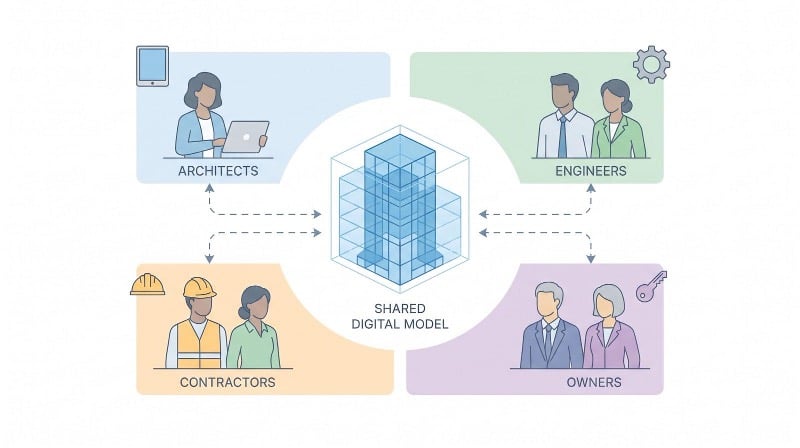
Construction IQ works in the background, scanning quality, safety, and schedule signals. A spike in high-risk drywall inspections, for instance, appears days before it threatens commissioning.
Autodesk lists Forma Build Essentials at $800 per user per year and Forma Build at $117 per user per month on an annual plan (about $1,404 a year), with unlimited-user pricing on request. You gain the most value when design authoring, coordination, and field execution all stay under the Autodesk roof. If you rely on Primavera for schedules or InEight for cost, map integrations first to avoid duplication.
Bottom line: Choose Forma when model fidelity drives every decision and you want AI that speaks fluent BIM, provided your ecosystem already runs on Autodesk.
4. Oracle Construction & Engineering: best for P6 and Aconex enterprises
Many owners stay on Primavera because contracts, partner workflows, and decades of baselines depend on it. Oracle addresses that reality. Construction and Engineering Intelligence (CEI) lets you query schedules, cost logs, and Aconex documents in plain English, then returns charts that drill straight into the underlying P6 activities.
A separate Advisor for Safety predicts injury hot spots with an industry safety model that Oracle says is trained on more than 10,000 project-years of data.
The power spans several products: Primavera Cloud or P6 for schedules, Aconex for documents, and Unifier for cost and contracts. Integration requires configuration and budget, yet the effort pays off with familiar CPM rigor plus AI that understands your historical data.
Bottom line: Choose Oracle when Primavera and Aconex are wired into your contracts, and you will gain modern analytics without replacing tools the supply chain already trusts.
5. nPlan: best for challenging contractor schedules
Many glossy baselines look perfect until the first pay app lands. nPlan spots weak logic early: it ingests a contractor’s P6 or MS Project file, compares every activity against a dataset of more than 780,000 historical schedules, and predicts where delay risk will spike.
Upload a file and you receive percentile forecasts, likely slip paths, and the activities that carry the most risk. Portfolio teams use those probabilities to add float where it matters, sharpen contract penalties, or reject bids that seem too optimistic.
nPlan moved beyond prediction with Schedule Studio, a generative tool that drafts a logic-linked schedule from a scope document. The first draft still needs planner review, but it turns a blank page into a viable option in one meeting.
Choose nPlan when you trust your core controls platform yet question the schedules landing on your desk. It will not manage cost or documents; its sole job is to expose timeline fiction before it drains the contingency fund.
6. ALICE Technologies: best for what-if scheduling and delay recovery
Generative AI does more than chat, and ALICE shows it by simulating thousands of schedule permutations, then ranking the few sequences that beat your milestone. Upload a Primavera P6 file or a 4D model, set constraints such as crews, cranes, and weather windows, and watch alternative build strategies appear.
ALICE’s Targeted Optimization mode isolates the handful of tasks that move the critical path. Suffolk Construction used it on a life-sciences project: after ALICE’s Schedule Insights Agent resequenced work, Targeted Optimization pointed to the trade tasks where better productivity would pay off most, and the team recovered a total of 42 days.
Owners see value at two points:
- Pre-award. Stress-test bids for realism and explore lower-cost resource mixes.
- Mid-project. Generate a recovery roadmap with quantified float, cost, and crew trade-offs when the board asks for a comeback plan.
Remember, ALICE is a specialist overlay, not a project-controls system. Bring clean schedules and resource data, and it will return options a human planner might need days to assemble.
7. Hexagon EcoSys: best for portfolio EVM & governance
Few systems stay calm when the CFO requests a five-year capital cash-flow curve. Hexagon EcoSys answers that call. Its core spans capital budgeting, cost forecasting, change management, risk, and earned-value metrics that roll up cleanly from work package to corporate board.
With EcoSys 9.4, Hexagon embedded its generative AI assistant, HxGN Alix, which lets users query schedules, costs, and forecasts in plain language, for example “Show variances over two percent on our renewables program.”
Large owners and EPC firms use EcoSys to manage multi-currency, multi-contract portfolios, and its low-code configuration lets them match the tool to company processes. The platform is powerful but opinionated, so teams face a learning curve before dashboards pay off.
Bottom line: Choose EcoSys when governance, capital planning, and portfolio optimization outrank job-site app adoption. Pair it with Procore or Autodesk Forma for richer field visibility and you will gain a clear view of both portfolio cash flow and project-level action.
8. Trunk Tools: best spec-book and drawing AI
Specs and drawings still consume hours in review cycles. Trunk Tools tackles that paperwork directly. Drop project PDFs into the cloud and its TrunkText engine builds an indexed library of specs, drawings, and submittals. Ask “fire-stopping sleeve requirement,” and it returns the exact page and paragraph so you can verify before acting.
AI extends beyond text. TrunkReview compares drawing revisions and flags changes, so teams see updates without rereading a hundred sheets. In a Gilbane pilot, the team saved 20 to 40 minutes per question, and Trunk Tools’ case study puts the return on labor and avoided re-work at about 40x.
Recent add-ons expand coverage:
- TrunkBid levels subcontractor bids automatically.
- TrunkRFI drafts responses with live source links.
- Cortex (launched June 2026) is the intelligence layer that reads from and writes back to Procore and Autodesk, and Trunk Tools now also works inside Outlook and on mobile.
Remember, Trunk is a specialist overlay. It will not manage cost curves or CPM logic; its job is to slash document search and review time while providing citations your legal team can trust. Pair it with InEight or Oracle for controls, and spec confusion turns into searchable facts.
Integrated platform or specialist AI: what should an owner buy?
Owners face two roads:
- One integrated backbone that unites cost, schedule, risk, documents, and field progress.
- Targeted overlays that fix a specific bottleneck such as schedule assurance, generative recovery, or spec-book search, all on top of an existing system of record.
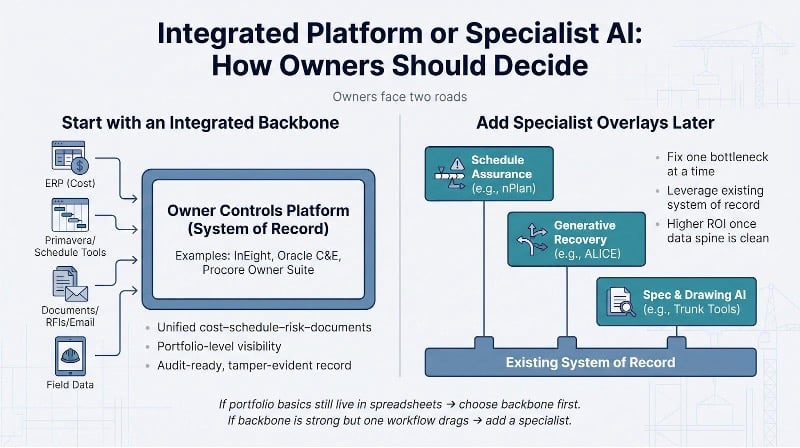
Start with a platform when basic portfolio questions (“How much float is left across funded work?”) still require manual spreadsheet work. Add a specialist only after the core data spine is in place and a single workflow (for example schedule realism) still slows the program. The next three sub-sections explain when each path wins and offer stack archetypes you can copy.
Start with an integrated platform when…
If cost lives in the ERP, schedules hide in Primavera, and RFIs sit in email, AI will inherit that chaos. An integrated platform such as InEight, Oracle C&E, or Procore creates one data spine before any algorithm starts.
Choose a backbone when:
- Projects report in different formats and Fridays disappear into spreadsheet clean-up.
- Board reviews stall because no one can reconcile change orders, float erosion, and funding gates in real time.
- Auditors or regulators expect a tamper-evident record that links estimate, schedule, cost, and risk.
Fix the data routes first. Once information flows cleanly, specialist AI becomes pure upside rather than a patch on structural gaps.
Add a specialist when…
Your backbone is solid, yet one workflow still drags the project. That is when an overlay earns its keep.
Bring in a niche tool when:
- Schedules look sturdy but still slip; nPlan or ALICE flags weak logic or generates recovery options.
- Document review burns hours; Trunk Tools answers spec questions with source citations, saving 20 to 40 minutes per query in the Gilbane pilot.
- Field updates lag; Procore agents draft RFIs and daily logs on the fly, sending cleaner data back to the controls core.
Keep the system of record stable, then attach intelligence that fixes one costly bottleneck without rewriting every process.
Suggested stack archetypes
Every owner’s digital estate is unique, yet patterns repeat. Use the five line-ups below as starting points; then adjust for contract model, data maturity, and the workflow that hurts most.
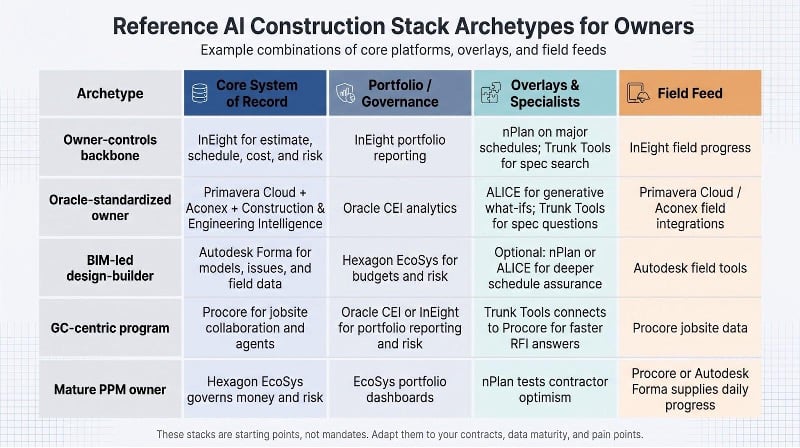
- Owner-controls backbone
Core: InEight for estimate, schedule, cost, and risk.
Overlays: nPlan on major schedules; Trunk Tools for spec search.
One source of truth plus two lightweight specialists. - Oracle-standardized owner
Core: Primavera Cloud + Aconex + Construction & Engineering Intelligence.
Overlays: ALICE for generative what-ifs; Trunk Tools for spec questions.
Keeps contractual standards while adding modern insight. - BIM-led design-builder
Core: Autodesk Forma for models, issues, and field data.
Portfolio: Hexagon EcoSys for budgets and risk.
Optional: nPlan or ALICE for deeper schedule assurance. - GC-centric program
Core: Procore for jobsite collaboration and agents.
Owner layer: Oracle CEI or InEight for portfolio reporting and risk.
Doc AI: Trunk Tools connects to Procore for faster RFI answers. - Mature PPM owner
Core: Hexagon EcoSys governs money and risk.
Field feed: Procore or Forma supplies daily progress.
Schedule check: nPlan tests contractor optimism.
Lean, audit-ready, and expandable.
Treat these as menu options, not mandates. Scale up or swap parts as your data backbone matures.
Ten questions to ask every AI construction vendor
Smart buyers do not fall in love with a demo; they test substance. Use the questions below to separate partners from pretenders.
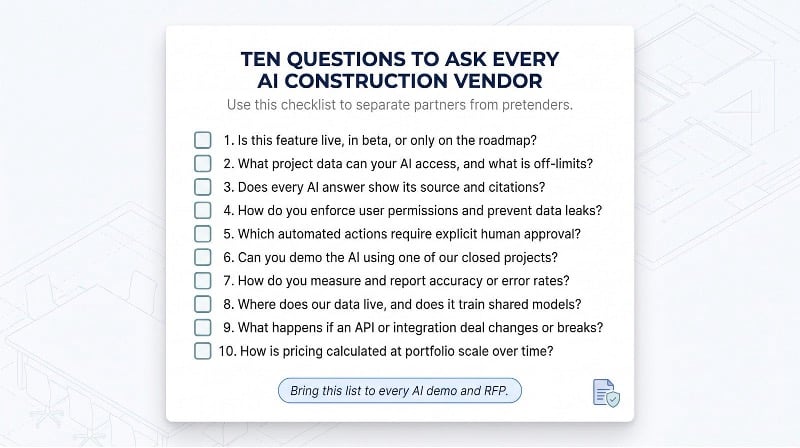
- Is the feature live, beta, or on the roadmap? Pay only for what ships today and budget for the rest tomorrow.
- What project data can the AI reach, and what is off limits? Insight scope equals data scope.
- Does every answer show its source? Citations turn guesses into defensible evidence.
- How does the tool respect existing user permissions? An RFI bot that exposes bid numbers is worse than no bot.
- Which actions require human approval? Automation without review invites unapproved change orders.
- Can you demo on one of our closed projects? Historical data reveals hallucinations quickly.
- How were any accuracy claims measured? Prefer published benchmarks or peer-reviewed studies over marketing math.
- Where will our data live, and will it train shared models? Clarify residency, retention, and opt-out terms up front.
- What happens if an API or integration deal changes? A revoked token can stall the workflow; insist on contingencies.
- How is pricing calculated at portfolio scale? Per user, annual construction volume, or AI packages. Know the driver before growth multiplies cost.
Trends shaping construction-AI buying in 2026
Labor shortages turn AI into capacity, not cuts
With ABC estimating the industry must attract 349,000 net new workers in 2026, AI lands as a digital teammate that absorbs administrative work (drafting RFIs, daily logs, spec look-ups) and frees field time instead of reducing head count.
Material inflation raises the value of early warnings
Producer-price data show non-residential input costs up 8.9 percent from August 2025 to August 2026. Predictive schedulers such as nPlan flag tasks likely to slip into peak-price quarters, giving finance teams weeks, not days, to hedge.
Agentic AI replaces passive chat
The 2026 release wave shifts from answers to actions. Procore agents draft RFIs and review submittals, and assistants in Forma and EcoSys answer questions against live project data. The better tools show the source behind each answer, and human approval stays mandatory.
Data quality becomes the deciding edge
Stalled AI rollouts usually trace back to disconnected spreadsheets and duplicate revisions. Vendors now win deals by proving lineage: tools such as Trunk and Procore surface citations next to every AI answer, and integrated platforms keep cost, schedule, and documents in one record.
ESG and carbon reporting demand auditable project data
Boards increasingly expect embodied-carbon figures alongside cost. Owners get the most credible numbers when carbon factors run through the same cost-and-quantity records as the budget, avoiding “green gloss” figures that collapse in audit.
AI investment is outpacing governance
More than three-quarters of executives lack full confidence they could pass an independent AI governance audit within 90 days, according to Grant Thornton’s 2026 AI Impact Survey. Owners now embed AI clauses in contracts, log every prompt, and insist on a kill switch. Draft the policy before the pilot; governance written after go-live rarely sticks.
Frequently asked questions
Below are answers to common questions owners ask about AI construction tools.
1. What is the “best” AI tool for construction management?
It depends on your role. If you need a single record from estimate to field, InEight often rises to the top because its integrated controls tie cost, schedule, risk, and documents together. General contractors tend to choose Procore for field-ready agents, while BIM-centric teams favor Autodesk Forma.
2. Is Primavera P6 an AI construction-management system?
P6 remains the gold-standard CPM scheduler, but its native AI is minimal. Oracle’s Construction & Engineering Intelligence adds conversational analytics and predictive safety on top.
3. Can AI really create a construction schedule?
Yes, within guardrails. nPlan Schedule Studio drafts logic-linked schedules from scope documents, and ALICE simulates thousands of resource scenarios. Human planners still refine sequencing, calendars, and contract constraints before locking the baseline.
4. How accurate are spec-book chatbots?
Accuracy depends on clean source files and visible citations. Tools such as TrunkText return the exact page and paragraph they reference. Skip any bot that cannot show its homework.
5. Do we need to clean data before rolling out AI?
Yes. Poor data governance is a common reason AI pilots stall in capital programs. Audit drawings, schedules, and cost codes first; let algorithms amplify, not expose, your workflows.
6. How do vendors price AI construction software?
Common models include per user (Autodesk Forma), annual construction volume (Procore), and enterprise or project quotes (InEight, Oracle, Hexagon EcoSys, and most specialists). Include AI packages, implementation, training, and data-egress fees to estimate true ownership cost.
7. Should we buy an integrated platform or several specialist tools?
Start with a clean system of record. If schedule assurance or document review still drags, add specialists such as nPlan or Trunk Tools. Overlays on messy core data save neither time nor money.
8. What governance do we need before go-live?
Draft an AI policy that covers data residency, user permissions, human-approval checkpoints, audit logging, model-training opt-outs, and a rollback plan. If a vendor cannot map settings to each clause, keep shopping.
Conclusion
For an owner, the best AI tool is the one that sits on clean, connected project data. An integrated platform such as InEight gives you one record from estimate to field, so its AI flags real conflicts in cost, schedule, and risk. Specialists such as nPlan, ALICE, and Trunk Tools then earn their place by fixing one bottleneck at a time. Start with the data spine, ask every vendor the ten questions above, and pay only for features that ship today.

Author: Kokou Adzo
Kokou Adzo is the editor and author of Startup.info. He is passionate about business and tech, and brings you the latest Startup news and information. He graduated from university of Siena (Italy) and Rennes (France) in Communications and Political Science with a Master's Degree. He manages the editorial operations at Startup.info.