

Building your MVP is a cash decision. Take a lean agency budget of $3,400 as the benchmark: at $25 to $49 an hour it buys just 69 to 136 billable hours, barely enough for one user flow, basic login, and a payment button before time runs out.
Quick answer: An AI app builder ships that click-ready scope in days for roughly 7 to 18 percent of the cost. When regulated data, custom hardware, or strict audits loom, a seasoned agency (or a builder-first, agency-second hybrid) still holds the edge.
This guide compares seven AI builders with that $3,400 benchmark so you can invest every dollar where it creates the most certainty.
How we chose the best AI app builders for startups
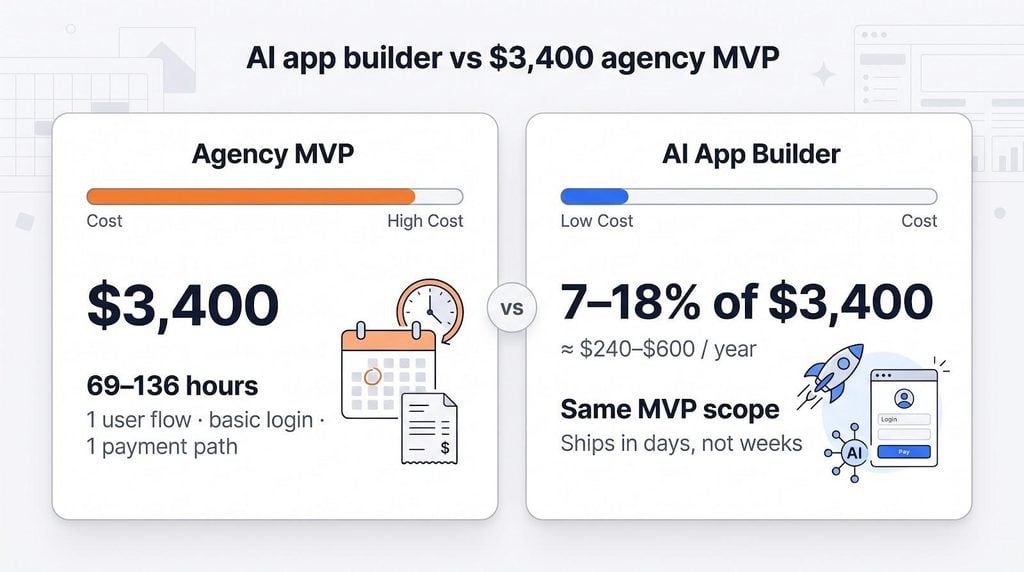
What qualified as an AI app builder
For this guide, an AI app builder is any self-serve tool that turns plain-language instructions into a deployable app you can buy online today.
To make the list, each platform had to meet five tests:
- Generate or refactor a working app from a prompt, not just mock-ups or autocompleted code.
- Provide a real launch path: live web, app-store binary, or downloadable source.
- Offer transparent, self-serve pricing a solo founder can afford.
- Update documentation and the product itself on a visible, ongoing cadence.
- Publish clear plan prices and overage terms.
We excluded pure wire-framing tools, agent frameworks without end-user output, and any service already in sunset or insolvency. Every pick can power a one-week sprint now and still flex for a pivot later.
The seven evaluation criteria
A rock-bottom subscription can balloon once hidden credits, hosting, or compliance work appear. To judge the cost founders feel after launch, not just at sign-up, we scored every platform on seven factors:
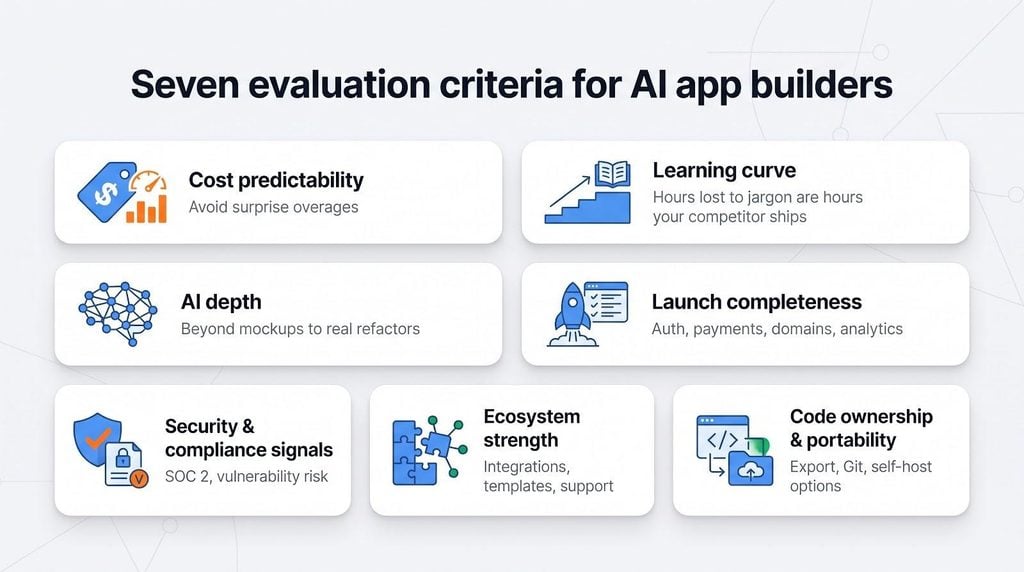
- Cost predictability: A $25 plan that climbs to $80 in overages is no bargain.
- Learning curve: Hours lost to jargon are hours your competitor ships.
- AI depth: Can the agent refactor a live database when the market pivots, or only sketch screens?
- Launch completeness: Auth, payments, domains, and analytics should ship on day one.
- Security and compliance signals: Public SOC 2 reports or similar audits matter; Escape’s scan of 5,600 vibe-coded apps found more than 2,000 high-impact vulnerabilities.
- Ecosystem strength: Native integrations, community templates, and responsive support shorten the road to revenue.
- Code ownership and portability: Downloadable, self-hostable code can erase a future rewrite bill.
These weights shape every “best for” call that follows, so you can map each platform’s edge to the milestone you need next.
How the $3,400 agency benchmark was modeled
We use $3,400 as an illustrative budget for a lean, offshore-rate “basic MVP,” not a quoted market price. At $25 to $49 per hour, that figure buys only 69 to 136 billable hours, with meetings, QA, and deployment included.
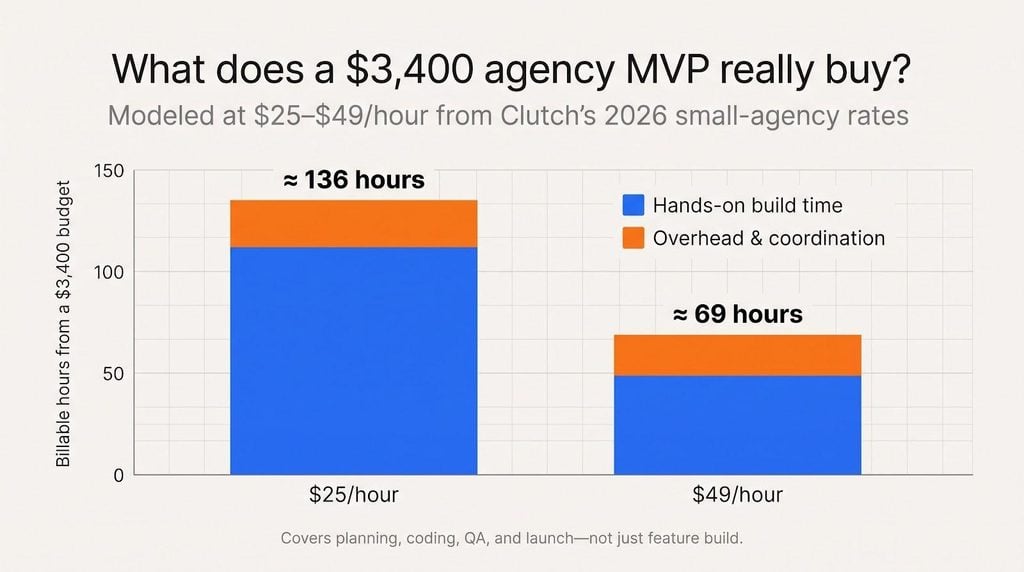
That budget typically covers one user flow, email or social login, a tiny data model, and a single payment path. Anything the proposal doesn’t mention (source-code hand-off, bug warranty, production hosting) still lands on your tab.
By fixing the benchmark this way, each builder review answers one reality-check question: can you ship the same scope, with clearer ownership, for less than 69 agency hours?
The seven best AI app builders at a glance
Scan this table to shortlist two or three platforms that fit your launch goal, then jump to their deep-dive sections.
| Platform | Best for | Output | Starter plan (monthly) | First-year base fee | Code export | Native apps | Hidden cost to watch |
| Spark | First paying web customers | Hosted web app/site | $25 | $300 | No | No | Ten percent sales fee on every transaction |
| Lovable | Exportable full-stack web MVP | Hosted + downloadable code | $25 | $300 | Yes | No | Build, hosting, and in-app AI share one credit pool |
| Replit | Agent-built projects an engineer can extend | Hosted + downloadable code | $20 | $240 | Yes | Check docs | Usage past the plan’s included credit |
| FlutterFlow | Native iOS + Android from day one | Hosted + Flutter source | $39 | $468 | Yes | Yes | Store-account fees sit outside the plan; GitHub push needs Pro |
| Bubble | Complex visual logic at web scale | Hosted web / optional mobile | $32 (annual) | $384 | No | Yes* | Workload units and AI credits rack up quickly |
| Softr | Secure client portals and internal tools | Hosted web app/portal | See softr.io | See softr.io† | Data only | No | Per-user tiers can force an upgrade |
| Glide | Spreadsheet-led internal or public apps | Hosted responsive web | $50 | $600 | No | No | Credits and published-app limits throttle scale |
- Bubble’s native apps need a paid Mobile or Web & Mobile plan to deploy.
† Softr’s pricing page did not load for our check, so confirm its current tiers and user limits on softr.io before you budget.
Dollar figures use monthly billing where the vendor shows it (Bubble’s Starter is shown at its annual rate) and exclude overages, domains, payment processing, and founder time.
As you read the platform breakdowns, watch how those headline numbers can flex (or spike) when real users, payments, or compliance reviews arrive.
1. Spark: best for turning a simple paid web idea into a first customer
Spark is built for founders whose first milestone is a paying customer rather than a polished prototype. Describe the business in plain language and you can preview the finished site for free on a spark.site subdomain as soon as you get started.
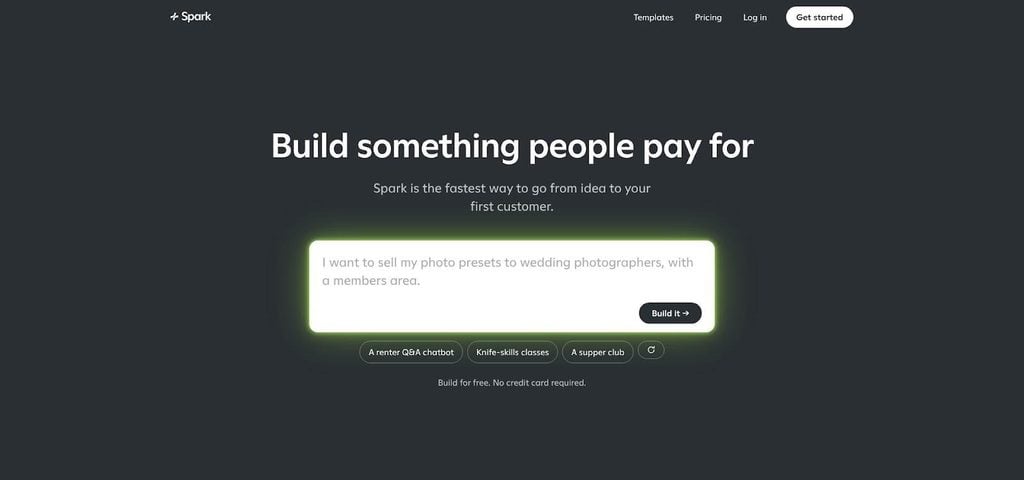
Spark AI app builder homepage screenshot.
What Spark builds
Type a one-paragraph brief, such as “Sell paid video yoga classes with subscriptions and a members-only blog,” and Spark, built by Plus Docs, Inc., returns a live site with user accounts, Stripe checkout, custom-domain email, and a starter marketing sequence. The platform focuses on revenue-ready essentials, not fringe features, so you can charge money the same afternoon.
Payments sit at the core. Spark wires one-off sales, recurring memberships, and coaching sessions through Stripe. You own what Spark creates, including the code, but the runtime stays on Spark’s servers. That works for validation and is less ideal if you need to self-host later.
Pricing and revenue math
- Starter: $25 per month + ten percent of each sale
- Pro: $200 per month + five percent of each sale
Both tiers break even around $3,500 in monthly gross sales. Below that, Starter costs less; above it, Pro wins. Plans include separate build and app credits that reset monthly. Add a domain fee, Stripe’s 2.9 percent + 30 cents, and any credit top-ups to see Spark’s true first-year cost. Even after those extras, most founders spend a single-digit slice of the $3,400 agency benchmark if they watch the meter.
Limitations and when an agency helps
Spark is web-only. No native iOS or Android support. The code can’t be downloaded, and Stripe is the lone payment rail. If your roadmap needs multi-processor payments, regulated data, or native mobile features, a scoped agency contract can turn the $3,400 floor from “too expensive” into smart insurance. For a fast, cash-efficient sprint to first revenue, Spark keeps burn low and momentum high.
2. Lovable: best for an exportable full-stack web MVP
Why it made the list
Describe your idea in chat and Lovable’s agent spins up front end, back end, auth, payments, and hosting in one pass. On the Pro plan you can open the code, sync to GitHub, or download the entire project, a rare level of freedom at this price. One unified credit pool covers generation, hosting, and any live AI calls, so early invoices stay predictable until traffic climbs.
Current cost and market signal
- Pro: $25 per month for 100 credits that cover build, runtime, and AI usage.
- In August 2026 the company announced a $400 million Series C at a $13.3 billion valuation and more than 60 million projects, proof it can fund new features and absorb GPU bills.
Because code export, Git sync, and custom domains unlock on Pro, you reach production-ready ownership before your bill hits triple digits, unlike rivals that hide these perks behind enterprise tiers.
Limitations and when an agency helps
You still depend on Lovable’s runtime for serverless functions, the database, and built-in AI. Migrating later means wiring those pieces to a new stack, work that lands on your engineering budget. A viral launch or a mis-configured loop can also burn credits fast, so set usage alerts.
Lovable is web-first. If App Store distribution, regulated compliance audits, or push notifications are launch-critical, a mobile-focused builder or a scoped agency may justify its fee, even if the agency starts by refining the very code Lovable lets you export.
For founders who want to own their MVP without a costly rebuild, Lovable delivers that option for about ten percent of the $3,400 agency benchmark.
3. Replit: best for agentic flexibility and an engineer-ready hand-off
Why it made the list
Replit drops you into a full IDE the moment its agent scaffolds your app, so custom logic, new packages, and hot fixes happen where the code already lives. The agent builds, tests, and redeploys in a visible loop. Ask it to rename a database field and it edits migrations, updates front-end calls, and reruns unit tests. When human eyes step in, you can push to GitHub or download a normal repository, never a closed export.
Replit also bundles hosting, authentication, secrets, and a Postgres-compatible database under one roof, turning first deploy into a single click instead of five dashboards.
Mobile and pricing caveats
- Core: $20 per month ($18 billed annually), with $20 of usage toward more powerful models and up to 60 projects on Free Mode.
- Pro: $100 per month ($90 billed annually), with $100 of usage toward the most powerful models, up to 15 collaborators, and database rollback up to 28 days.
Usage beyond the included credit runs on Replit’s effort-based, pay-as-you-go pricing, so think cloud, not flat SaaS.
Replit’s pricing page does not list native app-store publishing, so check its current docs before you count on iOS or Android, or consider FlutterFlow or Bubble if store apps are critical.
When an agency still helps
Metered pricing means a viral spike can erase Core’s savings fast, so set spend alerts and cap retries. Whatever certifications the platform holds, permissions, secrets, and data flows remain your job to harden. If regulated data, penetration tests, or uptime SLAs are non-negotiable, a specialist agency, or Replit’s enterprise tier, earns its fee.
Use Replit when you want AI speed without giving up engineering dignity; call an agency when contractual accountability, locked-down compliance, or a store-first mobile roadmap can’t wait.
4. FlutterFlow: best for native iOS and Android apps
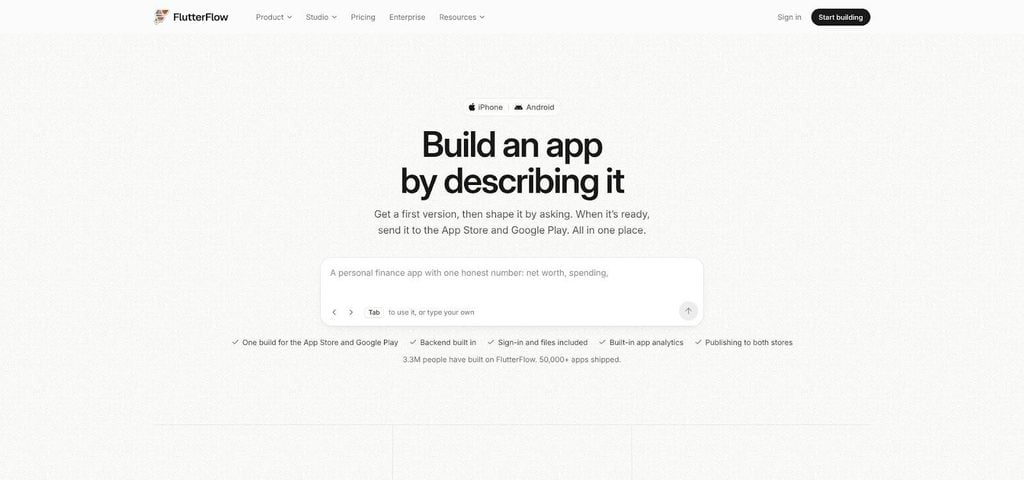
FlutterFlow native iOS and Android app builder interface screenshot.
Why it made the list
FlutterFlow generates real Flutter code and packages true iOS and Android binaries with no web-view wrapper. Even on the Basic plan ($39 per month, or $29 billed yearly) you can download source code, connect Firebase or Supabase, and deploy to the Apple and Google Play stores in one click. Pushing code to GitHub starts on Pro ($80 per month). That export right alone can save four figures in rewrite costs when your first engineer joins.
FlutterFlow Studio, its AI-led way to build, is covered by the same subscription as the visual builder, and both draw on one shared AI allowance; Pro and Max can buy a refill when it runs out.
What to watch
Early users report strong first drafts but lighter documentation and fewer guard rails than the mature studio, so budget time for manual checks, especially around state management and push notifications.
Agency comparison
Native publishing adds costs founders sometimes miss: Apple and Google developer account fees, plus extra setup for in-app purchases or push notifications. Backend services such as Firebase or Supabase are billed by those providers, not by FlutterFlow.
If your roadmap needs Bluetooth, offline persistence, or tight store-review timelines, pairing FlutterFlow’s AI speed with a mobile-focused agency can still land well below a ground-up Swift or Kotlin build, yet sturdy enough for the App Store spotlight. For simpler native MVPs, FlutterFlow alone often delivers for a fraction of the $3,400 agency benchmark.
5. Bubble: best for complex logic without writing code
Why it made the list
Bubble lets non-developers design workflows, databases, APIs, and native iOS and Android apps inside one platform. The AI Agent can generate, edit, and debug multi-step marketplaces or granular permission schemes that simpler builders can’t touch. A dense plugin marketplace covers payments, CRM sync, analytics pixels, and industry-specific add-ons, so you rarely hit the “now we must write custom code” wall.
Pricing, credits, and lock-in
- Web Starter: $32 per month on annual billing, for a project ready to launch.
- Two meters drive real cost: AI credits for the AI Agent, page generation, and image generation, and workload units for database operations, workflows, and web interactions. Plan allowances refresh monthly; past them you buy extra credits, a workload tier, or pay overages.
- Apps run on Bubble’s own hosting rather than as code you deploy elsewhere, so migrating later means a rebuild.
Think of Bubble like a long-term lease: great amenities, but the owner keeps the keys.
Production caveat
Bubble emails you at 75 percent and again at 100 percent of your workload allowance, and you can disable overages to cap spend. Still, double-check privacy rules, rotate API keys, and add your own monitoring before onboarding sensitive data.
When an agency still helps
Visual power is Bubble’s edge, but high traffic triggers larger workload tiers, and migration stays costly. Agencies that specialise in Bubble can refine privacy rules, optimise workload units, and build guard rails, while the first-year base fee stays near 11 percent of the $3,400 agency benchmark. Choose Bubble when visual flexibility outweighs code portability; bring in an agency, or switch to Lovable or Replit, when long-term ownership and self-hosting matter more than drag-and-drop speed.
6. Softr: best for portals and operational business apps
Why it made the list
Some products need a secure home for client data, not an Instagram-ready interface. Paste a prompt or connect a spreadsheet and Softr’s AI Co-Builder assembles a customer portal, internal dashboard, or membership site with roles, granular permissions, and built-in business logic. Data modelling feels like Airtable, and privacy rules switch on with plain-language toggles.
Softr runs a public Trust Center, so check its current certifications and data-processing terms there before you put client data in it.
The pricing cliff to watch
Softr prices its plans by tier and by the number of users each tier allows. Its pricing page did not load for our check, so read the current per-user limits on softr.io before you commit: on a portal, adding external users is what usually forces the next tier. Budget that step function before you promise “unlimited” seats.
When Softr’s limits appear
The controlled stack means no source-code ZIP, no App Store path, and little room for offline sync or custom AI services. If your roadmap needs push notifications, bespoke integrations, or thousands of external users, you will meet limits quickly.
Agency comparison
Softr’s well-kept garden offers roles and granular permissions that can replace weeks of backend work an agency would bill. Bring in an agency when the portal evolves into a full customer-facing product, needs complex third-party hooks, or outgrows Softr’s user tiers. Until then, Softr keeps data safe, invoices small, and clients logged in, often for less than half the cost of even a budget agency build.
7. Glide: best for spreadsheet-led internal and lightweight apps
Why it made the list
If your startup already lives in Google Sheets, Notion tables, or CSV files, Glide turns that data into a responsive web app in minutes. GlideOS, a standalone platform separate from Glide Classic, lets you start from a prompt, a spreadsheet, a PDF, or a screenshot and has an AI agent build the app.
Glide shines at operational tools: internal CRMs, resource trackers, lightweight client portals, and public mini-sites that borrow their structure from an existing spreadsheet. Hosting, auth, and a mobile-friendly UI come baked in, so there is no store-submission drama.
Current pricing
- Plus: $50 per month, the first tier that publishes public apps; 3 team members, 5 published apps, and 250 credits to start.
- Pro: $125 per month, adds unlimited published apps and workflows, premium integrations, and org-level roles and permissions.
Credits meter the agent’s work. Heavy automation or frequent redesigns can drain the pool fast, so check the balance each week.
Limits and when to call an agency
Glide’s abstraction hides complexity but also blocks advanced moves: code and project files are viewable only on Enterprise, and there is no self-hosted runtime or direct path to native app stores. Check its Trust Center for where data is hosted.
When your data model grows beyond spreadsheets (think many-to-many relations, offline sync, or pixel-perfect marketing pages), a custom React dashboard or a Softr-style portal (often with agency help) gives more runway. For straightforward internal workflows, Glide still upgrades “numbers on a sheet” to “users on a live app” for a fraction of the $3,400 agency benchmark.
Side-by-side cost, control, and capability comparison
First-year base cost
Sticker prices hide surprises, so here’s what each platform draws from your bank account in its first 12 months, before overages, domains, payment fees, or late-night coffee.
| Platform | Launch plan | Monthly fee | 12-month base | Share of $3,400 agency floor |
| Spark | Starter | $25 | $300 | 8.8 % |
| Lovable | Pro | $25 | $300 | 8.8 % |
| Replit | Core | $20 | $240 | 7.1 % |
| FlutterFlow | Basic | $39 | $468 | 13.8 % |
| Bubble | Web Starter | $32 (annual) | $384 | 11.3 % |
| Softr | Varies* | See softr.io | See softr.io | Check tiers |
| Glide | Plus | $50 | $600 | 17.6 % |
- Softr’s pricing page did not load for our check; its user-based tiers can force an upgrade as a portal grows.
The six builders we could price keep first-year base spend under 18 percent of the $3,400 benchmark. You can redirect that delta to marketing, compliance, or scale work instead of raw build hours.
Next, we’ll compare who really owns the code and which tools reach the web, the app stores, or both.
Code ownership is not the same as portability
Owning the intellectual property feels reassuring, until you try to move it. Some builders say “the code is yours” but never let you download a file. Others hand over a ZIP, yet keep the databases, background jobs, or authentication stack locked inside their cloud.
Think of portability as a four-rung ladder:
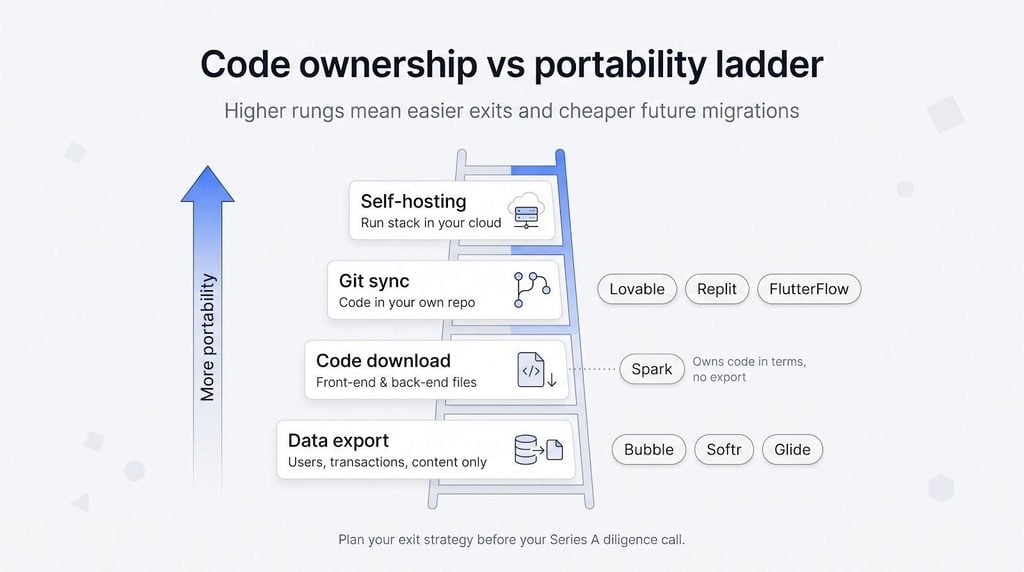
- Data export: pull users, transactions, and content through CSV or API.
- Code download: front-end and back-end files land on your laptop.
- Git sync: updates flow to a repository your engineers already use.
- Self-hosting: the entire stack (database, auth, storage) runs under your own cloud account.
Where the seven platforms sit today:
- Lovable, Replit, FlutterFlow reach rung three (FlutterFlow’s GitHub push needs its Pro plan); you leave with runnable code and a Git pipeline, although serverless add-ons may remain on their cloud.
- Spark stops before rung two. Per its terms, you own what it builds, including the code, but you cannot export the source or runtime.
- Bubble, Softr, Glide also stay on the first rung. They suit many businesses, yet investors who expect a future re-platform will flag the risk.
Plan your exit strategy now, long before a Series A diligence call. Every rung you climb today can save thousands on a future migration bill.
Web, PWA, or native app?
Your launch target matters as much as your feature list. A polished web app won’t help if your pitch depends on push notifications or in-app purchases. Here’s where each builder sits today:
- Web-first: Spark, Lovable, Softr, and Glide publish responsive web apps (some offer installable PWAs) yet skip App Store gatekeepers.
- Native on both major stores: FlutterFlow compiles true iOS and Android binaries, and Bubble does the same once you add its mobile tier.
- Check before you count on it: Replit’s pricing page does not list app-store publishing, so confirm its current mobile support in its docs and budget extra help if store apps are critical.
Match this map to your early growth loop. If virality depends on shareable links, web-first wins. If onboarding leans on push alerts or Apple Pay, native builders save weeks. Choose now, because switching lanes later costs twice: once in time and again in cash.
What does a $3,400 agency MVP actually buy?
Turn the quote into hours
Lean offshore mobile agencies often bill in the $25 to $49 per hour range.
- At $25 per hour, $3,400 buys about 136 hours.
- At $49 per hour, that falls to 69 hours.
Picture that block as a single sprint. Kickoff calls, scope clarifications, Slack pings, design handoffs, code reviews, QA, and deployment prep all nibble at the clock before the first change request lands. After project-management overhead you may have only 30 to 60 hands-on build hours left, just enough for one user flow, basic email or social login, a tiny data model, and a single payment or subscription path. There’s no room for push notifications, an analytics funnel, compliance paperwork, or any pivots.
Seen this way, when an AI builder ships the same scope for 7 to 18 percent of the cash, the real question becomes where the freed-up dollars work harder: marketing, security hardening, or user research instead of raw development time.
Questions the quote must answer
A dollar figure without detail is a mirage. Before you sign, press the agency on these points; every clear answer prevents surprise hours later.
- Who owns the Git repository and the cloud accounts? If the code sits under the agency’s umbrella, hand-off day can bring an extra bill or, worse, downtime while credentials move.
- Is source-code handoff included? Some “MVP” proposals cover only a compiled build. Insist on the full, readable codebase plus any build scripts.
- How many revision rounds are baked in? Two feedback loops vanish fast when real users expose edge cases; additional rounds eat into the 69 to 136 billable hours your budget buys.
- Is QA part of the price or an add-on? A bug warranty sounds standard, yet some shops charge separately for regression testing or post-launch fixes.
- Who pays for hosting and third-party APIs? Stripe, SendGrid, or an LLM endpoint can turn a flat fee into a rolling tab if the contract leaves those costs on your card.
- What happens after launch day? Nail down maintenance rates, response times, and whether change requests trigger a fresh statement of work.
Walk through this checklist line by line. Any fuzzy answer today turns into time or dollars tomorrow. Better to sharpen scope now than discover mid-sprint that “basic authentication” meant a single social-login option or that “payments” was Stripe in test mode, not live.
When the agency wins
AI builders cut validation costs, yet certain checkpoints still reward a human team that is on the hook for outcomes.
- Regulated or high-risk data: Healthcare records, children’s information, and anything under financial regulations need documented controls and liability clauses that self-serve platforms rarely sign.
- Intricate multi-tenant permissions: “Company-within-company” access rules or audit trails are faster, and often cheaper, to model once with an architect than to debug through repeated AI prompts.
- Native hardware or edge ML: Custom Bluetooth devices, advanced camera pipelines, or on-device machine-learning models sit outside most builders’ comfort zones; experienced specialists can cut months of R&D.
- Mission-critical integrations: Gateways beyond Stripe, legacy ERPs, or real-time data feeds often need bespoke middleware the platforms don’t expose.
- Contractual accountability: When uptime, accessibility, or security guarantees appear in the deal memo, you need a partner who can sign an SLA; builders offer best-effort docs, not legal remedies.
When the AI builder wins
Speed and cost are the obvious advantages, yet AI tools also thrive when uncertainty is high and polish can wait.
- Demand testing: Need proof of interest before you spend? An AI builder can publish a working funnel in hours, letting you measure real clicks and conversions this weekend instead of pitching hypotheticals next quarter.
- Single-workflow products: For narrow flows (for example, “book a call, pay a fee”) most builders deliver out of the box, and you keep every prompt, tweak, and user insight.
- Low-risk data: If a mistake dents pride, not compliance, you can iterate and repair without legal overhead.
- Frequent pivots: Natural-language edits beat change-order paperwork; builders shine while you’re still discovering the product.
- Low downside: When the worst-case cost is a small lesson, DIY becomes smart insurance, freeing capital for marketing or user research.
In short, pick the builder path when learning speed outweighs contractual guarantees and the cost of failure is measured in experiments, not fines.
The hidden-cost calculator
DIY cost formula
A $25 headline plan can grow fast once overages, third-party services, and founder hours stack up. Use this simple equation to find the real tab:
Total DIY cost = platform fees + usage overages + external services + (founder hours × hourly value) + security / hardening work
Line items to include
- Platform fees: the subscription or credit package you already track.
- Usage overages: extra AI calls, hosting minutes, or revenue-share cuts.
- External services: Stripe, email, analytics, or pay-as-you-go AI models.
- Founder hours: every late-night debug session is time you’re not closing deals; assign a fair hourly rate.
- Security and hardening: GDPR compliance or a penetration test often appears only after the first customer asks.
Run your numbers, then compare the total with the platform’s landing-page quote. A “$25 a month” tool can feel like a few hundred dollars, still well under a $3,400 agency bill, or climb high enough to justify outside help.
AI app builder or agency? Use this decision tree
Start at the top, answer seven yes/no questions, and land on the safest next move for your budget and risk profile.
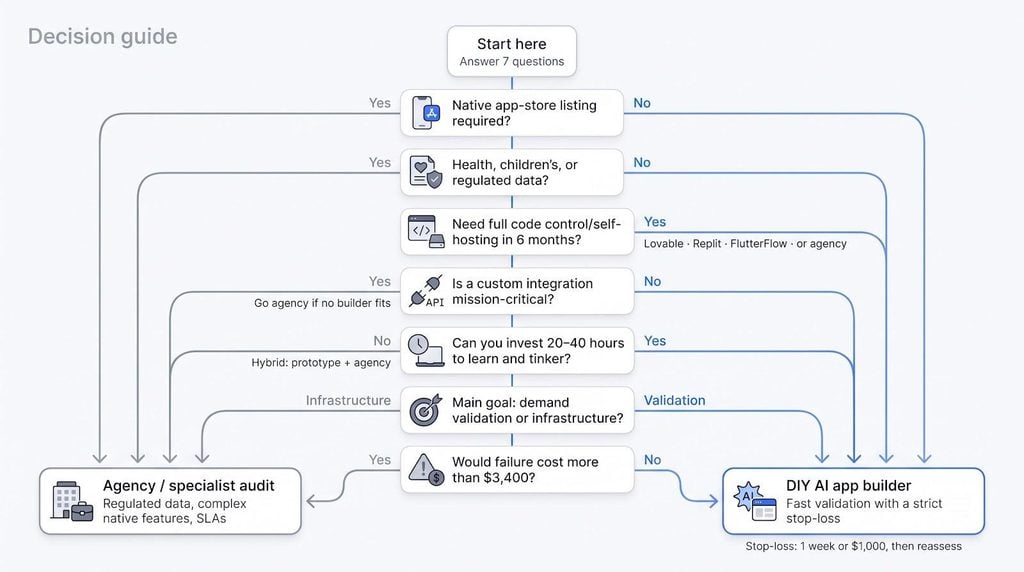
- Native app-store listing required?
- Yes → keep going. • No → Q 2
- Will you store health, children’s, or other regulated data?
- Yes → agency or specialist audit. • No → Q 3
- Do you need full code control or self-hosting within six months?
- Yes → Lovable, Replit, FlutterFlow, or an agency for a guaranteed handoff. • No → Q 4
- Is a custom integration mission-critical?
- Yes → check each builder’s API depth; if none fit, go agency. • No → Q 5
- Can the founder invest 20 to 40 hours to learn and tinker?
- Yes → DIY builder stays viable. • No → hybrid path (prototype with a builder, polish with an agency).
- Is the goal demand validation or long-term infrastructure?
- Validation → DIY first, expert review later. • Infrastructure → budget for an agency or at least a security consultant.
- Would failure cost more than $3,400 in fines, lost revenue, or reputation?
- Yes → pay for professional accountability. • No → roll with the builder and iterate fast.
If you land on “DIY builder,” set a strict stop-loss: one month or $1,000 in combined fees before you pause and reassess. If you land on “agency,” use the same checklist to cap scope and protect both wallet and timeline.
A seven-day founder validation plan
Day 1: Clarify the problem
Write one tight paragraph that names your user, their pain, and the single workflow you will solve. Sketch the data model, then convert each step into a one-sentence acceptance test; that clarity prevents wasted prompts later.
Day 2: Build on two platforms
Choose the two builders that best match your output target and budget cap. Generate a first draft in each, publish to staging, and note the credit or time cost.
Day 3: Lock down access
Add email or social login plus role-based permissions. Confirm an admin sees everything and a standard user does not. Document every click; many generated apps leak at this step.
Day 4: Take money
Connect Stripe (or the platform’s checkout) and run a real $1 transaction to yourself. Screenshots prove the flow works.
Day 5: Break it on purpose
Rename a database field, add a form field, or change pricing. Note what survives and what fails. Good builders fix forward; weak ones burn credits while you watch.
Day 6: Test with five real users
Give target users a link and your card. Collect feedback, error screenshots, and completion times. Observe; don’t patch mid-session.
Day 7: Compare and decide
Line up cost, bugs, founder effort, exportability, and next-90-day needs. Keep the winner, scrap the loser, and set a stop-loss for the next sprint.
Stop-loss rule: if you spend more than one week or $1,000 fixing the same structural issue, escalate to an expert or switch platforms. Momentum beats sunk cost every time.
Buyer’s checklist before committing
Take five minutes with this list before you click “buy annual.” A short pause now can save months of migration pain later.
- Deployment target: Is the app strictly web, a PWA, or a native download? “Mobile-friendly” won’t satisfy investors who expect App Store badges.
- Exit doors: Can you export both data and runnable code? A ZIP of images is not source control, and “you own the code” is hollow if no repository ever leaves the platform.
- Billing triggers: What burns credits: model calls, hosting minutes, workflow runs? Note the breakpoints and test them against a modest growth forecast.
- Compliance evidence: Where is customer data stored, and does the vendor publish a DPA? A SOC 2 badge usually covers the platform, not the app you generate; ask whether backups, logs, and sub-processors share the same controls.
- Account ownership: Keep the domain registrar, Stripe account, Apple Developer ID, and Git repo under your organisation, not a personal email or vendor umbrella; moving them post-launch courts downtime.
- Contingency plan: If the vendor shutters, can you self-host or will you rebuild from scratch? Is version control available for rollback? Can you audit permissions independently?
Run through the checklist once, sign only what passes, and move forward with confidence instead of crossed fingers.
FAQs
Below are answers to common questions founders ask about AI app builders.
What’s the best AI app builder for a non-technical founder?
There isn’t one winner. Match the tool to the job: Spark for paid web content, Lovable for exportable MVPs, Replit for engineer-friendly code, FlutterFlow for native apps, Bubble for complex logic, Softr for secure portals, and Glide for spreadsheet-based tools.
Can ChatGPT build a complete app by itself?
No. Escape’s scan of 5,600 publicly available vibe-coded apps uncovered more than 2,000 high-impact vulnerabilities and over 400 exposed secrets. AI speeds work, but human review still closes the final mile.
Do founders really own AI-generated code?
Yes in most terms of service, but practical ownership depends on portability. Lovable, Replit, and FlutterFlow let you download code you can host elsewhere; the others don’t.
How much does an AI app builder cost?
Starter plans run $20 to $50 a month. Overages, third-party APIs, and founder time can lift real spend to a few hundred dollars per year, still a fraction of a $3,400 agency bill.
Which builders can publish to both the App Store and Google Play?
FlutterFlow can on its Basic plan, and Bubble on a paid Mobile or Web & Mobile plan. Check Replit’s docs for its current mobile support; the rest focus on web apps.
Are AI app builders secure enough for customer data?
Platform SOC 2 or ISO certificates help, but generated apps inherit only part of those controls. Always audit permissions, rotate keys, and run vulnerability scans before launch.
What happens if the platform shuts down?
If you can export code and data, you can migrate. If not, you’ll rebuild. Check portability rights and the vendor’s funding history before committing.
Is a $3,400 agency MVP better than a no-code build?
When stakes involve regulated data, complex native features, or contractual uptime, agencies win on accountability. For fast validation with low risk, AI builders ship more product for less cash.
Do AI-built apps scale?
Yes, within platform limits. Watch usage-based billing, database caps, and data-region options as you grow.
When should I switch from DIY to an agency?
Make the switch when hidden costs, compliance gaps, or feature ceilings erase the savings you gained by building solo.
Conclusion: use AI for evidence, not blind confidence
AI builders have torn down the price wall between an idea and a working product. For roughly 7 percent of a bargain-agency quote, you can launch a paid web app, export a full-stack MVP, or ship a native iOS binary in a week.
Speed pays only when you pair it with scrutiny. Escape’s scan of 5,600 publicly available vibe-coded apps uncovered more than 2,000 high-impact vulnerabilities and 175 instances of exposed personal data. Ownership clauses without download rights still lock you in, and credits without alerts can turn a $25 plan into a surprise bill when a Fortune 500 prospect asks where its data lives.
Treat AI like a co-founder who prototypes at lightning pace but still needs regular code reviews. Build fast, pressure-test pricing and user flows with real customers, then invest the savings in a security audit, compliance hardening, or native features; work where humans still outperform machines.
Choose your tool, set a stop-loss, and move. The market will teach you faster than any whiteboard ever can.

Author: Jean-Pierre
Jean-Pierre is a polyglot communication specialist, freelance journalist, and writer for startup.info with over two decades of experience in media and public relations. He creates engaging content, manages communication campaigns, and attends conferences to stay up-to-date with the latest trends. He brings his wealth of experience and expertise to provide insightful analysis and engaging content for startup.info's audience.