It’s 11:40 p.m. The essay is due at nine. You have a title, three tabs of half-read PDFs, and a blinking cursor that seems to be judging you.
So you open a chatbot. Almost everyone does now. The harder question is which one, and for which part of the job, because the tool that helps you find sources is rarely the one that should touch your final paragraph.
Nearly Every Student Uses AI Now, but Not for the Same Jobs
The Higher Education Policy Institute’s 2026 survey of 1,054 UK undergraduates found that 95% use AI in at least one way, and 94% use generative AI to help with assessed work (HEPI, 2026). Two years earlier, that second figure was just over half.
What’s interesting is how they use it. Explaining concepts tops the list. Summarising articles comes next. Around four in ten use a chatbot to suggest research ideas or structure their thinking, which is basically outlining with a study partner who never sleeps.
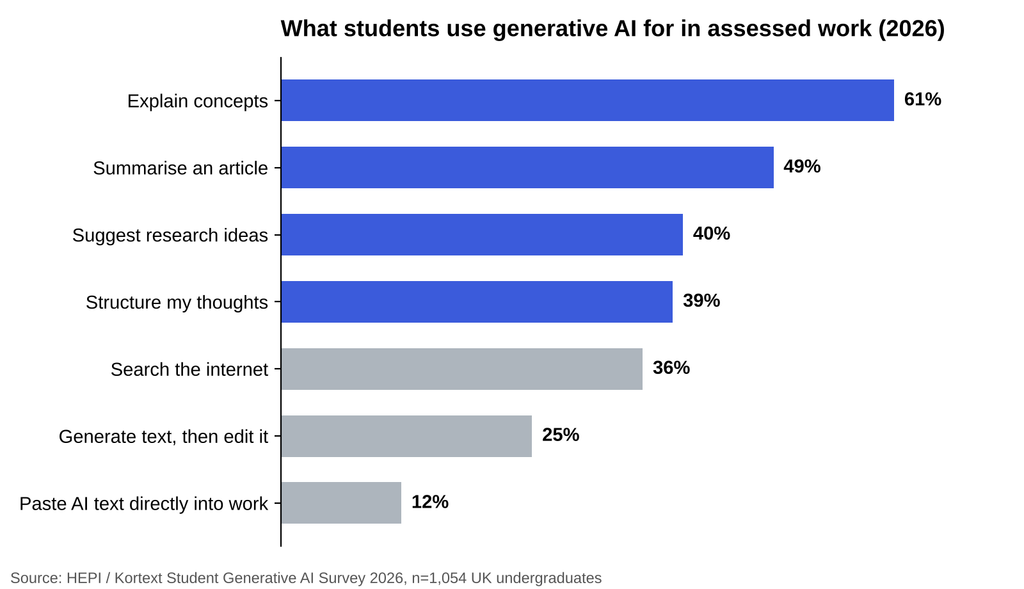
How UK undergraduates use generative AI for assessed work. Source: HEPI Student Generative AI Survey 2026 (n=1,054, fieldwork December 2025).
Look at the bottom of that chart, though. The share pasting AI-generated text straight into assessed work rose from 3% in 2024 to 12% in 2026 (HEPI, 2026). The same survey found the top reason students hold back is fear of being accused of cheating, cited by 42%, followed by worry about false results at 35%.
Both worries are fair. They also point to the same fix: use the chatbot for thinking work, then do the writing yourself.
Why the Same Chatbot Can Teach You or Do Your Homework
Here’s the study I wish every student read before opening a chat window.
Researchers at Wharton gave nearly a thousand high school math students GPT-4 during practice sessions. One group got a plain ChatGPT-style interface. Another got a version prompted to give hints instead of answers. On practice problems, the plain group did 48% better than students with no AI, and the hint-only group did 127% better (Bastani et al., PNAS, 2025).
Then the AI was taken away for the exam. The plain group scored 17% worse than students who never had it. The hint-only group? Roughly level with the control. Same model, different design, very different learning.
A 2025 MIT Media Lab study on essay writing pointed the same way. Students who wrote with an LLM showed the weakest brain connectivity of three groups, felt the least ownership of their essays, and struggled to accurately quote what they had just written (Kosmyna et al., 2025). The twist: people who wrote on their own first and only then brought in the chatbot showed higher memory recall. It’s a small study that hasn’t been peer reviewed, so hold it loosely. But the order matters, and it’s an easy habit to copy.
Think first. Then ask.
Research: Use AI to Find Sources, Never to Invent Them
Chatbots have gotten better at references. They haven’t gotten perfect. When researchers put 350 orthopaedic questions to ChatGPT-5 in early 2026, 7.13% of the 2,736 references it produced were fabricated, papers that simply don’t exist (Cureus, 2026). One fake citation is enough to sink your credibility with a marker or an editor.
So split research into two jobs.
Finding new sources
Search-first tools that show a link next to every claim are the right fit here. Phrasly Neo works this way on paid plans: when you ask for sources, it searches for real ones, cites them in the text and builds a reference list in APA, MLA or Chicago. If it can’t find support for a point, it tells you instead of making something up.
Understanding sources you already have
Google’s NotebookLM answers only from documents you upload, with citations back to the passage. Neo also reads PDFs, scans, images and audio, which helps when your reading pack is a photocopied chapter from 1994.
Whichever you use, open every source before it goes in your bibliography. Every single one.
Outlining: Make the Chatbot Argue With Your Plan
Outlining is where a chatbot earns its keep, as long as you bring the first version.
Write three rough bullet points about what you think, then ask the bot to find holes. Ask what a skeptical reader would object to. Ask which point is weakest. If you’re stuck on the argument itself, Phrasly’s Thesis Generator can hand you a few starting claims to react against, and reacting is easier than inventing.
If you’d rather keep research, outlining and editing in one window, an AI chatbot for students and writers like Phrasly Neo is built for that flow. Before it drafts anything long, it proposes a type, outline, length and tone, and you change whatever you don’t like. The document then sits beside the chat as a Phrasly Docs file you can edit yourself, and applying a humanized pass saves a new version rather than overwriting your text. Neo chat is free on every plan with daily limits, though free accounts cap documents at 500 words.
Editing: Keep Your Voice and Cut the Filler
Editing is where most AI help quietly goes wrong. A good edit tightens your sentences. A bad one swaps them for the same polished, slightly beige prose everyone else is handing in.
A few rules that have saved me:
- Ask for feedback before asking for rewrites. “What’s unclear here?” teaches you more than “fix this.”
- Edit one paragraph at a time, so you can see exactly what changed.
- Keep your own examples, opinions and odd phrasing. That’s the part a reader remembers.
- Run a plagiarism check before submitting anything that leaned on sources.
Neo can humanize a draft when you ask, but that’s a separate step, and Phrasly is upfront that it doesn’t guarantee any detector result. For students, the safer path is simpler: follow your course’s AI policy, keep your drafts and notes, and write the final version in your own words. Professional writers juggling a house style will find a longer comparison in Phrasly’s roundup of AI tools that reduce editing time while keeping brand voice.
Matching the Tool to Each Stage of the Work
| Stage | Ask the chatbot to | Keep for yourself | Good fit |
| Research | Find sources and summarise them | Opening and checking every source | Search tools with links, NotebookLM, Neo (paid) |
| Outlining | Poke holes in your plan | The thesis and the order of ideas | General chatbots, Neo, Thesis Generator |
| Editing | Flag unclear lines and repetition | Final wording and your examples | Neo, grammar checkers |
One more thing before you upload your whole reading folder: check the tool’s privacy terms and what it keeps. Unpublished research, a client’s draft or a friend’s essay deserves the same care you’d give an email attachment.
A Sparring Partner, Not a Ghostwriter
The best AI chatbot for research, outlining and editing isn’t the smartest one. It’s the one you use in the right order.
Go back to that 11:40 p.m. moment. Write three messy bullets before you type a prompt. Let the chatbot find sources, then check them. Let it attack your outline, then fix it yourself. Let it point at weak sentences, then rewrite them in your own voice.
The Wharton students who got hints instead of answers held on to what they learned. That’s the deal worth taking: a tool that makes you sharper by the deadline, and still sharper the week after.

Author: Kossi Adzo
Kossi Adzo is the editor and author of Startup.info. He is software engineer. Innovation, Businesses and companies are his passion. He filled several patents in IT & Communication technologies. He manages the technical operations at Startup.info.