Resources
How to Compare Products Online Without Getting Lost in Specifications

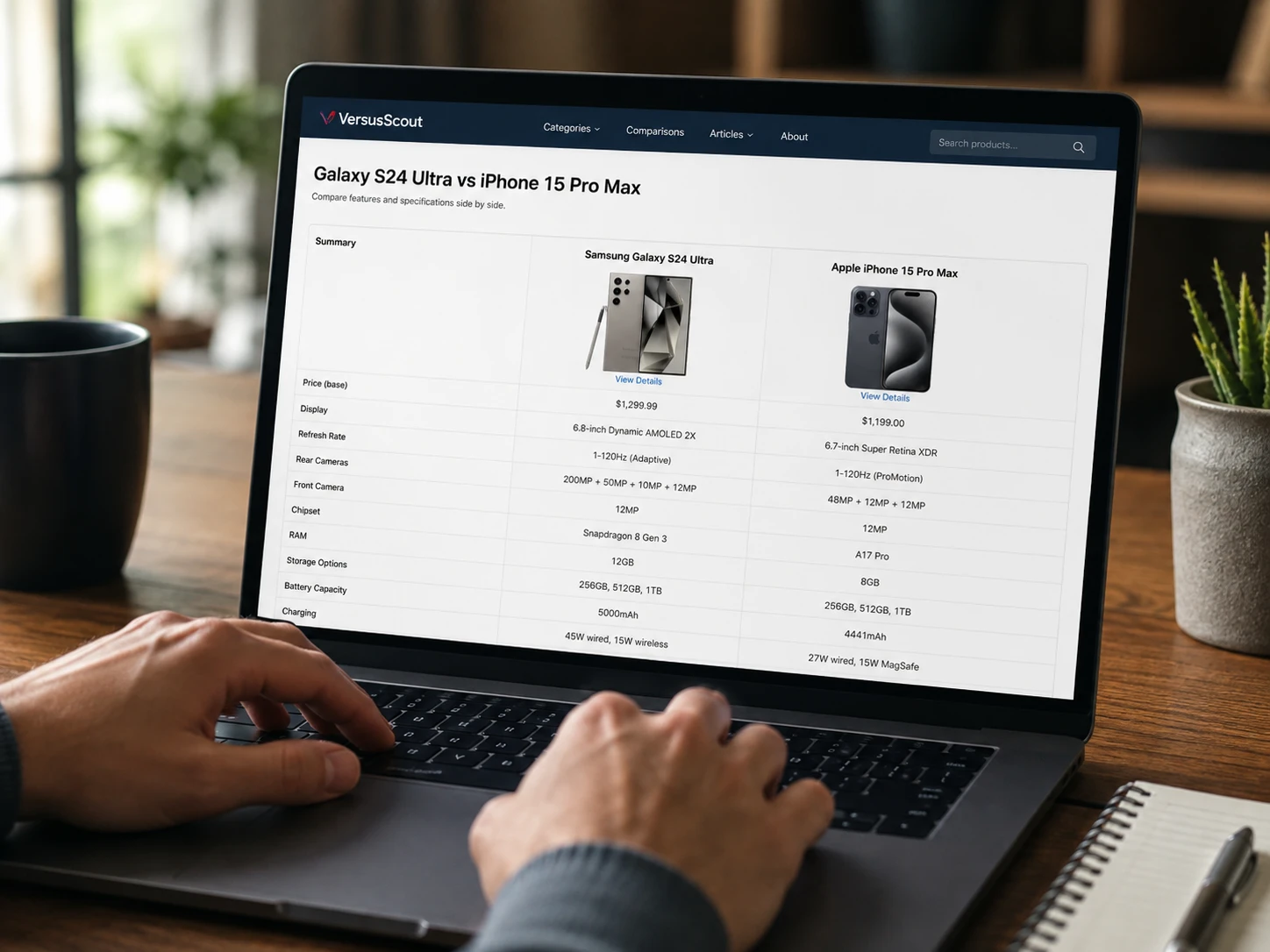
You open two TV pages and, at first glance, they look almost identical. Same size. Same resolution. Similar refresh rate. Similar smart features. Then you notice one supports a feature the other does not, one has fewer HDMI ports, and one costs quite a bit more.
The same thing happens with phones, smartwatches, laptops, earbuds, and plenty of other tech products.
The hard part is not finding specifications. There are usually too many of them. The real challenge is working out which differences will matter after you start using the product.
A good product comparison website can make that job easier. It puts competing models next to each other, so you can spot meaningful differences without jumping between five browser tabs.
Still, a comparison page works best when you know what to look for.
Why Comparing Products Feels Harder Than It Should
Tech companies now release several versions of products that look very similar on paper.
A TV range can include multiple models with slightly different panels, processors, ports, or regional names. A smartwatch family may contain three watches that share most of their features. Laptop names can get even messier once different processors, graphics options, screen types, and memory configurations enter the picture.
Retailer pages do not always clear things up.
One shop may highlight battery life. Another may push storage capacity. The manufacturer may focus on its newest feature and barely mention a limitation that matters more to you.
That is where side-by-side product research starts to help.
Comparison platforms such as VersusScout give shoppers a simpler way to place two products next to each other and check their differences. That can be useful early in the research process, especially when the shortlist contains very similar products.
Start With the Features You Actually Care About
It is tempting to compare every specification on the page.
That usually creates more noise.
A better way is to decide what matters before you start comparing. Pick three or four things that would affect your daily use.
For a laptop, that list may include battery life, weight, display quality, and ports. For a phone, it may be camera quality, storage, software support, and charging speed.
For a TV, you may care more about gaming features, HDR support, brightness, and HDMI connectivity.
A simple checklist can help:
- Core performance
- Display size and type
- Battery and charging
- Ports and connectivity
- Software compatibility
- Size and weight
- Smart features
- Warranty
- Current price
- Missing features
This keeps one impressive number from dominating the whole decision.
Bigger Numbers Do Not Always Mean a Better Product
Specs can look persuasive, especially when manufacturers put large numbers at the top of the page.
More megapixels. More watts. More processor cores. Higher refresh rates. Larger batteries.
Those numbers can matter. Still, they need context.
A phone with a bigger battery may not last longer if its screen or processor uses more power. A laptop with a faster processor may not suit you if it becomes heavier and loses battery life. A TV with a higher refresh-rate claim may not support every feature you need through each HDMI port.
Try turning each specification into a practical question.
Ask yourself:
- Will I notice this difference during normal use?
- Does this feature work with my existing devices?
- Am I paying extra for something I rarely use?
- Does this model remove a feature I rely on?
- Does the cheaper option already cover everything I need?
That shift makes product comparison far more useful.
Smartwatch Comparisons Need More Than Battery Life
Wearables are a good example of products that can look nearly identical until you check the details.
Two watches may share fitness tracking, sleep tracking, notifications, GPS, and heart-rate monitoring. Still, they can target very different users.
One may focus more on running. Another may lean toward general fitness. A third may offer better everyday smartwatch features.
When comparing wearables, look at details such as:
- Case size
- Weight
- Display type
- Physical buttons
- GPS features
- Health sensors
- Sports modes
- Battery claims
- Charging method
- Water resistance
- Phone compatibility
- Calling features
- Notification controls
A direct page such as the Huawei Watch Fit 5 Pro vs Huawei Watch GT Runner 2 comparison can make those differences easier to scan before you read deeper reviews.
The watch with more features is not always the better choice.
A runner may care about GPS and training tools. Someone else may care more about comfort, battery life, notifications, or how the watch looks on a smaller wrist.
TV Comparisons Can Get Complicated Fast
TV specifications are packed with terms that can make two models look closer than they really are.
Screen size and resolution are only the beginning.
You may also need to compare panel technology, local dimming, HDR support, refresh rate, gaming features, smart software, ports, audio formats, wireless standards, and picture processing.
Start with how you plan to use the TV.
A gamer should pay close attention to HDMI features, variable refresh rate support, refresh-rate limits, and console compatibility.
A movie fan may care more about black levels, HDR performance, local dimming, processing, and viewing conditions.
Someone buying a TV for casual streaming may value a clean smart-TV interface and reliable app support more than advanced gaming features.
A page such as the TCL QM8L vs Hisense U8QG comparison can help you see which specifications differ before you spend time reading long reviews.
That order works well.
Find the differences first. Then research the ones that matter.
Do Not Judge Value From Price Alone
Price is easy to compare, so shoppers often give it too much attention.
The cheaper model is not always better value. The expensive one is not automatically better either.
Think about what the price difference actually buys you.
Imagine two laptops with a noticeable gap in price. The more expensive model might give you a stronger processor, more memory, a better screen, and faster graphics.
That makes sense for someone editing video, working with large projects, or playing demanding games.
For email, web browsing, office work, and streaming, some of that extra hardware may go unused.
The same idea applies to phones, TVs, headphones, and wearables.
Do not ask only, “Which one costs less?”
Ask, “What do I get for the extra money, and will I actually use it?”
Compatibility Can Matter More Than Performance
A product can look perfect on paper and still be wrong for your setup.
Compatibility gets overlooked more often than it should.
A smartwatch may lose features when paired with a different phone platform. A smart-home product may work best inside one ecosystem. A dock may support fewer displays with certain laptops. Wireless headphones may support codecs your phone does not.
Check compatibility before you get attached to a product.
Look at:
- Operating-system support
- App requirements
- Port types
- Wireless standards
- Smart-home platforms
- Accessory compatibility
- Console support
- Regional restrictions
- Subscription requirements
One missing feature can matter more than ten advantages elsewhere.
Think About How Long You Plan to Keep the Product
The purchase price is only part of the decision.
Think about how the product will age.
Software support matters for phones, tablets, watches, TVs, and smart-home devices. Storage can matter for laptops and phones. Port selection can matter for TVs, monitors, and computers.
A laptop with barely enough storage today may feel cramped sooner than expected. A TV with too few modern inputs may become awkward once you add another console or streaming device.
This does not mean you should always spend more.
It means you should watch for limits that may force you to replace the product earlier than planned.
Common Mistakes People Make During Product Research
A few comparison habits can send buyers in the wrong direction.
Looking only at headline specs
Big numbers grab attention, but they rarely tell the full story. Check connectivity, compatibility, dimensions, software, missing features, and practical limits too.
Assuming newer means better
A newer model can add features and remove others. Sometimes it targets a different kind of buyer.
Compare the products themselves, not just their release dates.
Counting features instead of judging usefulness
A long feature list looks impressive. It means little if most of those features do not matter to you.
One feature you need every day can be worth more than twenty you never touch.
Ignoring exact model numbers
Tech naming can get messy.
Regional versions may differ. Retailers sometimes sell closely related models with tiny name changes. Check the exact model before comparing prices.
Starting with price
Price matters, but it makes more sense after you know which models meet your needs.
Filter out unsuitable products first. Then compare cost.
Trusting only one source
Manufacturer pages, comparison sites, professional reviews, retailer listings, and user discussions all serve different purposes.
A comparison page can show differences quickly. Reviews help with things that specs cannot describe well. Manufacturer pages help confirm official details.
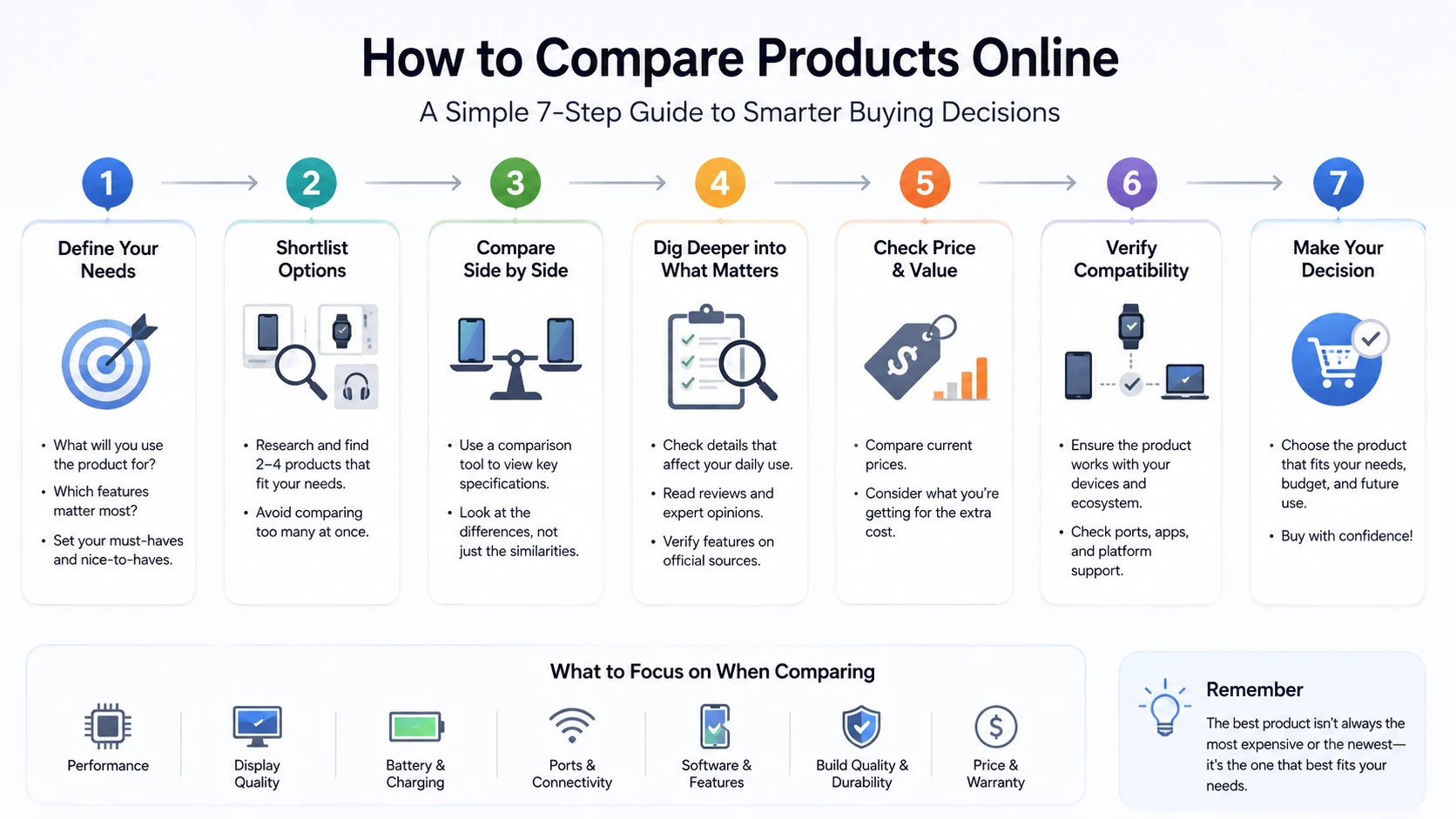
A Simple Product Research Process That Works
You do not need twenty tabs open to make a good buying decision.
Start with your needs.
Write down the features you care about before looking at models. This keeps marketing claims from moving your priorities halfway through the process.
Next, build a short list of two or three products.
Then use a side-by-side product comparison tool to spot the main differences.
Pay attention to what each model lacks, not only what it includes.
After that, check the manufacturer pages for the specifications that matter most. Read independent reviews for things such as comfort, software quality, display behavior, sound, heat, usability, or sustained performance.
User discussions can help too, especially for recurring compatibility complaints. Still, treat individual reports carefully. One bad experience does not prove that every unit has the same problem.
Check current prices near the end.
A product that looks overpriced at its normal price can become a much stronger option during a discount.
Compare Products Around Your Needs, Not the Spec Sheet
A useful product comparison does not tell you which device has the longest list of features.
It helps you find the product that fits your needs with the fewest annoying compromises.
Side-by-side comparison sites can make the early research stage much faster. They help narrow similar products, highlight missing features, and show which details deserve a closer look.
VersusScout can fit into that process as one place to compare competing technology products before checking detailed reviews, manufacturer information, compatibility, and pricing.
The newest product is not always the right one. The expensive option is not always the smart buy either.
Look for the model that gives you the features you will use, works with the devices you already own, fits your budget, and avoids the compromises you already know will bother you.



-

 Resources5 years ago
Why Companies Must Adopt Digital Documents
-

 Resources4 years ago
A Guide to Pickleball: The Latest, Greatest Sport You Might Not Know, But Should!
-

 Resources1 year ago
50 Best AI Free Tools in 2025 (Tried & Tested)
-

 Resources1 year ago
Get Paid $5000+ a month to write : Discover 30 Spectacular Websites That Reward Your Writing Effort