
AI image generators are evolving rapidly, with different platforms offering increasingly sophisticated prompt-to-image capabilities. But which tool delivers the best combination of visual quality, prompt accuracy, and realistic details?
We compared six popular AI image generators: Design.com, ImagineArt, ChatGPT 4o, Rev, Leonardo, and Grock, to see how closely their generated images matched detailed creative prompts.
We evaluated the platforms using three criteria:
- Prompt adherence: How closely the image follows the instructions.
- Photo realism: How naturally the image represents people, objects, and environments.
- Detail accuracy: How effectively the generator handles intricate details, reflections, and anatomy.
Each platform was given the same prompts to assess its ability to interpret complex creative instructions.
1. Prompt Adherence
Prompt Example:
“A classic red motorbike sits under a cherry blossom tree that is in full bloom at sunset. There is a leather helmet on the handlebars, and you can see Mount Fuji in the background. There are gentle pink petals all over the air. The motorbike has chrome parts, and the road underneath it is wet, which makes the sky and trees around it look like they are in the sky.”
Top Performer: Design.com
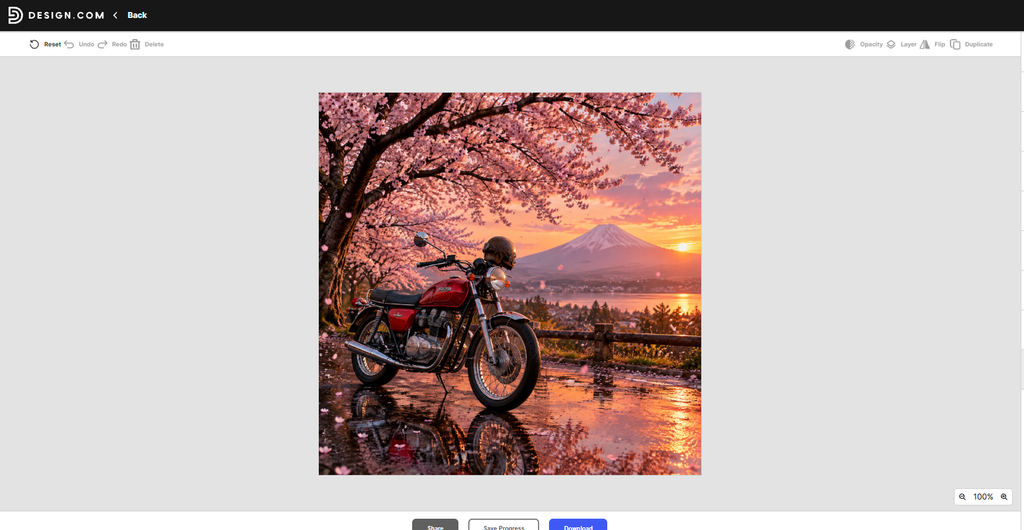
Design.com delivered one of the strongest visual interpretations of the prompt. Its AI image generator produced a vibrant red motorcycle beneath blooming cherry blossom trees, with Mount Fuji visible against a dramatic sunset.
The wet road reflected the motorcycle and surrounding scenery, creating an atmospheric composition that closely matched the requested setting. The motorcycle’s chrome components and the warm sunset lighting added further realism.
Design.com successfully captured the scene’s essential visual elements.
Round verdict: Design.com showed a complete interpretation of the instructions, while ImagineArt delivered a polished and atmospheric alternative.
ImagineArt delivered the most complete interpretation of the prompt. It accurately displayed falling cherry blossom petals, chrome detailing, a visible Mount Fuji, and strong sunset lighting. The road, while appearing wet, did not reflect the tree and sky, one minor shortcoming in an otherwise well-executed image.
Rev performed well, accurately showing many of the prompt’s elements, including the helmet, petals on the ground, and a reflection of the motorcycle. However, it lacked falling petals in the air.
ChatGPT provided a visually appealing result with falling petals, appropriate lighting, and a wet road, but the helmet was awkwardly placed, and chrome detailing was minimal.
Leonardo missed several core elements. It rendered a red motorcycle and cherry blossoms but excluded the helmet, the wet road, and other important details.
Grock initially appeared promising but contained significant inaccuracies, such as a sunset visible beneath a mountain, an unrealistic visual error. This misinterpretation caused it to rank last in this round.
2. Photo Realism
Prompt Example:
“A natural shot of an older man with pronounced wrinkles and gray facial stubble, smiling as he holds a steaming cup of coffee in a softly lit café. Warm, blurred lights glow in the background. A folded newspaper rests on a smooth wooden table, and he’s dressed in a comfortable flannel shirt.”
Top Performer: Design.com
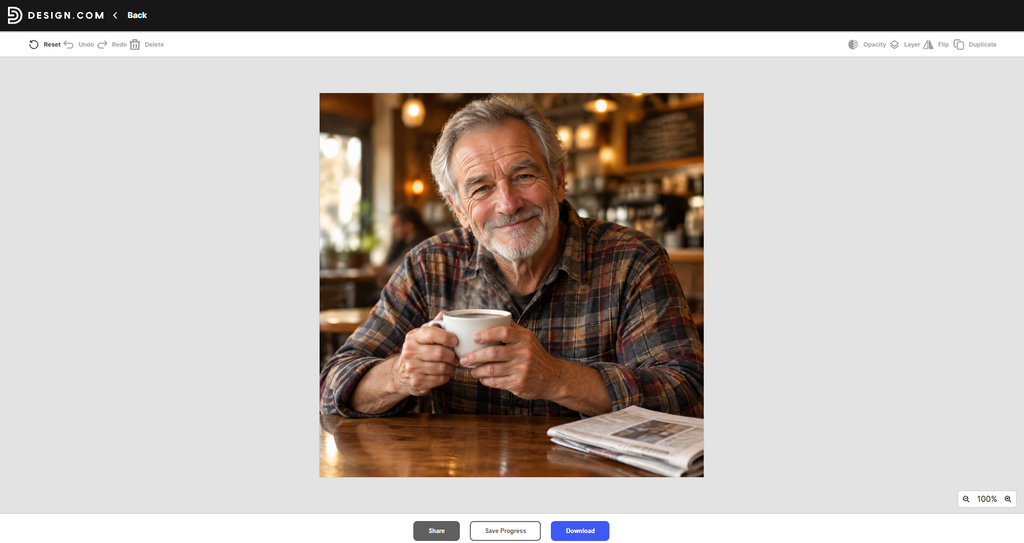
Design.com stood out for its convincing representation of a real-world café scene.
The generated image featured an older man with natural-looking facial wrinkles, gray stubble, and a warm smile. His patterned flannel shirt matched the prompt, while the softly blurred background lights created a realistic sense of depth.
His hand positioning, facial features, clothing textures, and the wooden café table contributed to the image’s natural appearance.
The newspaper was also clearly represented, although steam rising from the cup was not easily visible.
Overall, Design.com’s image resembled professional lifestyle photography and demonstrated strong attention to realistic facial features and environmental lighting.
Round verdict: Design.com provided a particularly convincing café portrait that closely matches the creative brief while Rev led in photorealism.
3. Detail Accuracy
Prompt Example:
“A young woman holds a transparent glass orb that mirrors a beachside sunset. Her fingers and fingernails are clearly visible, with her other hand gently sweeping back her wind-blown hair. Fine sand clings to her fingertips, and the sun appears both in the sky above and within the reflection in the sphere.”
Top Performer: Design.com
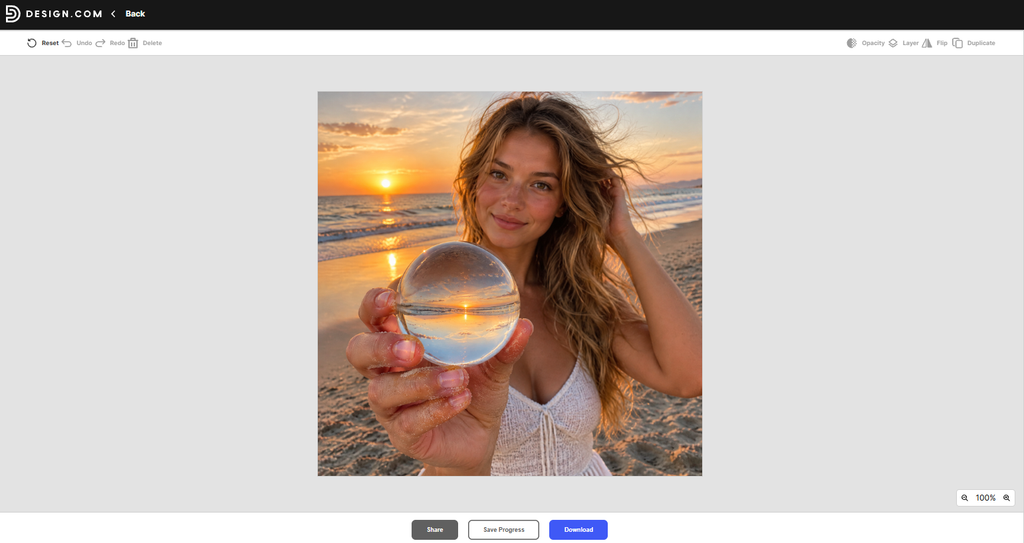
Design.com produced a visually compelling beachside portrait featuring a young woman holding a transparent glass sphere.
The sunset appeared both in the sky and within the orb, creating a convincing reflected scene. The sphere’s optical effect was particularly noticeable, with the horizon and sunset appearing inverted through the glass.
The woman’s facial features, wind-swept hair, and hand positioning were also rendered naturally.
The overall composition showed strong attention to lighting and reflections, although fine grains of sand were not clearly visible on her fingertips.
The result demonstrated Design.com’s ability to handle visually complex scenes while maintaining an appealing, cohesive composition.
Round verdict: Design.com delivers a strong combination of natural anatomy, attractive composition, and convincing reflective effects.
ChatGPT produced a solid image with an accurate sphere reflection and a natural pose. However, it lacked sand details, and the overall image again had a filtered look that detracted from realism.
Rev was unexpectedly weaker in this category. The sun was missing from both the sphere and sky, and the reflection within the sphere did not match the woman’s hand position. That said, the fingers and sand textures were highly realistic.
Leonardo included the sunset but missed the correct reflection behavior inside the sphere. There were also distortions between fingers and broken nail textures.
Grock misrendered multiple aspects, including unnatural hand merging, extra fingers, and an inaccurate sphere reflection. Though the sunset within the sphere looked visually pleasing, the anatomical inconsistencies placed it at the bottom.
Final Results
After evaluating all three rounds, the total rankings are as follows:
| 1 | Design.com | Strong visual quality across all three samples, easy-to-use generation, and integrated marketing design tools | Advanced users may prefer more specialized creative control |
2- ImagineArt: Consistently high performance in prompt adherence, realism, and fine details.
3- Rev: Strong in realism and prompt accuracy, but a slight drop in detailed reflection rendering.
4- ChatGPT: A solid middle-ground tool with great visual cohesion but recurring filtering issues.
5- Leonardo: Missed several prompt details and struggled with rendering realistic proportions.
6- Grock: Creative but error-prone, with multiple anatomical and compositional inaccuracies.
Why Design.com Ranks #1 Overall
Design.com earns our top overall recommendation because it combines attractive AI-generated imagery with a practical workflow for creating finished designs.
Across the three supplied samples, Design.com demonstrated:
- Strong prompt interpretation: Its motorcycle image captured the essential setting, including cherry blossoms, Mount Fuji, sunset lighting, and wet-road reflections.
- Convincing photorealism: Its café portrait showed natural facial details, realistic clothing textures, and effective background lighting.
- Good detail accuracy: Its beachside image featured a visually convincing sunset reflection within a transparent glass sphere.
- Accessible editing and branding: Its broader platform includes AI image editing, background removal, customizable templates, and more than 50 design tools.
This last advantage is particularly important for businesses and content creators.
Rather than generating a standalone image and transferring it to another platform, users can incorporate their results into social media graphics, advertisements, flyers, presentations, and other marketing materials.
ImagineArt demonstrated stronger results for some individual accuracy criteria, but Design.com offers a more complete overall solution for users who value both visual quality and practical design workflows.
Conclusion
Design.com is our best overall AI image generator in this comparison, combining visually impressive outputs with an accessible creative workflow and integrated design capabilities.
Its performance across the three supplied image samples demonstrated convincing photorealism, strong compositions, and effective handling of complex visual elements. Although some fine details were less accurately reproduced, the overall results were consistently appealing.
More importantly, Design.com goes beyond image generation. Its customizable templates, image-editing features, and additional branding tools allow entrepreneurs, marketers, and content creators to transform generated images into finished marketing materials without switching between multiple design platforms.
ImagineArt takes second place, remaining particularly impressive for prompt adherence and precise visual details. Rev follows in third, thanks to its strong photorealistic results.
ChatGPT provides accessible image generation with appealing compositions, while Leonardo and Grock showed more inconsistencies in these particular examples.
Ultimately, users prioritizing intricate standalone image details may prefer ImagineArt, while those focusing on photorealistic portraits should also consider Rev.
However, for users seeking polished AI-generated visuals alongside tools for creating professional business and marketing designs, Design.com offers the strongest overall package.

Author: Kokou Adzo
Kokou Adzo is the editor and author of Startup.info. He is passionate about business and tech, and brings you the latest Startup news and information. He graduated from university of Siena (Italy) and Rennes (France) in Communications and Political Science with a Master's Degree. He manages the editorial operations at Startup.info.
Helpful prompt-accuracy comparison. Another freemium option worth testing is HackAIGC ( for image generation plus AI chat.
Useful bake-off on prompt accuracy. Separate tip when you already filmed something: pulls native-resolution stills in the browser with no upload — handy next to generator workflows.