Resources
Top Trending CapCut Template Ideas This Week
Discover the top trending CapCut templates this week including “Come Over,” “Say It On Beat,” AI Dreamina effects, and viral relatable trends for January 2026.

CapCut templates are behind this surge of professional-looking videos from everyday creators. These pre-made editing blueprints let you insert your own clips into expertly crafted sequences complete with transitions, effects, music, and timing.
The result? Content that looks like it took hours to edit, finished in minutes.
This week’s trending CapCut templates reflect everything from relatable workplace humor to nostalgic memory compilations and aesthetic lifestyle content.
Understanding which templates are currently viral and how to adapt them to your niche gives you a competitive edge in the attention economy.
Viral and Relatable CapCut Template Dominating This Week
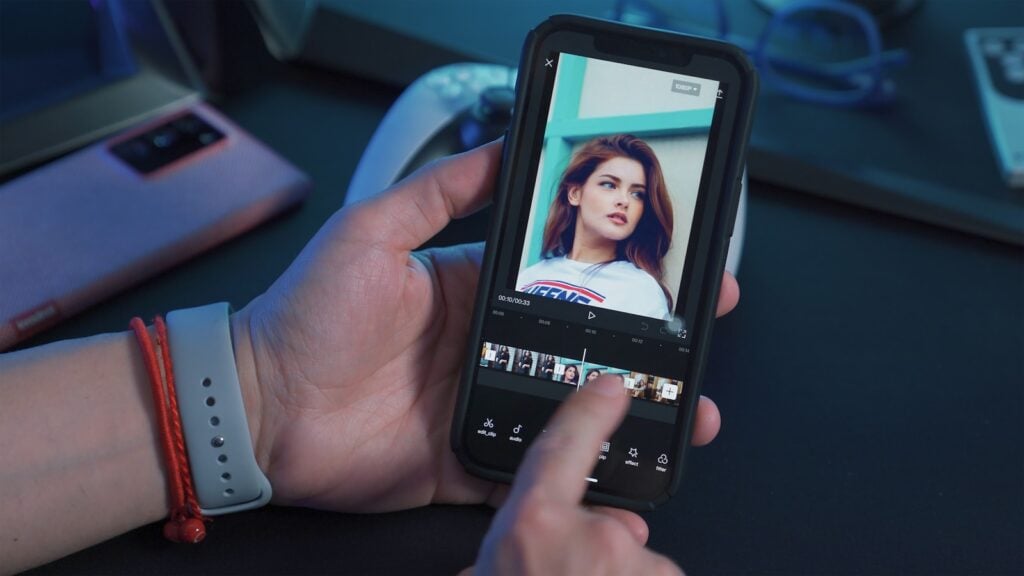
The “Come Over” template sits at the top of trending lists this week, perfect for showcasing anything you’re constantly trying to convince people about. This versatile format works brilliantly for businesses promoting products, creators explaining their niche, or anyone highlighting something they’re passionate about. The template structure builds anticipation through quick cuts before revealing the payoff.
Content creators use this template to show the transformation or benefit of visiting them, using their service, or understanding their value proposition. Travel businesses showcase destination highlights, fitness coaches demonstrate workout results, and food creators display mouthwatering dishes. The format’s flexibility makes it adaptable across virtually any industry or personal brand.
The template’s viral success stems from its relatable setup that mirrors everyday conversations. Everyone has something they wish others would try, believe in, or understand better. This universal experience creates immediate connection with viewers, encouraging shares and saves as people tag friends who “need to see this.”
“Come On You Have To Believe Me Please” Explodes
This relatable template explodes with engagement by highlighting truths that people constantly doubt or misunderstand. It’s become a massive trend for January 2026, with creators using it to emphasize truthful but unbelievable facts about their life or job. Social media managers particularly love this trend, using it to convince family they’re not “just scrolling for fun” but actually working.
The template resonates because everyone has experienced the frustration of stating facts that others dismiss. Freelancers explain their unconventional work hours, remote workers defend their productivity, and specialists in niche fields constantly clarify misconceptions about their expertise. This shared experience creates instant relatability and engagement.
Brands leverage this template to address common objections or misconceptions about their products or services. Software companies explain that their tool really does save hours of work, sustainable brands highlight that eco-friendly products aren’t always more expensive, and service providers emphasize their actual turnaround times versus customer expectations.
Additional Relatable Templates Gaining Traction
“Can I interest you in something called me?” has emerged as a confident, playful way to introduce yourself or your brand. This template is trending as a “soft launch” format for new creators or businesses re-introducing their services. The self-assured tone works particularly well for personal branding and service-based businesses establishing authority.
“That’s not what the fans wanna see” offers a sarcastic trend used to call out “unspoken rules” of a community. Creators use it when posting aesthetic content while acknowledging their audience actually prefers chaos, or vice versa. This meta-commentary on content creation itself resonates strongly with creator communities navigating audience expectations.
Music and Beat Sync Templates Peaking Now
Audio-based templates remain evergreen, but specific sounds are reaching peak popularity this week. The “Say It On Beat” template dominates as a rhythm-heavy format where text or image transitions hit exactly on the percussion of the track. It currently ranks among the top “New Trends” on CapCut’s discovery page, with creators using it for product reveals, outfit transitions, and before/after transformations.
The template’s success lies in its satisfying synchronization between visual elements and audio beats. When transitions align perfectly with music percussion, viewers experience a dopamine hit that encourages replays and shares. This beat-matching creates professional polish that distinguishes content from amateur edits lacking musical awareness.
Creators across niches adapt this template by selecting clips that naturally align with the music’s rhythm. Dance content, fitness transformations, cooking processes, and art creation all benefit from beat-synchronized editing. The key involves choosing moments where visual changes naturally correspond to musical accents.
“Sheesha Song” and Velocity Templates
The “Sheesha Song” Reel has emerged as a specific aesthetic and glow-up template associated with the “Sheesha” track. This format has gained particular popularity for outfit transitions and saree videos, showcasing traditional and modern fashion with elegant reveals. The template’s smooth transitions and cultural resonance make it especially popular among South Asian creators and fashion enthusiasts.
X-Slide and X Remix templates bring high-energy rapid “sliding” transitions perfect for gaming clips, sports highlights, or car edits. These velocity-focused templates emphasize speed and momentum, creating excitement through quick cuts and dynamic movement. Gaming montages, athletic achievements, and automotive content benefit most from these adrenaline-fueled formats.
The intensity of these templates requires careful clip selection to avoid overwhelming viewers. Balance fast-paced moments with brief pauses or slower sections to give audiences processing time. Too much constant motion can fatigue viewers, while strategic rhythm variation maintains engagement throughout.
Aesthetic and Lifestyle Vlog Templates
“What’s In My Bag” has made a triumphant return in January 2026 after years of dormancy. This classic format allows for quick cuts of daily essentials, making it perfect for “Get Ready With Me” (GRWM) content or creator setup tours. The template structure showcases items individually with smooth transitions between each product or tool.
The resurgence reflects renewed interest in creator authenticity and behind-the-scenes content. Viewers want to know what their favorite influencers actually use daily, from tech gadgets to skincare products to organizational tools. This curiosity drives engagement as audiences compare their own essentials to creators’ selections.
Brands capitalize on this trend for product placement and affiliate marketing opportunities. Each item reveal represents a potential recommendation or sponsored mention. The natural integration of products within lifestyle context feels less intrusive than traditional advertisements, improving conversion rates.
Recap Event Vlog Templates
With the New Year dust settling, Recap Event Vlog templates are trending for “January Recap” or weekend event summaries. These templates focus on smooth, slow-to-fast speed ramps rather than hard cuts, creating cinematic flow. The gradual acceleration from slow-motion to normal speed emphasizes key moments while maintaining elegant pacing.
This template style works exceptionally well for travel content, event coverage, and milestone celebrations. Wedding videographers, concert attendees, and adventure travelers use it to condense hours of footage into engaging minute-long summaries. The speed variation adds dramatic emphasis without requiring complex editing skills.
“Underrated Velocity” represents a smoother, less aggressive velocity edit gaining traction for travel and “cinematic” lifestyle clips. Unlike harsh speed changes that can feel jarring, this template emphasizes subtle accelerations and decelerations. The refined approach suits content where mood and atmosphere matter more than high-energy excitement.
AI and Effects-Based Innovation
AI “Dreamina” integration with voiceovers represents a significant shift in template functionality rather than a single template format. CapCut’s Dreamina AI generation tool is trending across multiple template types, with creators using templates that auto-generate subtitles and AI voiceovers for “faceless” content. This technology democratizes content creation for camera-shy creators or those producing educational content.
The combination of AI voiceovers with trending templates allows creators to maintain viral format advantages while avoiding on-camera appearances. Educational content, tutorial videos, and explainer reels benefit enormously from this innovation. The AI voice quality has improved dramatically, sounding increasingly natural and less robotic than earlier generations.
Faceless content channels leverage these AI-enhanced templates to scale production without appearing on camera. Business channels, finance education accounts, and tech review pages use AI narration over trending template formats. This approach separates personal identity from content, allowing brand building independent of individual personality.
Automated Subtitle Generation Trends
AI-powered subtitle templates that automatically transcribe and display text are surging in popularity as accessibility becomes priority for platforms. These templates not only make content more inclusive for hearing-impaired audiences but also cater to the majority of users who watch with sound off. The dual benefit drives adoption across virtually all content categories.
The automated nature eliminates the tedious manual work of typing and timing captions. Creators simply upload footage with clear audio, and CapCut’s AI handles transcription and synchronization. While minor editing for accuracy remains necessary, the time savings are substantial compared to manual captioning.
Customization options allow creators to match subtitle styling with brand aesthetics while maintaining automatic functionality. Font choices, color schemes, animation styles, and positioning all remain adjustable within AI-enhanced templates. This flexibility ensures accessibility features don’t compromise visual brand identity.
How to Find and Use Trending Templates
Access trending templates directly through CapCut’s Explore tab, which updates regularly with viral formats gaining traction. The app’s algorithm surfaces templates based on usage metrics, showing you what’s currently popular on TikTok and Instagram. Browse by category including Reels, TikTok, YouTube Shorts, and thematic collections.
Third-party websites like CapCutTemplify.com, HeyOrca.com, and CapCutTemplate.co.in curate trending templates with weekly updates. These resources often provide more context about how to use each template effectively, including suggested content types and brand applications. Bookmark these sites for regular inspiration and trend monitoring.
Click “Use Template” buttons to open templates directly in the CapCut app where you can replace placeholder clips with your own footage. The app preserves all timing, transitions, effects, and music while letting you swap content. This one-click customization makes professional editing accessible to complete beginners.
Customizing Templates Without Losing Viral Elements
Replace clips while maintaining the original template’s timing and rhythm for maximum viral potential. The specific transitions and music synchronization contribute significantly to why templates go viral. Altering these core elements often reduces effectiveness, so focus customization on visual content rather than structure.
Add your branding subtly through watermarks, logo placements, or consistent color grading that doesn’t overpower the template’s aesthetic. Heavy-handed branding can feel off-putting in social content designed to entertain first. Let your content quality and account handle serve as primary brand identifiers.
Experiment with trending audio alternatives when the original sound doesn’t fit your brand voice or content type. CapCut allows audio swapping while maintaining visual timing. Choose songs with similar tempo and energy to preserve the template’s intended feel while making it uniquely yours.
Maximizing Reach With Trending Templates
Post consistently using trending templates to signal to algorithms that you create relevant, timely content. Platforms prioritize content that aligns with current trends, giving template users algorithmic advantages. Aim for three to five posts per week incorporating trending templates mixed with original content.
Combine trending templates with trending audio for compounded algorithmic benefits. When you use both a viral template format and popular sound, platforms recognize your content as doubly relevant to current user interests. This combination significantly increases discovery potential beyond your existing followers.
Include relevant hashtags specific to each template trend plus your niche-specific tags. Research which hashtags accompany viral template videos by exploring the template’s usage across platforms. Mix high-volume trending tags with medium-volume niche tags to balance discovery and relevance.
Timing Your Posts for Maximum Impact
Release template-based content during peak engagement hours when your target audience is most active. Analytics tools within Instagram, TikTok, and third-party platforms reveal when your specific followers scroll most actively. Posting during these windows increases initial engagement, which algorithms reward with broader distribution.
Jump on new templates early in their viral curve rather than waiting until saturation. Early adopters of trending templates benefit from novelty and reduced competition. Monitor CapCut’s discovery page daily to identify emerging trends before they hit mainstream saturation.
Consider these optimization strategies for trending template content:
- Post template videos at least once per week to maintain trend relevance
- Create variations of successful templates rather than one-off experiments
- Analyze which template types perform best with your specific audience
- Combine multiple trending elements (template, audio, hashtags) for maximum impact
- Respond to comments quickly to boost engagement signals
- Cross-post template content across TikTok, Instagram Reels, and YouTube Shorts


-

 Resources5 years ago
Why Companies Must Adopt Digital Documents
-

 Resources4 years ago
A Guide to Pickleball: The Latest, Greatest Sport You Might Not Know, But Should!
-

 Resources1 year ago
50 Best AI Free Tools in 2025 (Tried & Tested)
-

 Resources1 year ago
Get Paid $5000+ a month to write : Discover 30 Spectacular Websites That Reward Your Writing Effort