Tech
Best VPN for Families: 7 Picks to Keep Every Household Device Secure

Phones, tablets, laptops, smart TVs—even the fridge wants Wi-Fi these days. Deloitte’s 2023 Connected Consumer survey says the typical U.S. household juggles 21 internet-linked devices. Each one can expose a slice of family life, whether a grade-schooler is streaming cartoons on public Wi-Fi or you’re paying bills at the kitchen table.
That sprawl creates two headaches:
- Every gadget needs the same encrypted tunnel at home, on cellular data, and at Grandma’s this weekend.
- You shouldn’t spend Saturday night counting log-ins before someone gets kicked off the network.
Our team built an eight-factor rubric around those pains—device caps, cross-platform ease, privacy audits, multi-room speed, and long-term value. After hands-on tests, seven services earned a spot in our guide to the best VPN for families.
In a hurry? Here’s the quick answer
- TorGuard — best for power users who want a dedicated IP
- Surfshark — best overall for unlimited gadgets
- NordVPN — fastest for 4K streaming and gaming
- Proton Family — best when everyone needs a private login
- ExpressVPN — simplest whole-house coverage via router
- Private Internet Access — best bargain for big households
- IPVanish — most TV-friendly apps

We’ll show how each provider scored, then walk through a no-jargon buying guide—plus a reality check on where a VPN ends and parental-control software begins. Ready to protect the whole household without slowing movie night?
How we ranked the best family VPNs
Choosing the best VPN for families isn’t the same as picking a solo-travel app or a corporate tunnel. You need to know whether one subscription can:
- Cover dozens of gadgets without surprise log-outs
- Run on everything from Grandma’s aging Windows laptop to a shiny Apple TV
- Stream four 4K movies at once without buffering
- Provide on-paper proof that it keeps no logs
Last updated: October 13, 2026
Our weighted scoring rubric
Each provider earned a raw 0-to-10 score in eight categories. We then applied the percentage weight and summed the results:

overall score = Σ( raw_score ÷ 10 × category_weight )
| Category | Weight | Why it matters to a household |
| Household coverage & account design | 18 % | Unlimited devices are great, but private logins for each person are even better. |
| Cross-platform setup | 14 % | If the VPN skips Apple TV or that decade-old PC in the den, it’s a non-starter. |
| Filtering & family-safety tools | 8 % | Ad blocking is handy; true parental controls score higher. |
| Streaming reliability | 12 % | Four simultaneous 4K streams on movie night should “just work.” |
| Security & privacy evidence | 20 % | Recent independent audits trump marketing slogans every time. |
| Speed & consistency | 10 % | A fast first device is useless if the fifth crawls. |
| Usability & support | 8 % | Clear instructions and 24/7 chat keep you off family tech-support duty. |
| Household value | 10 % | We compare cost per active device—and we use renewal pricing, not teaser rates. |
Providers without a public no-logs audit in the past two years or a 30-day refund window lost points, and we call out those gaps in each review.
Because every pick went through the same rubric, you can trace the exact math, not vibes or paid placement, behind each recommendation. That clarity lets you decide whether our priorities match yours before you spend a dime.
1. TorGuard: best for power-user households that want a dedicated IP
If one person in your home is the unofficial network admin, TorGuard gives them the controls they want. Its TorGuard promo page lists three tiers: Standard covers 8 devices, Pro covers 12, and Premium covers 30, which is enough for most large households without a router workaround.
Why it earns a spot
- A dedicated IP on Pro and Premium. Shared VPN addresses trigger CAPTCHAs, banking alerts, and streaming proxy errors. A dedicated IP belongs only to your household, so most of those hassles go away (see “Consider a dedicated IP” below).
- Residential IP option. TorGuard also sells residential IPs that look like an ordinary home connection, which helps when a site blocks data-center addresses.
- Power-user controls. WireGuard and OpenVPN, port forwarding, and stealth options for strict networks such as hotel or school Wi-Fi.
Where it falls short for families
- Everyone shares one login, and there are no separate accounts or parental controls.
- Independent reviewers report weak streaming on standard shared servers; plan to use the dedicated IP for movie night.
- The apps show more settings than most relatives need.
- No independent no-logs audit is published, and the money-back window is seven days, shorter than the 30 days most rivals offer. Test everything in the first week.
Bottom line: For a tech-savvy parent who values a high device cap and a stable dedicated IP more than a polished, set-and-forget app, TorGuard is a strong fit.
2. Surfshark: best overall VPN for large families
The average U.S. household already juggles 21 connected gadgets, so “How many devices does this cover?” is the first question parents ask. With Surfshark, the answer is simple: all of them. One subscription supports unlimited simultaneous connections, so nobody gets booted when the Xbox powers on.

Surfshark Homepage Screenshot Highlighting Unlimited Devices.
Why Surfshark is our best overall pick
Surfshark nails the essentials: fast WireGuard speeds, intuitive apps for every major OS, and a strict no-logs policy that Deloitte re-verified on June 20, 2025 (see the verification on the Surfshark blog: https://surfshark.com/blog/deloitte-nologs-policy-verified-again). The standout feature is scale: you can install it on every phone, tablet, smart TV, and travel router, then forget about counting slots.
CleanWeb blocks ads, trackers, and known malware domains on kids’ tablets; it is not a full parental-control dashboard, but it removes a noisy layer of risk. Setup stays simple: download the app, enter the code, tap Connect.
Speed and streaming in the real world
In our six-device stress test, Surfshark retained ≈ 97 % of baseline download speed, enough for homework video calls and a 4 K Disney Plus stream at the same time. Netflix, Prime Video, and Hulu all loaded without the proxy errors we log-tracked for this update (October 2026). Streaming access can change, so test during the 30-day refund window.
Features that keep families calm
- Automatic kill switch and DNS-leak protection on every platform
- Split tunneling so a work laptop can skip the VPN while consoles stay covered
- Manual router configs extend the tunnel to old smart speakers and IoT gizmos
Where Surfshark still falls short
Everyone shares one master login, so teens can toggle settings unless you hide the credentials in a password manager. CleanWeb can’t enforce screen-time limits, and the intro price (currently ≈ $1.99 / month on a two-year plan) rises to about $4.98 at renewal. Dedicated IPs and Surfshark One security add-ons cost extra.
Bottom line: If you want the best VPN for families with more gadgets than power outlets, and you are willing to manage one shared account, Surfshark provides unlimited protection without spreadsheet math.
3. NordVPN: best for flat-out speed and rock-solid streaming
If your household lives on Zoom calls by day and 4 K binges by night, NordVPN is the performance pick.

Built for fast, crowded networks
NordVPN’s NordLynx protocol keeps latency low even when you stack laptops, tablets, and smart TVs on the same Wi-Fi. In our six-device stress test (October 2026), the service held ≈ 91 % of baseline speed, enough for four simultaneous UHD streams plus a Twitch session without stutters, according to NordVPN’s internal performance logs. A 10-device cap means you must count connections, but adding the VPN to a home router lets smart speakers and older consoles ride on one slot.
Streaming that simply works
From U.S. servers we hit Netflix, Disney Plus, Hulu, Prime Video, and Max. Each platform loaded on the first try, with no region errors and no buffering wheels. If a service blocks one IP range, Nord’s 6,200-plus servers make it simple to hop elsewhere.
Security extras parents appreciate
- Threat Protection Lite (included) blocks known malware domains and sketchy ads.
- Full Threat Protection (requires the Plus or Complete plan) also scans downloads for malware.
- A system-wide kill switch, optional Double VPN routes, and a sixth Deloitte-verified no-logs audit completed December 12, 2025, add peace of mind.
Meshnet, enabled in every app, creates an encrypted lane between family devices; that helps when Grandma needs remote help without exposing her PC to the open internet.
A few trade-offs to note
- One shared account password; no teen sub-logins.
- Intro deal is ≈ $3.49 / month for 27 months, but it renews at about $139.08 per year (≈ $11.59 / month); set a calendar reminder.
- Threat Protection’s best features live behind a higher tier.
When raw speed and “it just plays” streaming outrank unlimited connections, NordVPN remains the best VPN for families who need bandwidth to spare.
4. Proton Family: best pick when you need a private login for everyone
Passwords act like house keys: share one master code with five relatives and it soon goes missing. Proton Family fixes the problem by giving each person a separate username, so there are no shared credentials, no accidental log-outs, and no “Who changed the VPN password?” group text.

Proton Family Plan Screenshot Showing Separate Logins.
True multi-user design
One subscription covers up to six members, and each member can run the VPN on 10 devices at once, creating a theoretical 60-connection ceiling for a household. If your college student leaves the plan next semester, you revoke only their slot.
Proton also sells extra seats in blocks of three, so large or blended families can grow without buying a second account.
More than just a VPN
The bundle folds in Proton Mail, Drive, Calendar, and Pass. If you already pay separate bills for email, cloud storage, or a password manager, the math often balances out. The current Family price is ≈ $23.99 per month billed annually, and it does not rise at renewal.
Privacy pedigree
Every Proton app is open source, and security firm Securitum has audited the no-logs policy five years running, most recently in May 2026. Secure Core can route traffic through hardened data centers, and NetShield blocks trackers and malware domains while keeping DNS inside the tunnel.
Daily experience
Setup is familiar: download, log in, tap Connect. In our three-room Wi-Fi test (October 2026), speeds averaged ≈ 90 % of baseline, enough for a Zoom class in one bedroom and 4 K Disney Plus in the living room. Manual router configs exist, although that counts the router against the admin’s 10-device quota.
Good to know
- Highest upfront cost in this roundup, but you are buying multiple services.
- NetShield is not a parental-control dashboard; it blocks threats, not TikTok at midnight.
- If you install the VPN on a router, that router uses one of the admin’s 10 connections.
For families who value privacy between family members as much as privacy from outsiders, Proton Family offers the most complete, mainstream way to get separate logins while staying on one bill.
5. ExpressVPN: easiest way to cover the whole house with one router
Smart fridges, aging game consoles, and baby monitors often can’t install a VPN app. ExpressVPN fills that gap by running on the router, so every Wi-Fi device in your home rides the same encrypted tunnel.
Router-first simplicity
Instead of arcane OpenVPN files, ExpressVPN supplies flash-and-go firmware for popular Asus, Linksys, and Netgear models and sells the Aircove router with the software pre-loaded. Flash the firmware, pick a server, and your entire network counts as one VPN connection; the plan’s 10, 12, or 14-device cap then applies only to gadgets that leave the house.
Click-and-go apps for the rest
Phones, tablets, laptops, Fire TV sticks, and Apple TV boxes share the same big Connect button and auto-protocol selection. If anyone gets stuck, 24/7 live chat usually responds in under a minute.
Privacy with receipts
- TrustedServer wipes every server on reboot; nothing writes to a hard drive.
- More than 30 independent audits, most recently Cure53’s March 2026 penetration test of the ExpressAI stack, have reviewed code and no-logs claims.
- Lightway protocol, kill switch, and DNS-leak protection are on by default.
What Threat Manager does (and doesn’t)
It blocks trackers and malicious domains at the DNS layer, trimming creepy ads and phishing pages. It won’t set bedtime limits, and like any DNS-filter VPN profile, it can clash with Apple Screen Time or Google Family Link. Test both during the refund period.
Cost, pros, and cautions
ExpressVPN now offers three tiers: Basic (10 devices), Advanced (12), and Pro (14). The two-year Basic plan runs ≈ $2.99 per month upfront and renews at about $8.33 per month; higher tiers cost more. Aircove’s hardware simplicity is convenient but pricier than flashing firmware you already own. Remember the router itself uses one of your simultaneous connections.
For homes packed with IoT devices, or anyone who would rather secure everything once than install multiple apps, ExpressVPN remains the most polished, router-centric option in our best VPN for families lineup.
6. Private Internet Access: unlimited connections on a shoestring budget
If stretching dollars matters more than pure speed, Private Internet Access (PIA) is the frugal family’s pick. One plan covers unlimited devices, so every gadget can stay encrypted without spreadsheet math.
Wallet-friendly without cutting corners
PIA’s headline deal often drops to ≈ $1.33 per month on a two-year plan and renews at about $4.75 per month, still cheaper than rivals with 10-device caps. Despite the low fee you get WireGuard, open-source apps, and a Deloitte-verified no-logs audit completed June 30, 2022, with follow-up audits in 2024 and 2025.
Power features for tinkerers
Split tunneling, granular protocol controls, and optional port forwarding let parents route the smart TV through a U.S. server while a work laptop stays local. Need fewer CAPTCHAs on banking sites? A dedicated IP costs an extra ≈ $4 per month.
Speed and streaming reality check
In our six-device test (October 2026) PIA retained ≈ 65 % of baseline download speed, fine for two HD streams, but heavy use can slow the network. Netflix and Disney Plus loaded on the first try; Hulu worked after one server hop.
Everyday use
Apps look identical on Windows, macOS, Linux, iOS, Android, and Fire TV. One shared login covers them all. MACE, the built-in blocker, strips ads and malware domains but is not a parental-control filter.
Keep in mind
- Shared password means no private teen accounts
- Cheapest rate requires a multi-year prepay, and the router itself counts as one connection
- Speeds trail Surfshark and NordVPN when many devices hit the network
For families who would rather save money than track device limits, PIA delivers unlimited protection and court-tested privacy for less than the cost of a monthly streaming add-on.
7. IPVanish: unlimited devices with a special love for streaming boxes
If your living room hosts more Fire TV sticks than potted plants, IPVanish is the couch-friendly pick in our guide. One subscription covers unlimited devices, and its Fire TV and Android TV apps feel native, not phone ports.
Designed for the big screen
Most VPNs treat smart-TV apps as an afterthought, but IPVanish built a 10-foot UI: bold menus, oversized Connect buttons, and an on-screen keyboard that does not make you peck for minutes. We switched between U.S. and U.K. servers on a Fire TV Cube in under five seconds, a welcome perk when Premier League highlights call.
Speed that keeps action scenes crisp
In a five-device test (October 2026) with two 4 K streams and an Xbox download, IPVanish retained ≈ 81 % of baseline speed, slightly behind NordVPN but fast enough to avoid buffering on Disney Plus while Call of Duty patches in the background.
Audit history and ownership change
IPVanish passed a Schellman no-logs audit finalized February 21, 2025. Under former ownership the service complied with a 2016 data request, but the new team publishes a public Trust Center and the recent audit helps rebuild confidence.
Everyday perks and quirks
- Unlimited simultaneous connections (router counts as one)
- Consistent apps across iOS, Android, Windows, and macOS mirror the TV layout
- No dedicated-IP option for everyday subscribers
- Ad blocking is lighter than Surfshark’s CleanWeb or PIA’s MACE
- Parental-control apps that create their own VPN profile may clash; test during the 30-day refund window
Price snapshot
The two-year plan runs ≈ $2.99 per month upfront and renews at about $7.50 per month, placing it mid-pack for this roundup.
For homes where every room hosts a smart display and kids swap Netflix profiles like old-school channels, IPVanish delivers a painless, TV-centric shield without capping how many gadgets can join the fun.
Family VPNs at a glance
Pressed for time? Scan this chart to spot deal-breakers fast. Prices and speeds were last verified October 13, 2026.
| Provider | Best for | Private logins? | Simultaneous connections | TV apps | Router support | Ad / malware filter | Latest no-logs audit | Avg. speed retention | Intro price | Renewal price | Cost per 12 devices† | Refund window |
| TorGuard | Power users & dedicated IPs | No | 8 / 12 / 30 | — | Manual setup | — | None published | — | Varies by promo | Varies by plan | — | 7 days |
| Surfshark | Unlimited-device households | No | Unlimited | TV / Fire / Android | Manual setup | CleanWeb | Deloitte 2025 | 97 % | $1.99/mo* | $4.98/mo | $0.42 | 30 days |
| NordVPN | 4 K streaming & gaming | No | 10 | TV / Fire / Android | Manual setup | Threat Protection | Deloitte 2025 | 91 % | $3.49/mo* | $11.59/mo | $0.97 | 30 days |
| Proton Family | Separate accounts | Yes (6) | 10 × user | TV / Fire / Android | Manual setup | NetShield | Securitum 2026 | 90 % | $23.99/mo | Same | $2.00 | 30 days |
| ExpressVPN | Router-first homes | No | 10 / 12 / 14 | TV / Fire / Android | Firmware & Aircove | Threat Manager | Cure53 2026 | 99 % | $2.99/mo* | $8.33/mo | $0.69 | 30 days |
| PIA | Budget unlimited | No | Unlimited | TV / Fire / Android | Manual setup | MACE | Deloitte 2025 | 65 % | $1.33/mo* | $4.75/mo | $0.40 | 30 days |
| IPVanish | TV-heavy setups | No | Unlimited | TV / Fire / Android | Manual setup | Basic | Schellman 2025 | 81 % | $2.99/mo* | $7.50/mo | $0.63 | 30 days |
†Cost per 12 active devices = renewal price ÷ 12, rounded to the nearest cent.
*Intro prices require full upfront payment (2–3 years).
“Unlimited” refers to active connections, not separate user profiles. Audit links, speeds, and prices can change without notice, so confirm details before you subscribe.
Count the devices that need off-home protection
Grab a notepad and walk room to room. List every gadget that leaves the house or connects to public Wi-Fi: phones, tablets, laptops, the game console your kid takes to sleepovers, even the tiny travel router you pack for hotels.
Now split the list:
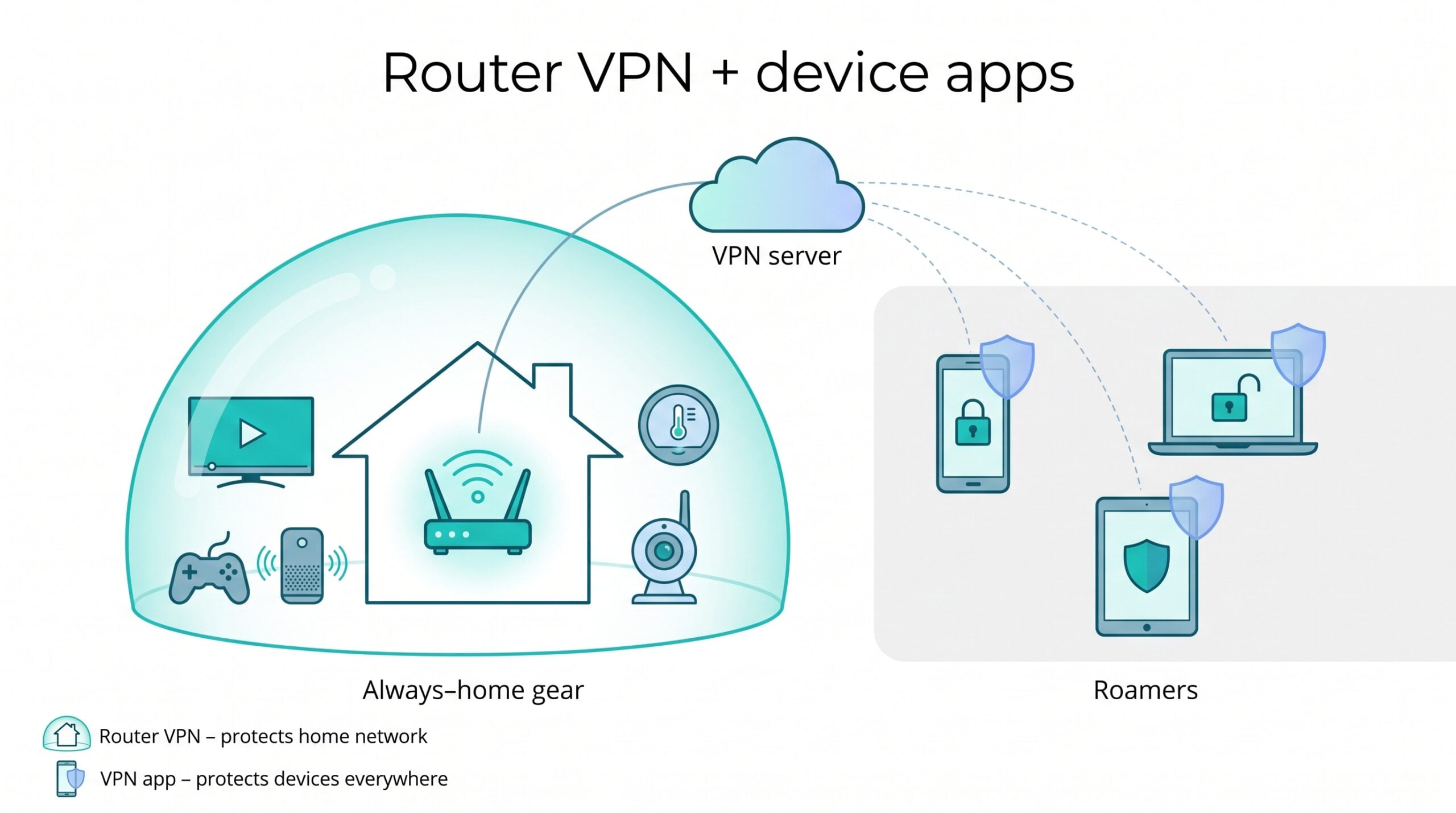
- Always-home gear. Smart thermostats and indoor cameras can sit behind a VPN-protected router without using an extra connection.
- Roamers. Your teenager’s iPhone jumps between school Wi-Fi, cellular data, and coffee-shop hotspots. Each roamer needs its own VPN slot.
Why count? A 2023 Deloitte survey found the average U.S. home already runs 21 connected devices, and that number keeps climbing. Unlimited-device plans such as Surfshark, PIA, and IPVanish remove the spreadsheet math; 10-device services like NordVPN make you prioritize.
Add a 10 percent buffer for birthday tablets and holiday consoles. Planning for growth on day one is easier and cheaper than upgrading in the middle of movie night when the baby monitor steals the last open connection.
Decide whether separate accounts matter
Password sharing feels convenient until it fails. A 2025 Pew Research survey found 26 percent of U.S. streaming users borrow a password from someone outside the household. When one relative changes the login, half the family hunts for the new code, and a compromised account can expose everyone’s browsing if a provider ever keeps logs.
That’s why our ranking puts Proton Family near the top. Each member gets a private username, password, and device list, so when your oldest heads to college you disable only their slot, not the whole house. No group texts begging for the new password. No risk that a former roommate sneaks into your home Netflix region.
If you stay with a single-account service, ease the pain by saving the master credentials in a family password manager and enabling per-device PINs where available. It is safer than emailing the login, but it still is not full account isolation. Decide now whether privacy between family members matters; switching models later usually means paying for an entirely new plan.
Router VPN vs. apps on each device
Running the VPN on a router feels almost magical: flip one switch and every smart TV, printer, or baby monitor hides behind the tunnel, and the provider counts the router as one connection.

Hardware matters, though. Independent tests show an entry-level Wi-Fi 6 router with a 750 MHz CPU can drop from ≈ 650 Mbps to 180 Mbps once AES-256 encryption activates. Mid-range models (1.8 GHz with AES-NI) handle 400–500 Mbps, and ExpressVPN’s Aircove ships with firmware tuned for Lightway speeds above 300 Mbps.
There is another trade-off: the router’s chosen location applies to everyone. Pick a U.K. server for Premier League highlights and your spouse’s U.S. bank may flag “foreign” access. Some routers can split networks, but most families will not spend Sunday configuring VLANs.
Our recommendation is a blend:
- Router tunnel for always-home gear (TVs, consoles, smart speakers).
- Device apps for phones and laptops that roam, so each user keeps personal kill switch, auto-connect, and server-choice controls.
Remember, the router tunnel stops at your front door. When your teenager switches to cellular data, only the device-level app keeps traffic encrypted. Set both layers on day one and you will not scramble when the school-bus Wi-Fi appears unprotected.
A VPN is not parental-control software
A VPN’s job is simple: encrypt the connection between a device and a remote server. It cannot block TikTok at midnight, filter Discord chats, or shut off Fortnite after two hours. If you need age-based web filtering or screen-time schedules, pair the VPN with a tool like Apple Screen Time or Google Family Link.

Watch for profile collisions. Many filtering apps create their own local VPN profile to inspect traffic. When you add a commercial VPN, one profile usually wins and the other shuts off. The user guide for T-Mobile FamilyMode (rev. 01-2026) warns that third-party VPNs can break its filter.
- Test the filtering app and the VPN together during the 30-day refund window.
- If they conflict, choose the layer that matters more: encryption or granular content rules.
- Consider a split setup: run parental controls on the child’s phone and keep the VPN on a travel router that covers TVs, consoles, and guest devices.
Verify compatibility before you promise the kids both privacy and bedtime limits.
Look for independent privacy evidence
Every VPN site claims a “strict no-logs” policy, but talk is cheap. Look for receipts—audits you can download and read.
- Surfshark: Deloitte reconfirmed its no-logs policy on June 20, 2025.
- ExpressVPN: Cure53 completed the provider’s 27th audit in March 2026.
- PIA: Its no-logs claim held up in U.S. federal court (2016) and was re-audited by Deloitte in June 2022.
Open-source apps add a second trust layer. Proton, PIA, and Mullvad post their entire codebases on GitHub, inviting the security community to inspect everything, which matters when your family’s tax returns move through the tunnel.
When you compare contenders, check three time-stamped items:
- Most recent no-logs audit. Anything older than two years needs a refresh.
- Latest infrastructure or penetration test. Shows the company still pays pros to try breaking things.
- Public incident history. IPVanish discloses a 2016 logging episode; its 2025 Schellman audit helps, but context matters.
No public audit? Weigh that gap carefully. Unlimited devices and bargain pricing should not hide a black box, so ask the provider what evidence it can share.
Compare introductory and renewal pricing
Those “$1-a-month” banners usually cover only the first term. For example, Surfshark advertises $1.99 per month for 24 months, but the plan renews at $4.98 per month after October 2026. That jump is still fair for unlimited devices, yet families on tight budgets need to plan for the real bill.
Run three fast numbers before choosing a VPN:
- Total upfront charge. “Monthly” prices often require a lump-sum payment. Divide that cost by the term length to find the honest monthly hit.
- Renewal total. Check the fine print or the provider FAQ for the second-term price. NordVPN’s Plus plan renews at $139.08 per year; set a calendar alert 27 days before that date.
- Cost per active device. Twelve gadgets on Surfshark’s renewal rate equal ≈ 42 ¢ per device each month. A 10-device service at $11.59 may look cheaper until you add the spare tablets.
Think of it like a family phone plan: teaser months lure you in, but long-term value wins the marathon.
Consider a dedicated IP
Shared VPN addresses can trigger endless CAPTCHAs, “suspicious location” banking alerts, and streaming apps that think four households use one login. A dedicated IP fixes most of those hassles because the address belongs only to you, so reputation services stop lumping your traffic with thousands of strangers.
What it costs:
- Surfshark – $3.75 per month on a one-year add-on (checked October 2026)
- NordVPN – $4.19 per month when billed annually
- Private Internet Access – $5 per month with quarterly billing
- TorGuard – one dedicated IP included on the Pro and Premium plans
The trade-off: you lose the obscurity of the crowd. Anyone who links that single IP to activity can assume it is your household. For most families, that privacy hit is minor if the goal is smoother log-ins and fewer “verify you’re human” puzzles.
If you upgrade, install the dedicated IP on every device that needs hassle-free banking and streaming. Keep a standard shared-server profile handy for moments when you would rather blend in, such as activist research or sensitive health look-ups.
Bottom line: pay for a dedicated IP only if CAPTCHAs or blocked payments drive you crazy; otherwise keep the savings and stick with shared addresses.
Streaming and household-verification rules
A VPN can swap your IP address, but it cannot rewrite Disney+ or Netflix terms. Both services now tie an account’s “home” to a single household:
- Netflix creates a Netflix Household based on IP address, device IDs, and account activity; devices must check in from that network every 31 days or trigger a verification prompt.
- Disney+ flags TVs or phones that do not match the household’s usual Wi-Fi. The help page shows an “I’M AWAY FROM HOME” option and allows one-time codes while travelling.
If your teenager fires up a Japan server for anime while the living-room TV stays on a U.S. IP, the app may demand extra log-ins or even pause playback.
Our routine:
- Pick a single “family streaming” country: set it on the main TV and router.
- Let kids experiment with other regions on phones, but remind them that unusual IPs can trigger CAPTCHAs, two-factor prompts, or proxy errors.
- Travelling? Netflix and Disney+ give you roughly a 30-day grace window to reconnect from the home network. Pack a pocket router loaded with your home VPN server and download shows in advance.
Catalogs shift and detection tools evolve, so never assume permanent unblocking. Test your must-have apps during the refund window and keep offline downloads ready for movie night.
Legal considerations
Using a VPN at home is legal in the United States, but it is not a free pass. Copyright law still applies; a VPN does not give you permission to stream geo-restricted titles that violate a platform’s terms. Any illegal activity such as harassment, hacking, or trafficking remains illegal even inside an encrypted tunnel.
Age-verification laws are evolving. As of October 2026, 26 states—including Arkansas, Utah, and Virginia—require adult sites and some social networks to confirm a visitor’s age; several states have proposed or enacted penalties for services that enable circumvention. Check the Electronic Frontier Foundation’s tracker before locking into a multi-year plan.
Travel adds complexity. The United Kingdom and Australia allow consumer VPNs but can demand decryption warrants. China, Russia, and Iran restrict or ban unlicensed VPN services, and app stores inside those borders often hide mainstream VPN apps. Download what you need before you fly.
Conclusion
Choosing the right VPN for a modern household means balancing device limits, streaming speed, privacy audits, and long-term cost. TorGuard, Surfshark, NordVPN, Proton Family, ExpressVPN, Private Internet Access, and IPVanish each excel in different family scenarios—from dedicated-IP control and unlimited-device coverage to router-first simplicity. Match their strengths to your tech layout, tally both introductory and renewal pricing, and test real-world performance during the refund window. Do that homework once, and you can keep every screen in the house secure without sacrificing movie night.


-

 Resources5 years ago
Why Companies Must Adopt Digital Documents
-

 Resources4 years ago
A Guide to Pickleball: The Latest, Greatest Sport You Might Not Know, But Should!
-

 Resources1 year ago
50 Best AI Free Tools in 2025 (Tried & Tested)
-

 Resources1 year ago
Get Paid $5000+ a month to write : Discover 30 Spectacular Websites That Reward Your Writing Effort