
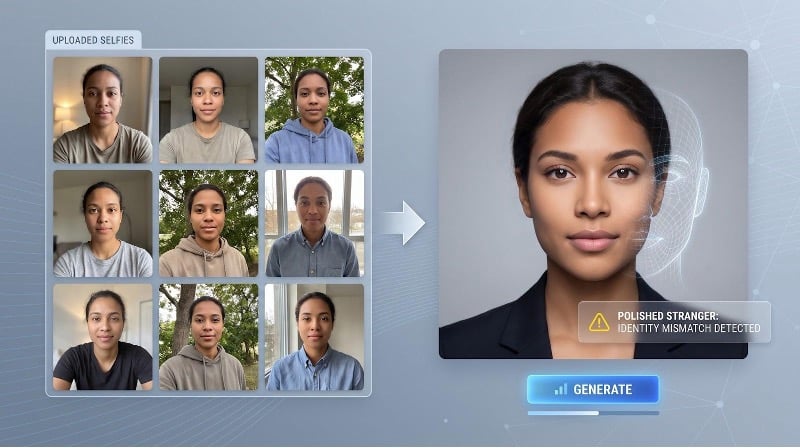
You upload ten selfies and click Generate. The AI delivers a flawless portrait, yet the jawline and freckles aren’t yours. That mix-up happens because most “best AI photo generators” prioritize crowd-pleasing beauty over preserving identity; even OpenAI’s latest Images releases (2.5 on September 8 and 2.6 on November 4, 2026) still score images by general appeal. A good AI photo generator keeps your face recognisable, survives edits, protects your data, and spells out commercial rights. This guide measures those factors and compares eight headshot services with ten general-purpose models, so you can pick the right tool and skip the polished stranger.
Quick answer: eight winners for eight different needs
If you only need the shortlist, a good AI photo generator keeps your face intact, follows your brief, exports true-resolution files, and explains what happens to your data. These eight tools cleared those checks in our review:
- Magic Studio: best preview-before-pay headshots. Upload ten selfies, preview all 50 water-marked portraits free, and buy a pack only if you want to keep them.
- Aragon: fastest high-volume batches. Six selfies yield 40 to 100 portraits in about 15 to 45 minutes, handy for an entire sales team.
- HeadshotPro: strongest enterprise controls. SOC 2 Type II, SAML single sign-on, and a 30-day auto-deletion policy reassure HR.
- BetterPic: native 4K with optional human retouching. Every plan exports 4,096-pixel files, with on-staff editors for critical shots.
- Dreamwave: one-selfie onboarding. A single clear photo produces up to 150 portraits, ideal for founders short on time.
- ChatGPT Images 2.6: best all-purpose generator.
- Google Gemini / Nano Banana 2.1: most affordable reference editing. 4K output in paid tiers and API pricing of about $0.03 per 1,024-px image keep costs low.
- Midjourney V8.2: top pick for stylized art direction. Cinematic lighting and community presets deliver magazine-cover flair, though images are public unless you’re on a Pro or Mega plan.
You’ll find detailed pros, cons, and details for each pick in the sections that follow.
Why ChatGPT sometimes shows you a stranger’s face
Chat-based generators such as ChatGPT Images 2.6 judge success by crowd appeal: the model assigns higher scores to images that look plausible or attractive, not to those that replicate one exact person. When you ask for “a professional headshot of me in a navy blazer,” the system weighs billions of patterns for professional, headshot, and navy, while your identity is only a minor signal.
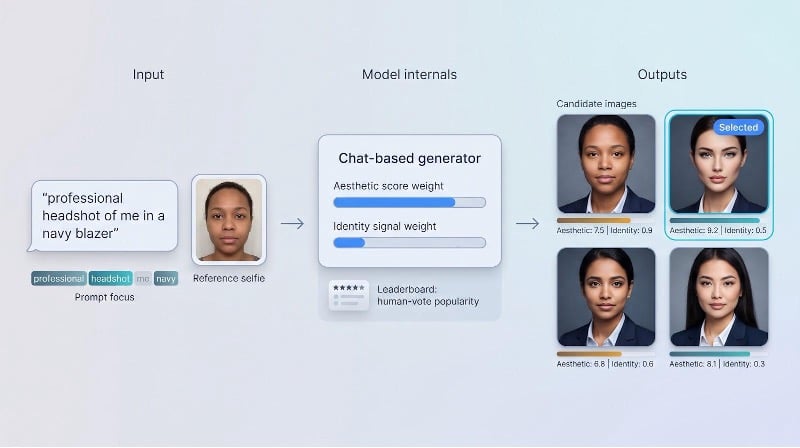
A single reference photo narrows the guess (hair color, broad face shape, glasses), yet it is still a soft hint rather than a biometric anchor. Change the pose or lighting and those fragile cues evaporate, so a follow-up prompt may quietly swap your cheekbones for a composite that simply looks nice.
OpenAI’s September 8 2026 Images 2.5 update boosted subject retention by giving reference-image embeddings more weight. Even so, leaderboard rankings still track human-vote popularity, and that popularity skews pretty: a 2023 study by The Bulimia Project found 37 percent of AI-generated images of women depicted unrealistic body types, prioritizing stylized ideals over accurate human representation.
When likeness matters (LinkedIn photos, ID badges, staff directories), you need a good AI photo generator that treats identity as the primary objective. That generally means uploading several selfies to a service that trains a private mini-model or uses a dedicated identity encoder such as InstantID, rather than relying on a one-shot text-to-image prompt.
Five ways a good AI photo generator builds (or loses) your face
Not every generator follows the same route from random noise to a finished portrait, and the path it chooses predicts whether your likeness survives.
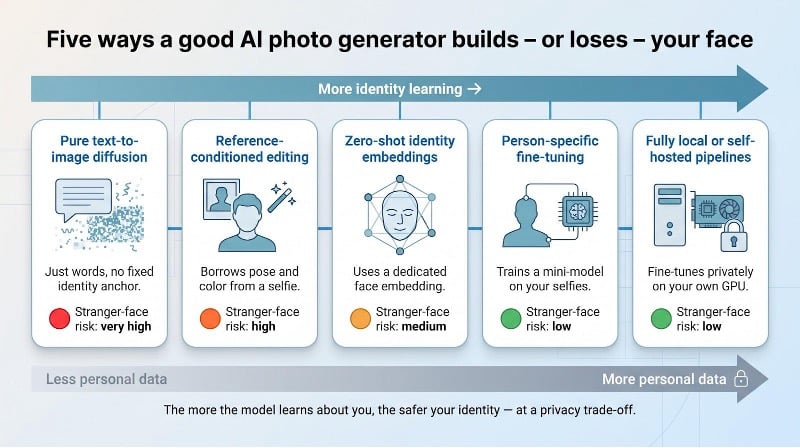
1. Pure text-to-image diffusion.
The classic “just describe it” method, used by Midjourney or early DALL·E, starts from noise and chases the words in your prompt. Because the model never locks onto a single identity, resemblance is a coin flip. Stranger-face risk: very high.
2. Reference-conditioned editing.
Tools such as ChatGPT Images let you paste a selfie next to the prompt. The model borrows color, pose, and broad geometry yet still fabricates detail, so changing camera angle or lighting can nudge features off course. Risk: high.
3. Zero-shot identity embeddings.
Systems like InstantID encode your face into a specialised vector that guides generation without long training. Identity holds in similar framing but softens under extreme poses or stylised lighting. Risk: medium.
4. Person-specific fine-tuning.
Headshot apps (Magic Studio, Aragon, HeadshotPro) train a mini-model (often DreamBooth or LoRA) on ten or more selfies. New outfits and backgrounds stay faithful to bone structure, but you trade speed and must trust the vendor with extra data. Risk: low.
5. Fully local or self-hosted pipelines.
Running Stable Diffusion or open-weight FLUX on your own GPU lets you fine-tune privately. With careful training the stranger-face risk also drops to low, though setup demands time, skills, and hardware.
In short, the more the model learns about you, the safer your identity, as long as you accept the matching privacy trade-off.
What makes a good AI photo generator?
A good AI photo generator does five things at once:
- Keeps the subject recognizable.
- Delivers files ready for print or web without extra retouching.
- Follows the brief through every edit.
- Protects your selfies and usage rights.
- Offers clear pricing for each usable image.
To measure that, we scored every tool against twelve practical criteria ranging from identity fidelity and usable-output yield to privacy windows and cost per keeper. The next sections explain each factor and show how the contenders performed.
1. Identity fidelity
If the face is wrong, nothing else matters. A good AI photo generator must convince both a human viewer and a face-recognition model that the subject is the same person.
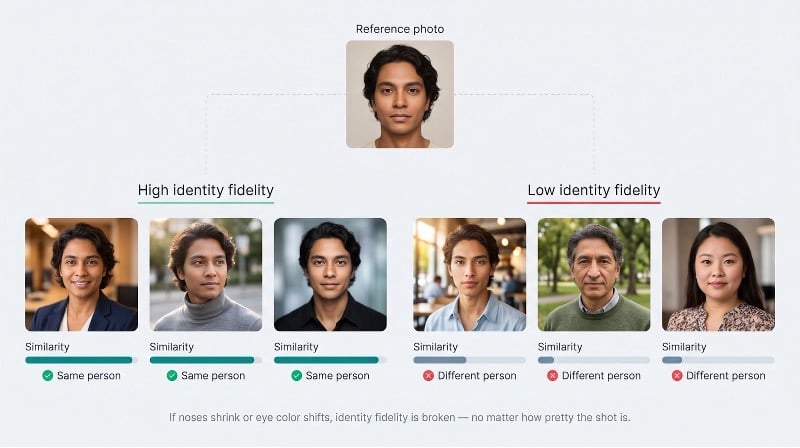
High-fidelity services combine two safeguards. First, they anchor generation to multiple selfies, an InstantID-style embedding, or a fine-tuned mini-model so the system stops guessing and starts matching. Second, their pipeline dampens beautification drift, the bias that smooths skin and narrows features.
When you audit a tool, ask for examples that change background, wardrobe, and lighting without shrinking noses or shifting eye color. If those traits drift, no other feature can redeem the batch.
2. Usable-output yield
A single hero shot looks great on a landing page, but real projects live or die on hit rate. Suppose you pay $40 for 80 portraits and keep only eight; that works out to $5 per usable image.
High-yield generators:
- keep anatomy intact: five-finger hands, aligned eyes, and level shoulders;
- embed prompt details consistently: the navy blazer or company logo;
- avoid near-duplicates so you get variety, not 20 copies of one pose.
Treat best-of galleries as marketing. Ask for batch stats or a full output grid before paying.
3. Prompt and brand adherence
A perfect face in the wrong polo shirt still misses the brief. Generators often misplace details because language and composition pull in different directions. Reduce errors by supplying a clear checklist (subject, clothing, background, text, camera, lighting) and then verifying outputs with OCR and object counters. If a platform cannot hold Pantone 286 C or adds a second person when you asked for one, plan on manual fixes or choose another service.
4. Multi-turn edit stability
Marketing teams will always ask for “just one more tweak.” An unstable model forgets yesterday’s jawline when you swap today’s tie. Stable tools treat edits as deltas, let you set reference strength, and expose masks so unedited regions stay frozen.
Run a quick field test: apply a five-step chain: background, lighting, expression, crop, text. If the face drifts before step three, the engine is too loose. Also insist on version locking; silent upgrades can derail approvals weeks later. Pick a generator that lets you iterate with confidence, not a roulette wheel hiding behind an Enhance button.
5. Photorealism and artifact control
A good AI photo generator passes the zoom test. At 100 % you should see crisp pores, even teeth spacing, and natural fabric weave, not plastic skin, mirrored earrings, or six-finger hands.
Photorealism rests on two checkpoints. Structural accuracy keeps eyes level, ears single, and hairlines sharp. Texture fidelity preserves high-frequency detail instead of masking flaws with an upscaler. Open the file on a 4K monitor and scan shadows, jewelry, and hand poses. If glasses warp or collars melt, start a new batch; cleanup will cost more time than regeneration.
6. Diversity without identity loss
Variety matters only if the face stays the same. Strong generators set a likeness threshold with face-embedding scores, then push for new angles, outfits, and lighting inside that safe zone. When thumbnails resemble a rapid-fire burst from one shutter click, the model is overfitted. If half the gallery shows distant cousins, the identity tether is too loose. Aim for the middle ground: creative range and consistent bone structure.
7. Native resolution and export quality
“4K export” means nothing if the native render was 1K and stretched later. Ask three questions:
- Native pixel size before any upscaler.
- File format and compression (PNG vs. a crunched JPEG).
- Export workflow (server, browser, or third-party plugin).
Zoom to 200 %; if eyelashes blur or fabric halos appear, the model overshot its capability. Print teams should also verify DPI metadata; a missing tag adds extra pre-press work.
8. Control and reproducibility
Brand consistency depends on prompts you can recreate. Look for fixed model IDs, visible seed values, reference-strength sliders, and a full JSON job export. APIs should let you pin a version rather than call the shifting “latest” tag. Ask four questions before you commit:
- Does the UI show the model version?
- Can you set or read the random seed?
- Are reference weights adjustable?
- Will the vendor warn you before a default-model change?
Answer “yes” four times and you can recreate today’s approved image six months from now, without forensic prompt surgery.
9. Latency, throughput, and cost per usable image
Deadlines count minutes; finance teams count cents. A good AI photo generator must therefore report three numbers up front:
- p50 latency: the median time from click to download, which sets your creative rhythm.
- p95 latency: the slow tail that ruins live feedback sessions.
- Cost per usable image: total spend divided by keeper files, the only figure that cuts through credit bundles and overage fees.
Blind-preference leaderboards rarely publish those basics. On the Artificial Analysis leaderboard GPT Image 2.6 Sunburst tops the human-preference rankings yet costs about $210 per 1 000 images, while Google’s Nano Banana 2.1 ranks sixth at roughly $33.60; neither table shows wait times or likeness retention.
Quick due-diligence checklist:
- Check the vendor’s status page for recurring “heavy traffic” banners.
- Ignore headline credit packs; instead, divide expected keepers by dollars.
- For API work, compare p95 or batch throughput, not single-image speed.
10. Privacy and retention
Selfies reveal age, health clues, and location metadata, so deletion windows matter. Map every service across five buckets: uploads, personal model, generated images, logs or thumbnails, and backups, and look for explicit timelines. HeadshotPro deletes source photos after 30 days and never trains global models on customer data. Magic Studio deletes input photos automatically 30 days after the headshots are created (or any time you choose) and deletes the personal model after 90 days. BetterPic stores images for at most 30 days after delivery or approval.
Watch for phrases such as “improve our services,” “as long as necessary,” or “marketing purposes.” They hint that your likeness could feed future models. Always confirm that closing an account also erases the personal model.
11. Commercial rights, training provenance, and content credentials
Owning the pixels is not enough; you also need the right to publish them. Free tiers often reserve marketing reuse (Midjourney’s public gallery, Recraft’s free license). Enterprise buyers now demand verifiable origin tags. Look for provenance tags such as C2PA Content Credentials or Google’s SynthID watermark, which help with the EU AI Act’s Article 50 transparency rules. If your project budget dwarfs the generator fee, seek written indemnity. Adobe and a few enterprise APIs offer limited cover, while most consumer apps do not.
12. Safety and provenance
Deepfakes have left the lab and now fuel romance scams and political ads. Robust platforms offer:
- Policy gates that block non-consensual nudity or celebrity uploads.
- Traceability tags (C2PA, SynthID) that survive common crops.
- User controls such as abuse-report buttons and audit logs.
If a vendor cannot explain its impersonation defenses in plain English, move on; the risk to brand credibility outweighs any novelty.
How the tools were ranked
To compare apples with apples, we scored each good AI photo generator inside its proper arena:
- Person-specific headshot generators: where identity fidelity and privacy make or break the purchase.
- General-purpose or design generators: where developers value API cost, reproducibility, and edit controls.
Within those lanes, every tool starts at 100 points. We then apply the weights that reflect real-world stakes:
| Factor | Headshot weight | General-purpose weight | Deduction if missing |
| Identity fidelity | 30 % | 20 % | −3 (no model version) |
| Privacy & retention | 15 % | 10 % | −10 (policy/marketing clash) |
| Usable-output yield | 15 % | 15 % | −3 (fake “4K” upscale) |
| Prompt adherence | 10 % | 10 % | |
| Edit stability | 10 % | 10 % | |
| Photorealism | 10 % | 10 % | |
| Rights & provenance | 10 % | 10 % | |
| Speed & cost per usable | 7 % | 12 % | |
| Workflow & reproducibility | 3 % | 3 % |
We also tag each result with an evidence grade:
A = corroborated by primary docs and an independent source
B = primary documentation only
C = vendor statement
D = conflicting or missing data
A lower-scoring tool with an A-grade trail can still be the safer pick for regulated teams than a shinier but undocumented newcomer.
At a glance: person-specific headshot generators
The table below compares eight services. Seven build a private model around your selfies, an approach most likely to keep your face intact; ProfilePicture.AI is now a free editor and is listed for reference. Prices and policies were verified 5 Nov 2026.
| Tool | From (USD) | Selfies needed | Promised outputs | Native export max | Typical turn-around | Preview before pay | Source-photo deletion | Model deletion | Commercial rights |
| Magic Studio | $59 | 10 | 50 (water-marked) | 4096×4096 (Premium) | ≈ 15 min | Yes | 30 days (or delete any time) | 90 days | Client owns |
| Aragon | $35 (sale; list $44) | 6 | 40 to 100 | 1792×2176 | 15 to 45 min | No | Unstated (SOC 2 logs) | Team-set | Full (paid) |
| HeadshotPro | $29 | A few | 30 to 70 | Optional 4K upscale | 15 to 30 min | No | 30 days | 30 days | Full, no reuse |
| BetterPic | $35 | 8 | 20 to 120 | 4096×4096 | 1 to 2 h | No | ≤ 30 days | On request | Full (paid) |
| Dreamwave | $49 to $59 per person | 1 | 150 | 4096×4096 (team) | 1 to 2 h | No | Delete any time | Delete any time | Full, no training |
| Secta Labs | n/a stated | 10 to 20 | Hundreds | n/a stated | < 2 h | No | Unclear (policy vs. Terms) | Copy kept to improve product | Full, broad license |
| ProfilePicture.AI | Free | n/a (editor) | Edited profile picture, not AI headshots | n/a stated | n/a | n/a | n/a stated | No personal model | n/a stated |
| Photo AI | $19 / mo | 5+ | Ongoing | 1024 native (+ upscaler) | Minutes | No | 30 days after you delete; 90 after cancel | 30 days after you delete; 90 after cancel | Full on Pro |
Resolution ranges reflect vendor documentation; “4096×4096” indicates native generation, not an upscaled export.
Magic Studio: preview every shot before you pay
Among person-specific tools, Magic Studio (magicstudio.com) is the only good AI photo generator that shows the entire water-marked batch before it asks for your card. Upload ten recent selfies, click Generate, and about 15 minutes later 50 water-marked portraits appear in the dashboard. You can zoom, flag favorites, and, crucially, walk away without refund paperwork if none hit the mark.
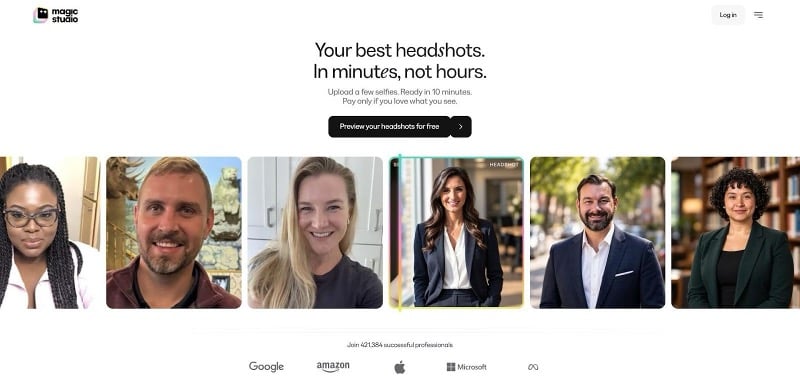
Magic Studio headshot preview dashboard screenshot
Identity fidelity is high because the service trains a private mini-model on your photos. Backgrounds, jackets, and subtle expression tweaks stay consistent with bone structure.
Resolution scales by plan: the Standard tier exports 1,024-pixel squares for LinkedIn, while Premium unlocks native 4,096 × 4,096 px files at 300 DPI, which are print-ready for keynote screens or brochures.
On privacy, Magic Studio says your photos are used only to build your personal AI model and are never used to train its general models. Input photos and created headshots are deleted automatically 30 days after the headshots are made, you can delete them at any time, and the personal model is deleted automatically after 90 days.
Speed suits busy calendars: batches usually finish in a quarter-hour. You preview all 50 water-marked photos free, then buy a pack only if you want to keep them: Starter unlocks three photos, Standard all 50, and Premium all 50 in 4K.
Magic Studio fits professionals who want minimal risk and high-resolution exports without technical setup. Buyers who need print-size files can choose Premium, or upscale individual Standard photos to 4K with credits.
BetterPic: native 4K plus an optional human touch
BetterPic is the only good AI photo generator in this group that delivers native 4,096 × 4,096-pixel files on every plan and lets you escalate any image to a human retoucher. Upload eight selfies; 20 to 120 portraits arrive 60 to 120 minutes later. Most batches keep bone structure intact, although studio lighting can introduce slight beautification drift. The paid human-edit add-on can correct that.
Privacy is clear: BetterPic says it never uses your images to train AI models and stores them for a maximum of 30 days after delivery or approval, then deletes them permanently.
BetterPic suits marketers who need true 4K prints today and want a human safety net when AI stumbles. It is less ideal for time-critical same-day turnarounds.
Dreamwave: one-selfie onboarding
Dreamwave cuts friction: a single well-lit selfie yields up to 150 portraits in one to two hours. Despite the light input, identity fidelity stays strong: glasses remain on or off as instructed, and bone structure holds through wardrobe swaps. Consumer plans export native 2,048-pixel files; team plans reach 4,096, with 2× or 4× upscalers filling gaps on mid-tiers.
Privacy scores high: Dreamwave says it never re-trains global models on customer likeness and lets you delete uploads and the personal model at any time. Pricing runs $49 to $59 per person, and cost per usable image mirrors BetterPic once you count the generous output.
Dreamwave fits solo founders and small teams that have only one usable selfie and strict deletion rules. Teams that want multi-photo fine-tuning or enterprise paperwork should look elsewhere.
Secta Labs: huge batches, hazy retention
Secta Labs delivers volume: upload once and receive hundreds of portraits, plus editing tools for outfits, expressions and backgrounds, ideal for social-media pipelines. Identity consistency is good because the service fine-tunes on 10 to 20 photos, and styles range from cinematic close-ups to half-body poses. Turnaround stays under two hours, though you will spend extra time filtering near-duplicate tweaks.
Transparency is weaker. The privacy policy says original images are deleted once processed, yet the Terms say Secta keeps a copy of the user model and uploaded images for internal use to improve its product, with no deletion date stated. Secta’s homepage describes its output only as “high quality” and “studio-grade” portraits, with no pixel numbers, so teams planning print work should request specs in writing.
Secta Labs suits creators who value quantity and editing freedom over strict data policies. Compliance-focused organizations or print designers who need confirmed native 4K should approach with caution.
ProfilePicture.AI: now a free profile-picture editor
ProfilePicture.AI no longer works as an AI headshot generator. Its site now presents it as a free profile-picture (PFP) editor from HeadshotPro: you edit an existing photo rather than training a private model on your selfies to create new portraits.
That makes it a quick, no-cost way to tidy up a photo you already have for a social profile, but it is not a like-for-like alternative to the generators above. If you need fresh AI portraits that keep your face, look at the person-specific services in this list instead.
Photo AI: subscription power for ongoing portraits
Photo AI runs on a $19-per-month plan. Upload at least five selfies once, and the service trains a private model that you can prompt any time, so cost per usable image falls as you keep creating. Batches land within minutes, and native renders start at 1,024 px with 2× and 4× upscalers that reach 4,096 px.
Privacy sits between green and yellow. Its FAQ says data is deleted 30 days after you delete it and 90 days after you cancel, so deletion waits on your action rather than a fixed schedule, which may stretch some compliance rules. Upgrading to the Pro tier grants full commercial rights.
Photo AI suits creators who need a steady stream of fresh portraits without repeated onboarding. Teams that require native 4K by default or stricter retention timelines should consider another option.
General-purpose and developer AI photo generators
While person-specific tools keep one face faithful, a good AI photo generator for designers or engineers must handle anything from product mock-ups and mood boards to batch marketing assets, then slot cleanly into design stacks or API pipelines. In this category we score models on identity fidelity and developer realities: reference-image control, version pinning, API cost, latency, and license transparency.
The next ten sections follow the same mini-template you saw for headshot services, so you can compare ChatGPT Images, Gemini Nano Banana, Midjourney, Adobe Firefly, and the rest line by line.
ChatGPT Images 2.6: the conversational all-rounder
OpenAI’s 8 Sep 2026 release unified the chat UI and public API under ChatGPT Images 2.5, replacing the legacy “DALL·E 3” endpoints. The update tightened subject retention, gave more weight to reference images, and cut median latency by about half. Images 2.6 followed on 4 Nov 2026: OpenAI says it generates images 50% faster, offers GPT-Image-2.6 Flare and Sunburst in the API, and adds GIF creation and SVG export.
Why it stands out
Generation happens inside the same chat thread you already use for copy or code. Paste a reference photo, ask “same lighting, navy blazer,” and the model localizes the change with minimal drift. Identity fidelity now rivals Nano Banana for single-face prompts, though multi-subject control still trails dedicated headshot tools.
Resolution & provenance
API calls accept up to 3,840 × 2,160 px. Files carry C2PA provenance metadata.
Speed & price (verified 5 Nov 2026)
- Free tier: a limited number of images per day
- Plus: $20 / month, with higher limits
- API: GPT-Image-2.6 Sunburst and Flare are billed per token, $8 per million image-input tokens and $30 per million image-output tokens, so cost scales with size and quality.
Privacy
Consumer uploads may improve future models unless you opt out.
Choose ChatGPT Images if your team already works in ChatGPT and values turnkey provenance tags. Skip it if you need local weights or sub-penny pricing.
Google Gemini / Nano Banana 2.1: budget-friendly reference maestro
Released 6 Oct 2026, Nano Banana 2.1 drops API cost to $0.0336 per 1,024-px image and unlocks native 4K on paid tiers.
Strength is reference fusion
You can attach up to 14 images per prompt, each with its own weight slider. Google’s constrained-edit pipeline pins unchanged regions, so the fifth lighting tweak will not redraw faces.
Latency & resolution
Average wait times run 5 to 7 s at 1,024 px and under 15 s at 4,096 px.
Pricing (verified 5 Nov 2026)
- Free tier: daily credit cap
- Paid: Google AI subscription plans with higher limits
- API: $0.0336 per image at 1,024 px, $0.0504 at 2K and $0.113 at 4K
Privacy & provenance
Consumer uploads can train future models unless you disable “Gemini Keep Activity.” Paid API data is fire-walled, and all images ship with C2PA and SynthID tags.
Pick Nano Banana for affordable 4K, multi-image control, and rock-solid provenance. Pass if you require offline generation or enterprise indemnity beyond Google’s standard terms.
Midjourney V8.2: the art-director’s secret weapon
V8.2 emphasizes cinematic color and adds a new Edit Model. You can supply up to four references (one face plus three style cues) and use maskable edits to boost consistency, yet full facial fidelity still trails headshot-first tools.
Base renders are about 1,024-px squares; upscales reach approximately 2,912 × 1,632 px. No public API exists, and generation runs only through Discord or the web app. Plans cost $10 to $120 per month. Images are public by default; Stealth Mode, which keeps them private, is available only on the Pro and Mega plans. Midjourney does not list C2PA or SynthID support; instead, every image it delivers carries a hidden Midjourney ID tag that anyone can check at midjourney.com/verify, though screenshots, edits, and most social sites strip it, so plan on manual disclosure for EU Article 50.
Choose Midjourney for rapid, stylized ideation when mood matters more than pixel accuracy. Pass if you need guaranteed privacy, strict likeness, or CI/CD automation.
Adobe Firefly: Creative Cloud native with built-in indemnity
Adobe embeds Firefly directly inside Photoshop, Illustrator, and Express, so “generate background” becomes a layer tweak, not an export-import chore. The selling point is trust: according to Adobe’s 5 Nov 2026 documentation, Firefly trains only on licensed, public-domain, or Adobe-stock images and offers limited IP indemnity on paid plans. Every export ships with C2PA Content Credentials, so provenance tags survive hand-offs between agencies and printers.
Image Model 5 renders native four-megapixel frames (up to 2,048 px on the short edge) and matches your artboard automatically. Need bigger? Photoshop’s Super Resolution or third-party upscalers fill the gap. Generation inside Photoshop averages 6 to 8 seconds; plans start at US $9.99 a month for 2,000 generative credits (Firefly Standard), with Pro and Pro Plus tiers above it and separate team plans. Because many teams already license Creative Cloud, the incremental cost per usable asset often undercuts stand-alone tools.
Firefly suits designers who need a good AI photo generator that inherits existing brand libraries, licensed training data, and audit-ready provenance tags. It is less useful if you require per-image API calls at scale (the Firefly API remains invite-only) or hyper-real personal likeness beyond casual collateral.
FLUX 3 Image: open-weight power for builders
Black Forest Labs ships the 5.6-billion-parameter FLUX 3 Image “Klein” checkpoint on Hugging Face, letting developers fine-tune locally and pin exact model hashes in production. Hosted API latency averages 8 to 10 seconds for 1,024-px renders; self-hosting on an RTX 4090 drops to about 1.2 seconds. Pricing is per image by resolution: US $0.008 per 768-px frame, US $0.009 at 1K and US $0.036 at 4K (checked 10 Nov 2026).
Up to ten reference images, each with its own strength slider, enable fine-grained control that rivals Google’s Nano Banana. The BFL-OSL-1.0 license allows commercial redistribution and LoRA tweaks, barring biometric surveillance. Hosted plans retain logs for 30 days by default, but enterprise tiers offer zero-retention DPAs.
Choose FLUX when you need an open-weight, version-pinned good AI photo generator for e-commerce catalogs or game-asset pipelines. Skip it if you prefer a turnkey UI or create fewer than a hundred images a month.
Ideogram 4.5: typography specialist with surgical edits
Ideogram fixes the perennial “AI can’t spell” problem. The 4.5 model renders crisp, legible text at a native 2,048 × 2,048 px and locks unmasked regions during Precise Edits, so replacing “2026” with “2027” no longer melts faces. Free accounts get weekly credits; Plus ($20 a month) and Pro ($60 a month) tiers add priority credits and private generation, while API use is billed by credits at 1 cent each (prices checked 10 Nov 2026).
Paid tiers keep outputs private and exclude them from future training. Ideogram shines in social ads, packaging mockups, and presentation slides where typography must survive print scrutiny. It is not the tool for hyper-real portraits or self-hosted pipelines, but as a niche good AI photo generator for branded text, it outperforms general models.
Recraft V4 Styles: vector-native with brand-system smarts
Most generators think in pixels; Recraft thinks in Bézier curves. Version 4.1 outputs true SVG files, so every line and gradient stays editable in Illustrator or Figma. That makes Recraft a good AI photo generator for brand teams that need icons, slide templates, or billboard-safe logos without redrawing fuzzy rasters.
You can upload up to ten style references (previous banners, color swatches, mood-board shots) and Recraft distills them into a reusable style token. Apply that token to new prompts and the model auto-aligns fonts, palettes, and spacing, acting like a mini design-system generator.
Because vectors scale infinitely, resolution is moot; for bitmap work the Pro tier renders 2,048 × 2,048 PNG files and lets you export any size in one click. Recraft offers a free plan and paid plans; check its pricing page for current prices.
Paid users own their assets outright, and Recraft pledges not to train on private uploads, deleting processing files after each job. Free-tier outputs remain public and may train future models, so keep confidential material behind the paywall.
Recraft excels when you need infinitely scalable graphics on brand: think app icons, infographics, or slide decks. It is less suitable for photoreal portraits or organizations that require a production-ready public API (REST endpoints remain in closed beta).
Leonardo.Ai: a sandbox for multi-model experimentation
Leonardo feels like a modular lab. Inside the browser you can choose its proprietary Lucid or Phoenix models, or tap OpenAI, Stability, or FLUX endpoints, then mix, match, and fine-tune without code. Six reference slots, LoRA training, and an Elements panel let you combine “Pixar skin,” “Vogue lighting,” and a brand palette in minutes.
Native resolution depends on the chosen base: Leonardo’s models reach up to 8.3 MP with the long edge capped at 3,840 px; external endpoints inherit their own limits. All tiers include 2× and 4× upscalers for social-media assets. Pricing checked 10 Nov 2026: Free (150 tokens per day), Essential $12, Premium $30 and Ultimate $60 a month, with API access sold separately on pay-as-you-go or custom plans.
Free creations are public and may train future models; paid private images stay out of the training set, and API traffic is excluded by default. Since Canva’s 2024 acquisition, Leonardo follows Canva’s “you own what you create” license, simplifying client approvals.
Leonardo is the good AI photo generator for agencies that prototype across several models, indie game studios testing creature concepts, or designers who need to compare OpenAI, Stability, and proprietary styles side by side. It is less ideal if your organization forbids any public visibility of drafts or you want one opinionated model rather than a buffet of options.
Stable Diffusion 3.5: local power and limitless tinkering
For teams that need a good AI photo generator they can run entirely on-prem, Stable Diffusion 3.5 remains the workhorse. The open-weight release lets you fine-tune DreamBooth or LoRA models on a quarantined GPU, so no selfie or brand asset ever leaves your network, a must for regulated industries and unannounced products.
The ecosystem is modular: DreamBooth for personalized subjects, ControlNet for exact poses or hands, IP-Adapter and InstantID for quick reference conditioning. Community add-ons appear almost weekly, outpacing any single SaaS roadmap.
Performance depends on your hardware. The default “Large” checkpoint targets about 1 MP. Pair it with a high-fidelity sampler and Real-ESRGAN to reach clean 4K. Tests on an RTX 4090 render a 1,024-px frame in 1.3 seconds; an M2 MacBook stays under 30 seconds. Electricity becomes part of your cost curve.
Licensing is your responsibility. Most official checkpoints use permissive CreativeML licenses, but some community forks add non-commercial riders. Because you own the stack, C2PA tagging is DIY; skip it and EU Article 50 fines become your problem.
Choose Stable Diffusion when privacy or air-gapped deployment is non-negotiable and you are willing to invest GPU capital. Skip it if you want a turnkey UI, vendor indemnity, or 24/7 uptime guarantees; open source provides freedom, not hand-holding.
Canva Craft: design-to-publish in one tab
Canva Craft trades raw photorealism for composition planning that drops straight into the Canva editor. Type a prompt, pick an aspect ratio, and Craft returns a layered design with background, subject, text boxes, and safe-zone guides, so last-second copy tweaks take seconds instead of a full re-render.
Outputs are ample for web, email, and slide decks. Because layers stay vector-aware inside Canva, you can scale or swap elements without degradation, then export PNG, MP4, or print-ready PDF/X in one click.
Pricing: a free tier, or Canva Pro for larger quotas and brand-kit integration.
User uploads may pass to technology partners for processing but, according to Canva policy, are not used to train public models. Optional Content Credentials let compliance teams tag AI assets.
Use Craft when your marketing team already lives in Canva and needs instant, editable mockups across multiple formats. Pass if you need pixel-perfect 4K portraits or fully local generation; Craft prioritizes speed and template convenience over ultimate resolution.
The privacy matrix most round-ups ignore
Every good AI photo generator promises “We respect your privacy,” yet the fine print usually splits your data into five buckets:
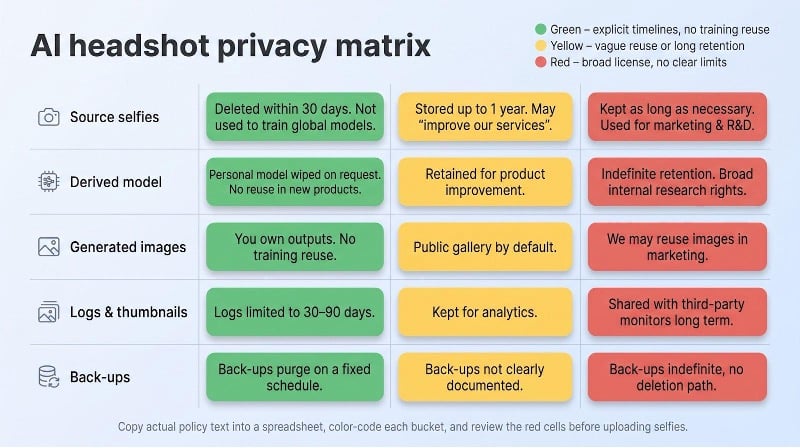
- Source selfies: the raw images you upload.
- Derived model: DreamBooth weights or InstantID embeddings built from those selfies.
- Generated images: the files you download.
- Operational traces: thumbnails, logs, and analytics copies.
- Back-ups: snapshots that survive long after you close the account.
A service that deletes selfies after 30 days but keeps the personal model for “product improvement” has not solved your privacy problem; nor has the vendor that wipes both yet stores thumbnails with a third-party monitor for a year.
We grade policies with a simple color key (prices and clauses verified 5 Nov 2026):
| Color | What it means | Example* |
| 🟢 Green | Explicit deletion windows for all five buckets, no training reuse, written DPA or SOC 2 | HeadshotPro: 30-day wipe, no-training clause |
| 🟡 Yellow | Clear selfie deletion but vague language (“may improve our services”) around models or logs | A vendor that deletes selfies on a schedule but says only “as needed” about models or logs |
| 🔴 Red | No timelines or broad marketing license, e.g., “as long as necessary” | Secta Labs: model and uploads kept to improve the product, no end date stated |
Examples drawn from vendor terms and privacy pages accessed 5 Nov 2026.
How to use the matrix: copy the exact clauses into a spreadsheet, color-code each bucket, and let legal scan the red cells before anyone uploads a selfie. Spotting a risky gap takes minutes, far better than learning about it in a breach notification. Privacy is a checklist, not a slogan.
The “Stranger-Face” test you can run tomorrow
Most public leaderboards crown the prettiest image; a good AI photo generator should rank by likeness first. The protocol below (validated 5 Nov 2026) needs six volunteers and a single-GPU laptop; everything else is organization and a spreadsheet.
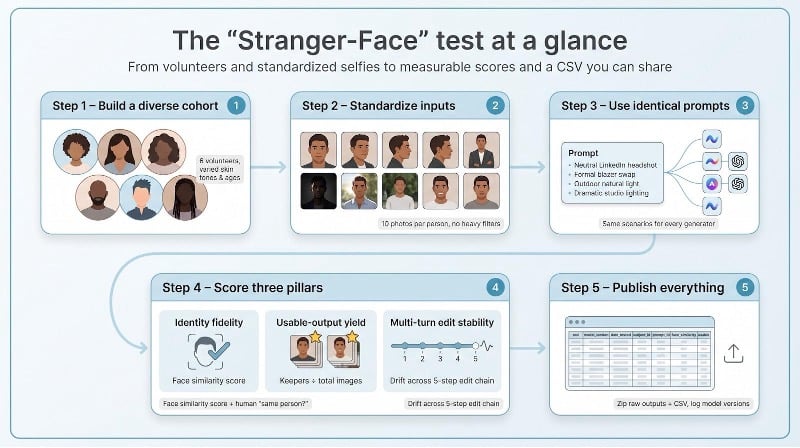
Step 1: Build a diverse cohort
Recruit six consenting adults across skin tones, ages, and face shapes to expose bias or beauty-filter drift.
Step 2: Standardize inputs
Photograph ten images per person: four close head-and-shoulders, two three-quarter views, two waist-up, one profile, and one in challenging light. Skip heavy makeup and social filters.
Step 3: Use identical prompts
All generators (headshot tools and chat models) receive the same eight scenarios:
- Neutral LinkedIn headshot
- Same person, formal blazer swap
- Outdoor natural light
- With and without glasses
- Three-quarter body, visible hands
- Dramatic studio lighting
- Name-badge text in frame
- Five-step edit chain (background → outfit → lighting → crop → text)
Tools that accept multiple references get the same selfie set; headshot apps that need ten photos ingest the full pack.
Step 4: Score three pillars
- Identity fidelity: ArcFace/AuraFace cosine score and a blinded “same person?” vote from three reviewers.
- Usable-output yield: keepers ÷ total images after likeness, anatomy, and prompt checks.
- Edit stability: face-embedding drift at each of the five edit turns.
Save results in CSV:
tool,model_version,date_tested,subject_id,prompt_id,output_id,face_similarity,usable,edit_step
Step 5: Publish everything
Zip the raw outputs, post the CSV, and log model versions plus test dates. Transparency stops cherry-picking.
What you learn
Chat models often win on aesthetics yet falter under dramatic lighting. Person-specific services dominate likeness but may miss text or hand anatomy. Beauty bias appears everywhere; generated faces trend slimmer and more symmetrical than the real subjects.
Run the test each quarter and watch scores (not marketing copy) show whether a new release actually improves your portraits.

Author: Kossi Adzo
Kossi Adzo is the editor and author of Startup.info. He is software engineer. Innovation, Businesses and companies are his passion. He filled several patents in IT & Communication technologies. He manages the technical operations at Startup.info.