Resources
Files Editor Experience: The Story of How PDF Editing Won Me Over


Files Editor Experience
Document editing apps usually fall into one of two camps. Either they’re so bare-bones they can barely open a file without glitching, or they’re so packed with features you need a tutorial just to fix a typo. Files Editor is one of the rare ones that lands somewhere in between – genuinely capable, but without drowning you in stuff you’ll never touch.
Before you dive in, it’s always smart to do a quick gut-check first. I’d recommend skimming through Files Editor reviews on Capterra or checking what people are saying on SoftwareAdvice, just so you know what you’re getting into. With that out of the way, here’s how my actual experience with the app went.
Where It All Started
It started, like most things do, with a small annoyance. I had a PDF that needed a quick fix – a typo, a wrong date, something minor – and I braced myself for the usual ordeal: opening some formatting panel, adjusting settings, confirming the change across three different screens. Instead, I opened the file, clicked into the text, made the edit, hit save, and that was it. The whole thing took maybe ten seconds. No ceremony, no hoops. It just trusted me to know what I wanted to do and let me do it.
That first impression mattered more than I expected, because it set the tone for everything else. A few days later I needed to actually clean up the text inside a PDF – not just a word here or there, but a proper correction – and this is usually where things go sideways. PDFs weren’t built to be edited like a normal document; they store everything as fixed positions, so one small fix can send the whole layout into chaos. That didn’t happen here. I fixed the line, and everything around it stayed exactly where it belonged. Fonts didn’t shift, spacing didn’t collapse. It’s a small thing until you’ve used an editor that can’t manage it, and then it becomes the thing you notice most.
Untangling a Pile of Scanned Pages
Around that same week, I had a pile of scanned pages that needed to become one single file – the kind of task that’s usually more annoying than it has any right to be. I picked the files, hit merge, and didn’t have to convert anything first or cross my fingers hoping the pages landed in the right order. They just did. A little while later I needed the opposite – pulling just the signature page out of a much longer contract – and that turned out to be just as painless. A few clicks, drag it where it needs to go, done. What used to be a printer-and-scanner problem became something I fixed entirely on-screen in under a minute, which honestly felt a little satisfying every time.
The Forms Test
Then came the forms. If you’ve ever filled out a tax document or an application digitally, you know how much of a coin flip it can be whether the app actually recognizes the fillable fields or makes you fight it the whole way through. This one just recognized them. I tabbed through, filled everything in, and moved on with my day. Even an older, scanned form without any built-in fields wasn’t a big deal – I just dropped text over the blanks manually. Not glamorous, but still miles better than printing something out, writing on it by hand, and scanning it back in like it’s a different decade.
Conversions and the File-Size Panic
Converting files was the next test, and this is usually where things fall apart the fastest – formatting rarely survives the trip in most apps. Files Editor handled the common conversions well enough that I stopped double-checking every single time, especially with straightforward, text-heavy documents. Turning other files into PDFs in particular was rock solid, which makes sense – PDFs are built to lock formatting in place, and the app clearly leans into that.
At some point I also ran into the classic scanned-document problem: a file too big to email without getting bounced back. The compression tool actually shrank it down while keeping everything legible, which felt like a small miracle the first time it worked exactly as it should.
What Actually Stuck With Me
Through all of this, what stuck with me most wasn’t any single feature – it was how little the interface got in my way. There’s no dashboard overload, no fifty-toggle settings page, no five-screen tutorial standing between me and the thing I actually opened the app to do. It’s clearly a deliberate choice, not an oversight. Most people opening a document editor just want to get one specific thing done quickly, and this app seems to genuinely understand that.
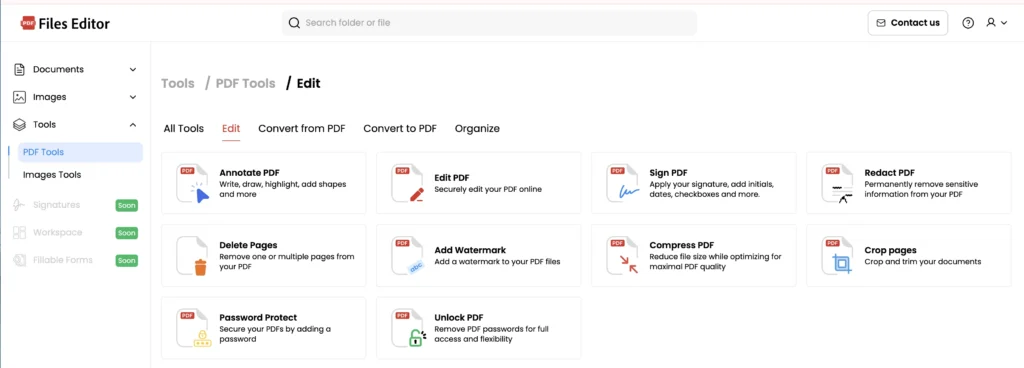
Later on, I needed to send something a little more sensitive – paperwork with financial details in it – and found basic redaction tools to black out the parts that needed hiding, along with password protection to lock the whole file down before sending it off. Nothing flashy about any of it, but exactly the kind of feature you’re quietly grateful exists the moment you actually need it.
And when everything was finally ready to go, getting it out the door was just as smooth as everything before it. I exported straight to another app, grabbed a shareable link, sent it off, and never had to worry about the formatting falling apart somewhere along the way. The whole experience – editing, organizing, sending – felt like one continuous process rather than a string of separate steps bouncing between different tools.
Looking Back on It
Looking back at it now, no single part of this app blew me away on its own. It was the accumulation of small things going right, one after another, that changed how I feel about it. Editing that didn’t need a tutorial. Merging that didn’t need a workaround. Forms that didn’t need a printer. Compression that didn’t wreck readability. Sharing that didn’t turn into a formatting gamble. None of it dramatic, all of it quietly reliable.
If your document life mostly revolves around signing contracts, filling out forms, merging scanned pages, or converting the occasional file, this app covers pretty much everything you’d need without much of a learning curve. If you’re doing heavier-duty stuff – serious legal redlining with full version tracking, or complex design-heavy layouts – you’ll probably want something built specifically for that. But for the regular, everyday paperwork most of us actually deal with, this quietly turned into one of the more dependable tools I’ve used.
Still, worth doing your own homework before you commit to anything. SoftwareAdvice and other review platforms are good places to see what other people think first. But as far as my own experience goes, this app earned its spot on my phone one small, unremarkable win at a time.



-

 Resources5 years ago
Why Companies Must Adopt Digital Documents
-

 Resources4 years ago
A Guide to Pickleball: The Latest, Greatest Sport You Might Not Know, But Should!
-

 Resources1 year ago
50 Best AI Free Tools in 2025 (Tried & Tested)
-

 Resources1 year ago
Get Paid $5000+ a month to write : Discover 30 Spectacular Websites That Reward Your Writing Effort