Blogs
The Ultimate DMARC Lookup Checklist For Better Email Authentication

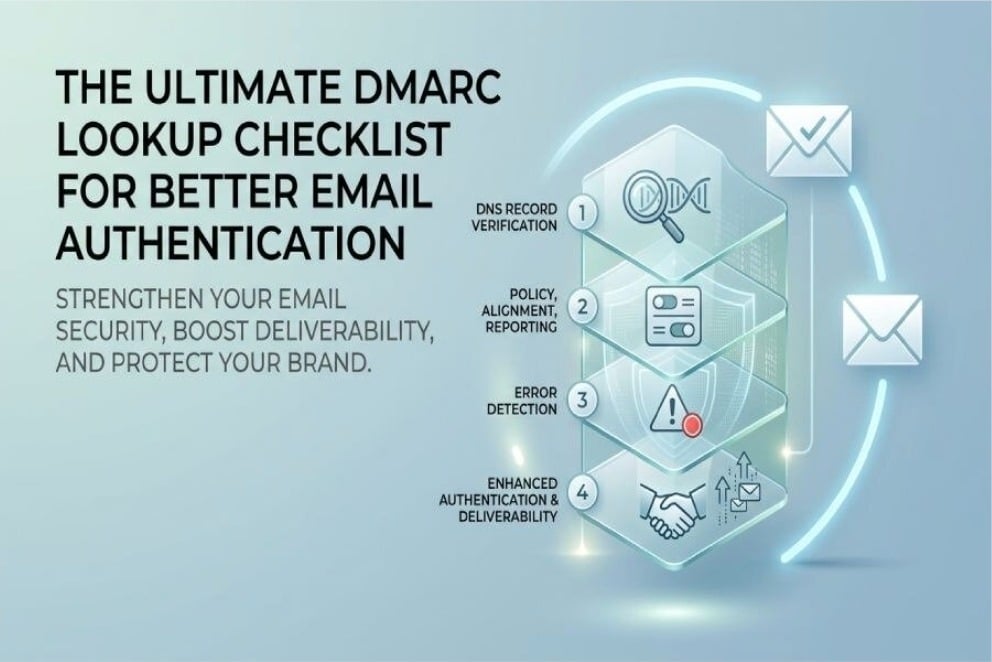
What a DMARC Lookup Is and Why It Matters for Email Security
Understanding the Role of DMARC Lookup in Modern Email Security
With the rise of sophisticated email threats such as phishing and spoofing, organizations are increasingly turning to strong email authentication methods. DMARC (Domain-based Message Authentication, Reporting, and Conformance) serves as a fundamental element of email security, offering a structure to verify legitimate senders and prevent unauthorized usage of your domain.
At the core of email authentication is the dmarc lookup tool, which retrieves and analyzes the DMARC record stored as a TXT record in your domain’s DNS. This process enables email providers and validation services to verify whether incoming messages comply with your DMARC policy—whether it is set to none, quarantined, or rejected. Using a DMARC lookup tool helps organizations identify configuration issues, strengthen email authentication, enforce domain protection policies, improve email deliverability, and safeguard their brand from phishing and spoofing attacks.
Why DMARC Lookups Matter for Policy Enforcement and Brand Protection
DMARC lookups serve crucial purposes beyond mere technical evaluations; they are essential for enforcing policies and safeguarding organizational domains against misuse. When set up correctly, DMARC records empower domain administrators to guide email service providers like Google and Yahoo on managing unauthenticated messages, thereby preventing phishing attempts and protecting the organization’s reputation. Additionally, DMARC lookups facilitate comprehensive reporting for compliance, producing aggregate and forensic reports that aid in analysis and shape future security strategies and best practices.
Step 1: Verify Your DMARC Record Exists and Is Published Correctly
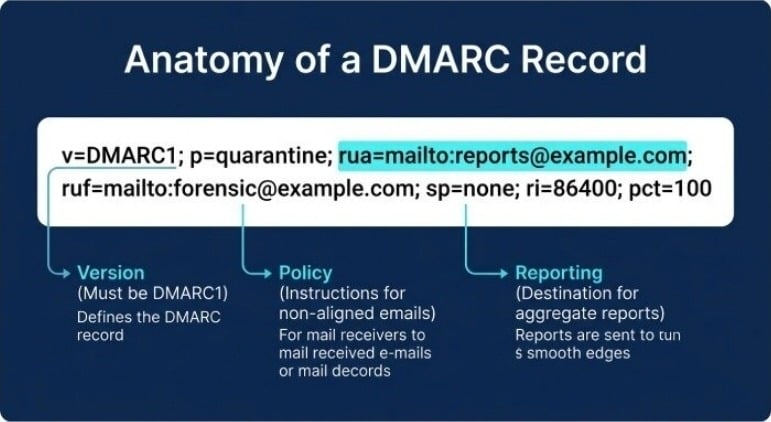
Ensuring Your DMARC TXT Record Is in DNS
The foremost and most essential task on any DMARC verification list is to ensure that your domain has a properly published DMARC record. This record should be available as a TXT Record in the appropriate DNS location: `_dmarc.yourdomain.com`.
To check and validate your DMARC record, you can utilize tools like EasyDMARC, MXToolbox, or dmarcian’s DMARC Record Wizard. These tools act as diagnostic resources, indicating whether your DNS record is detectable and formatted correctly. If a DMARC lookup does not find a record, your domain remains vulnerable to spoofing and other unauthorized mailing activities.
Publishing the Correct DMARC Record Syntax
A DMARC record must start with the essential tag `v=DMARC1`, followed by policy and reporting tags like `p=none`, `p=quarantine`, and `p=reject`, along with optional parameters such as `rua`, `ruf`, `pct`, `adkim`, and `aspf`. An example of a simple DMARC record is:
v=DMARC1; p=quarantine; rua=mailto:dmarc-reports@yourdomain.com;
If you fail to create a DMARC TXT Record in your DNS, or if you include any syntax errors in your record, you risk compromising your email authentication efforts and damaging the reliability of your outgoing emails.
Step 2: Check DMARC Policy Settings, Alignment, and Reporting Tags
Reviewing Policy Enforcement: None, Quarantine, or Reject
Once you’ve verified the record’s existence, the next step in the DMARC lookup process is to examine your policy tag. The `p` tag determines how you want to handle emails that are deemed unauthorized:
- none (Monitor): No actions are taken; information is gathered for future reporting and analysis.
- quarantine: Emails identified as suspicious are moved to the recipient’s spam or quarantine folder.
- reject: Unauthenticated emails are outright denied at the gateway.
When conducting a DMARC check, assess whether these policy settings reflect your organization’s security stance and readiness for enforcement. Organizations often begin with a “none” policy and can advance to “quarantine” or “reject” as their email authentication practices improve.
Alignment Modes: adkim and aspf
DMARC employs alignment to verify that the domains authenticated through SPF and DKIM correspond with the domain shown in the “Header From” field. The tags `adkim` and `aspf` define whether the alignment for DKIM and SPF is strict or relaxed, respectively. For instance:
adkim=s; aspf=r
A properly configured DMARC record takes alignment into account to minimize the risk of legitimate emails being rejected and to enhance deliverability, all while safeguarding the domain.
Setting Up Reporting: rua, ruf, Reporting Interval, and Format
To ensure strong visibility and ongoing enhancement, DMARC provides two types of feedback mechanisms:
- Aggregate Reports (`rua`): These are overall summaries of mail authentication outcomes.
- Forensic Reports (`ruf`): These offer in-depth failure insights for each individual message.
To obtain these reports, include the `rua` and `ruf` URIs in your DMARC record as follows:
rua=mailto:dmarc-aggregate@yourdomain.com; ruf=mailto:dmarc-forensic@yourdomain.com;
Moreover, it’s advisable to define the `ri` (reporting interval), which is usually indicated in seconds (for example, `ri=86400` for daily reporting).
Step 3: Identify Common DMARC Lookup Errors and Misconfigurations
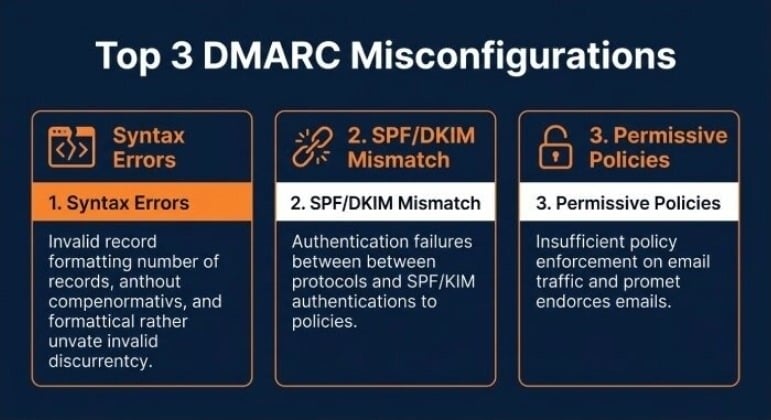
Detecting Syntax Errors and Invalid Tags
One common issue encountered during DMARC implementation is the incorrect setup of the DMARC record. Services such as EasyDMARC, MXToolbox, and dmarcian offer record validation features that can automatically identify syntax mistakes including:
- Missing or repeated tags
- Incorrect tag values (for instance, a misspelling like “quarantine” or improperly formatted rua/ruf URIs)
- The missing essential `v=DMARC1` tag
If DMARC lookups and checks are not conducted regularly, these mistakes can pile up, leading to an ineffective or non-enforceable DMARC policy.
Issues with Subdomain Policy, Alignment, and Authorized Sources
Misconfiguration can occur with the subdomain policy (the `sp` tag), particularly when administrators do not extend protection to subdomains or mistakenly permit unauthorized access. It’s essential to examine SPF and DKIM records related to your domain at the same time, since DMARC depends on these authentication methods for accurate validation. If there’s a mismatch in authentication (for instance, having different organizational domains in DKIM and the “Header From”), legitimate emails may be quarantined or rejected, negatively affecting deliverability.
Reporting and Overly Permissive Policies
Failing to specify `rua` or `ruf` means missed insights into your email ecosystem and unauthorized use. Setting the policy to `none` indefinitely defeats the purpose of DMARC, as no policy enforcement occurs and threats like phishing can persist unchecked. A clear roadmap for moving from “none” to stricter policies, along with periodic DMARC lookups, ensures your configuration evolves with your security needs.
Step 4: Use DMARC Lookup Results to Improve Authentication and Deliverability
Interpreting Lookup Results with Validation Tools and Checkers
Consistent use of DMARC Checkers, DMARC validation, and record checkers such as those provided by dmarcian, EasyDMARC, and MXToolbox gives instant feedback on record health and adherence to RFC 7489. DMARC lookup results help domain admins track authentication issues, unauthorized sources, and policy enforcement gaps across their domain name and subdomains.
Enhancing the Email Ecosystem and Brand Protection
Through regular DMARC lookups and validation checks, organizations significantly diminish the risk of phishing, spoofing, and unauthorized use, while also improving brand protection. A properly enforced “quarantine” or “reject” policy stops bad actors from abusing your domain, while a detailed reporting program increases visibility into who is sending what from your domain.
Deliverability Gains and Best Practices for Ongoing DMARC Management
Resolving DMARC misconfigurations, tightening alignment policies, and reviewing aggregate report data will avoid false positives and improve email deliverability. Adopting best practices—like incremental tightening of policy tags from “none” to “quarantine” to “reject,” validating each change with DMARC Checkers, and keeping configuration documentation up-to-date—ensures long-term compliance and effectiveness.
Ultimately, placing DMARC lookup and validation at the center of your email authentication checklist empowers you to maintain a secure, compliant, and high-performing email infrastructure within the global email ecosystem.



-

 Resources5 years ago
Why Companies Must Adopt Digital Documents
-

 Resources4 years ago
A Guide to Pickleball: The Latest, Greatest Sport You Might Not Know, But Should!
-

 Resources1 year ago
50 Best AI Free Tools in 2025 (Tried & Tested)
-

 Resources1 year ago
Get Paid $5000+ a month to write : Discover 30 Spectacular Websites That Reward Your Writing Effort