Resources
How Startups Create Professional Marketing Visuals With AI Photo Editing

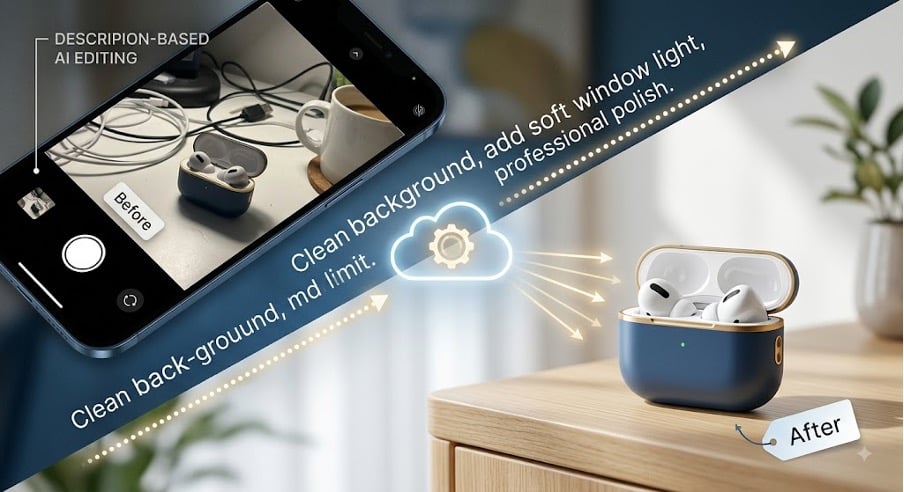
Startups, small businesses, and entrepreneurs need to do a lot of things they are not great at. Productizing, marketing, developing, releasing, iterating — hardly a lot of time to do customer support or anything that isn’t product development. That said, we live in a visual world, and in today’s digital-first marketplace, visual assets are the holy grail. Landing pages, FB ads, Instagram, product catalogs, and SEO content all need high-quality photos to convert prospects, win awards, and get impressions.
And for early stage teams this leaves us in a classic case of choosing between professional designers (or agencies) who will eat our budget, and creating our own gritty handmade assets with someone like Photoshop who ends up looking like us. Luckily the world of creative tools is about to undergo a massive change. By utilizing a modern Photolaria AI photo editor, founders and small teams can convert standard smartphone photography into studio-ready marketing assets simply by describing the desired changes in plain text.
The Visual Bottleneck: Scaling Marketing Assets Requires Time and Money
Bootstrapped companies have one major bottleneck that affects everything: producing high quality visual assets for marketing at scale. The problem rarely lies in the lack of vision; it’s the existing workflow of creating these assets that is problematic.
Limited Resources: While the entire current vision pipeline requires a few graphic designers or even a complete CAD team, an entire shooting studio has a high initial development cost, and at early stages most of it needs to go towards finding product/market fit and user acquisition.
Steep software learning curves: Traditional editing tools demand a knowledge depth that exceeds the technical expertise of most small business founders. Learning to use masks, layers, color grading controls, and pen tools requires dozens of hours of learning.
Fragmented format requirements: Research conducted by the Harvard Business Review demonstrates that visual consistency and brand coherence across multi-channel touchpoints directly impact consumer trust and purchasing decisions. A single hero image has to be re-formatted into a vertical story for Instagram, a wide banner for LinkedIn, a square graphic for portal ads on Meta and for a transparent PNG that will appear in an e-commerce catalog. Resizing, extending and re-framing an asset manually for each channel creates operational friction.
Low quality raw captures: While the hardware of smartphone cameras is capable of capturing high-resolution images, shooting conditions in the real world bring with them unwanted artifacts: reflections, uneven indoor lighting, distracting background clutter or color casts.
Without a design skillset or expensive hardware, startups often have to settle for low quality images that diminish brand credibility and advertising click-through rates.
The Solution: Plain-Text AI Photo Editing
Generative artificial intelligence and modern computer vision have revolutionized image post-processing. Rather than manually editing pixels with sophisticated selection brush tools, you can now simply ask editing models to perform tasks using natural language.
How Plain-Text Photo Editing works
Text-guided image modification uses those same multimodal AI models that excel at combining visual pixel data with linguistic semantics. When I upload an image and type in “Remove the messy office background and replace it with a warm, minimalist wooden desk with soft natural window light“, the AI understands that I want it to:
Semantic segmentation – figure out the product subject from the foreground, background, shadows and other elements, as you would do if you were to manually separate layers in Photoshop
Context aware background removal and replacement – not only remove an unwanted background but also clean up that element without creating artifacts such as harsh edges or haloing around complex shapes like hair or reflected glass
Relighting and shadow synthesis – detect geometry and synthesize realistic shadows, highlights and lighting that is consistent with the subject story you just told
This makes the AI investigating unexplored routes to transform raw smartphone product photos into marketing assets in minutes, not hours, in a conversational, text-based manner.
Step-by-Step Workflow: Turning Smartphone Shots Into Campaign Visuals
To build a repeatable visual asset pipeline without a design background, follow this practical four-step workflow.
Step 1: Capture Clean Raw Smartphone Shots
AI tools expand creative capabilities, but starting with a solid foundation produces the cleanest output. You do not need expensive DSLR camera equipment—a recent smartphone will suffice if you adhere to basic photography principles:
- Maximize Natural Light: Shoot near a large window during daylight hours. Direct sunlight creates harsh shadows, whereas indirect diffused light yields balanced exposures.
- Maintain Distance and Focus: Position your smartphone 2–3 feet back from the product and use tap-to-focus. Avoid extreme ultra-wide lenses that introduce optical distortion around the frame’s edges.
- Keep Backgrounds Simple: Place your subject on a plain table or wall. While AI can remove complex backgrounds, neutral backdrop textures ensure sharper subject edge definition.
Step 2: Clean Up Backgrounds and Remove Distractions
Once your base photo is captured, import it into your editing workspace. The first priority is eliminating visual clutter that pulls attention away from your value proposition.
- Prompt Example for Background Cleanup:
“Remove all background objects, wires, and reflections. Place the product on a seamless, soft off-white background with a subtle, realistic drop shadow underneath.”
For software-as-a-service (SaaS) or digital service products (e.g., app interface mockups on a laptop screen), plain-text prompts can quickly erase screen glare, align perspectives, or substitute placeholder text with crisp UI screenshots.
Step 3: Fix Lighting, Color, and Surface Details
Direct smartphone photos often suffer from dull color saturation, cool cast tints from indoor LED bulbs, or uneven exposure. Use plain-text prompts to correct lighting balance and refine product surfaces.
- Prompt Example for Lighting & Color Enhancement:
“Adjust exposure to make the image bright and vibrant. Warm up the color temperature slightly, correct shadow harshness, and enhance product surface details.”
If your product features transparent containers, metallic finishes, or subtle textures, instruct the editor to retain reflective integrity so the final render looks natural rather than artificially generated.
Step 4: Repurpose One Photo Across Campaign Formats
A major inefficiency in startup marketing is re-shooting products every time a new campaign channel opens up. Generative outpainting (generative fill/expansion) allows you to alter background aspect ratios without cropping into the core subject.
- E-Commerce Product Page (1:1 Square): Instruct the editor to center the subject on a clean studio neutral background with balanced padding.
- Instagram Story / TikTok Ad (9:16 Vertical): Request an vertical extension of the background upward and downward, adding relevant lifestyle elements (e.g., “Extend background vertically showing a warm, softly blurred minimalist living room setting”).
- LinkedIn / Twitter Header Banner (16:9 Landscape): Expand the scene horizontally to create clear negative space on the left or right side specifically for text overlays and call-to-action (CTA) buttons.
Common AI Photo Editing Mistakes to Avoid
While generative photo editing tools accelerate output, relying entirely on automated processes without quality control can damage brand perception. Avoid these frequent pitfalls:
| Common Pitfall | Why It Harms Your Brand | How to Prevent / Fix It |
| Over-Prompts & Unrealistic Contexts | Placing a physical product in hyper-dramatic, highly stylized AI environments looks artificial and lowers consumer trust. | Keep backgrounds grounded in real-world settings that reflect your actual target audience’s environment. |
| Ignoring Lighting Logic | Adding a background with light coming from the left while the subject is lit from the right creates an uncanny effect. | Explicitly state the light direction in your prompt (e.g., “Match lighting direction to soft window light coming from the top left”). |
| Loss of Original Brand Identity | Over-filtering can alter actual product colors, leading to customer disappointment upon delivery. | Use AI specifically for background, ambient lighting, and environmental edits while preserving the core product’s actual color hexes and logos. |
| Inconsistent Visual Styles Across Campaigns | Using vastly different visual themes across Instagram, website banners, and ad campaigns creates a fragmented brand image. | Establish a standardized prompt template for your brand (e.g., consistent background materials, lighting warmth, and shadow depth). |
Scale Your Startup Marketing Strategy Efficiently
Professional marketing visuals are no longer gated by massive design budgets or complex software mastery. By combining basic smartphone photography principles with plain-text AI photo editing, startup founders and small teams can build a flexible, high-converting visual asset library in-house.
By streamlining asset generation—from rapid background cleanup to multi-format campaign scaling—you save critical capital and time, allowing your business to stay agile, maintain brand consistency, and compete visually in a crowded marketplace.



-

 Resources5 years ago
Why Companies Must Adopt Digital Documents
-

 Resources4 years ago
A Guide to Pickleball: The Latest, Greatest Sport You Might Not Know, But Should!
-

 Resources1 year ago
50 Best AI Free Tools in 2025 (Tried & Tested)
-

 Resources1 year ago
Get Paid $5000+ a month to write : Discover 30 Spectacular Websites That Reward Your Writing Effort