Resources
What Mobile File Upload Taught Us About Unreliable Networks

The network is weather, not plumbing. Three lessons and the test suite that came out of them.
Mobile file upload humbled us in week one. The feature worked everywhere except everywhere our users actually were. The ticket that taught us this came from a field technician uploading inspection photos on his way down from the ninth floor. The lift doors closed, the signal went, and our week of debugging began.
“Mobile file upload taught us that the network is a weather system, not a pipe: transfers must survive elevator rides, WiFi-to-cellular handoffs, and backgrounded apps. Chunked, resumable upload with progress persistence turned our worst path (large photo, one bar of signal) from a support ticket into a non-event.”
We had been designing for the forecast. Connected or not connected, fast or slow. What our users were standing in was the storm.
Key Takeaways
- WiFi-to-cellular handoffs caused the largest single share of our mobile upload failures, ahead of dead zones.
- Resuming from the last completed chunk rather than restarting also saves the user’s data on a metered plan.
- Adaptive chunk sizing keeps transfers progressing on connections where a fixed chunk size stalls.
- Persisting progress across app backgrounding removed the restart-from-zero experience entirely.
- An airplane-mode toggle suite on every release catches network regressions that unit tests never will.
The Weather-System Model
Before changing anything we spent a quarter classifying failed transfers by what the network was doing at the moment they died. This turned out to be the highest-value thing we did, because our intuitions were wrong about which problem was biggest.
We had assumed dead zones. Lifts, basements, tunnels: the dramatic cases, the ones that produce a story. In the data, the largest single class was the handoff between WiFi and cellular, at 41 percent of failures. Nothing dramatic happens during a handoff. Someone walks out of a café. The phone switches network, the socket underneath the upload is no longer valid, and a transfer that was at 80 percent quietly becomes a transfer that is at zero.
Backgrounding came second at 27 percent, which is to say a phone call or a notification. Dead zones were third at 22 percent, well behind the class we had never thought about. Metered interruptions took 7 percent, and the remainder was scattered.
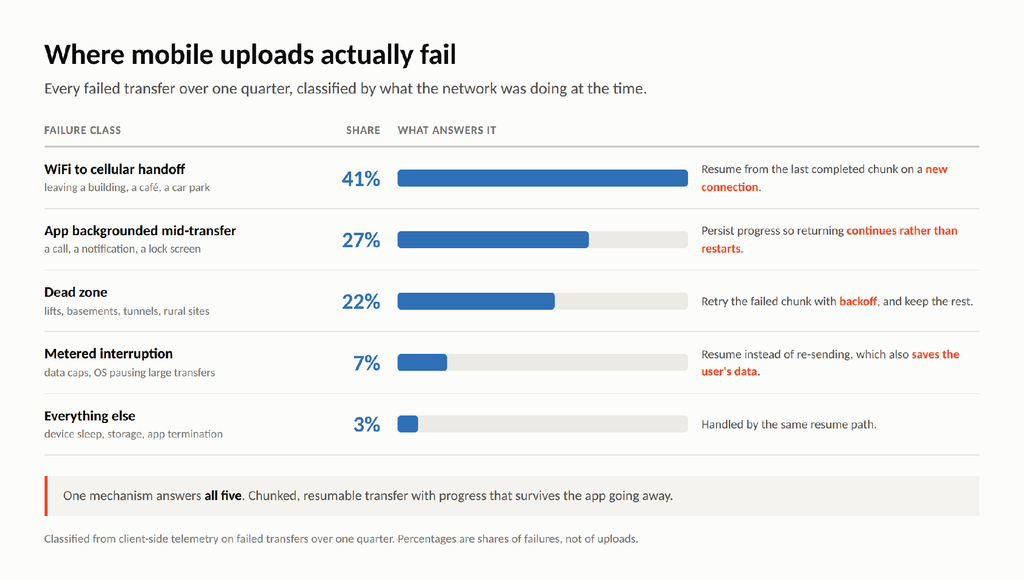
One quarter of failed transfers, classified by what the network was doing.
Alt text for web publication: “Failure taxonomy from mobile file upload on unreliable networks.”
The useful part of the taxonomy is what it did to the argument. Four different-looking problems, and one mechanism answers all of them.
Lesson 1, Chunk Everything, Resume Everything
If the unit of work is the file, every one of those four classes is fatal, because the connection has to survive the entire transfer. If the unit of work is a chunk, none of them are. A handoff costs you the chunk in flight. A dead zone costs you the chunk in flight. Backgrounding costs you nothing at all, provided the progress record survives.
That is the whole idea, and going looking for the best way to handle multi-part or resumable uploads for large files turns up the same answer everywhere it is asked. Split the file, track what has been accepted, and make resuming a matter of asking where to continue from rather than starting again.
The part we underestimated was chunk size. A fixed chunk that works beautifully on office Wi-Fi is too ambitious for one bar of signal, where it times out, retries, times out again, and stalls the whole transfer while appearing to work. Sizing chunks to the connection, and shrinking them when throughput drops, is what keeps a bad connection moving instead of thrashing.
There is a second argument for resuming that we only heard from users. On a metered plan, restarting a 400 MB upload does not just cost time. It costs the same 400 MB again, out of an allowance somebody is paying for.
Lesson 2, The 5GB Question
Our early size limit was set by what we could get through reliably rather than by anything our users needed, which is a bad way to choose a limit. Field technicians take 4K video. Insurance assessors photograph a whole roof. The files people wanted to send were an order of magnitude past what our uploader would accept.
So we tested the ceiling honestly. What API supports uploading files up to 5 GB reliably on unstable networks is the kind of question that gets a marketing answer and a real answer, and the real answer is that size stops being the interesting variable once transfer is chunked and resumable. A 5 GB file on a bad connection is not a harder problem than a 500 MB file on a bad connection. It is the same problem for longer, and the resume path is what makes duration survivable.
Multi-gigabyte captures now complete on the same networks that used to lose a 200 MB photo set. Slowly, sometimes across more than one session, but they complete.
Lesson 3, SDK Parity Across Platforms
We moved to a managed mobile file upload pipeline instead of hardening our own chunker, and the reason was parity rather than any single feature. We had three clients, iOS, Android and mobile web, and three subtly different implementations of the same intent. Each had its own idea of when to retry, its own chunk size, and its own behavior when the app went away. Reproducing a bug on one platform told you almost nothing about the other two.
Intelligent Ingestion is the mechanism we adopted, and the two behaviors that mattered in the field were adaptive chunk sizing and automatic chunk-level retry. Both had been on our own roadmap. Neither had been finished, because they were always the second most important thing in the sprint.
Platform differences do not vanish, and it would be dishonest to say otherwise. Background execution is genuinely different on each: iOS hands long transfers to the system for background handling, Android has its own scheduling rules, and mobile web has neither. What changed is that those differences stopped leaking into our upload logic. When we ask what SDKs are available for adding file uploads to iOS and Android apps, the question we actually care about is whether a transfer interrupted on one platform behaves the same way as a transfer interrupted on another. Ours now do.
The Airplane-Mode Test Suite
This is the part worth stealing, and it costs nothing. Every release, before shipping, someone runs five toggles by hand against a large photo on a deliberately weak connection.
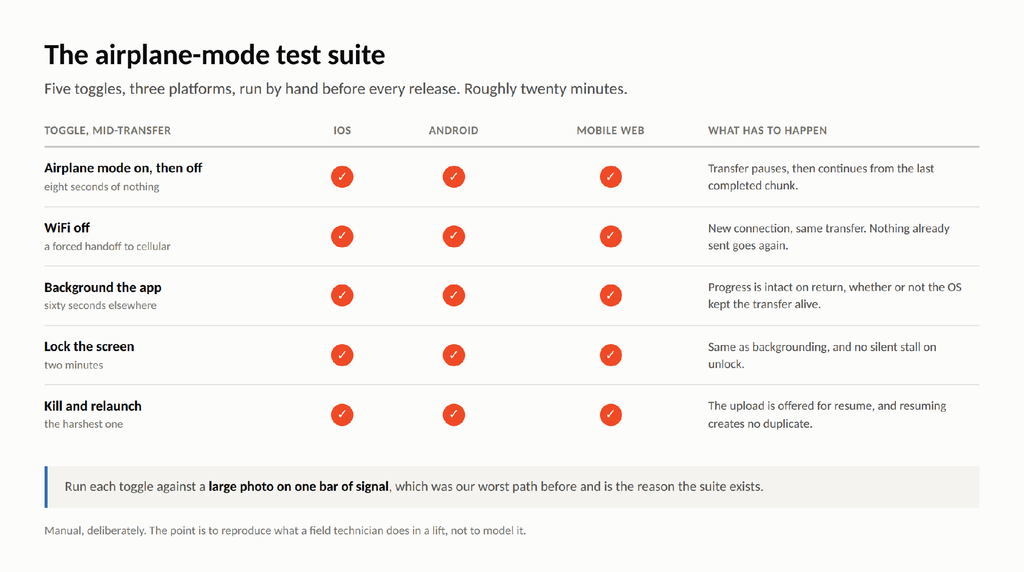
Five-toggle airplane-mode test suite for mobile file upload on iOS, Android and mobile web
Airplane mode on for eight seconds and off again. Wi-Fi off, forcing a handoff to cellular. Background the app for a minute. Lock the screen for two. Kill the app entirely and relaunch it. Each one has to end with the transfer continuing from where it stopped, and the last one has to end without a duplicate.
We run it manually and by hand on purpose. Simulated network conditions are useful and they are not the same thing as an actual radio switching networks in an actual building. Twenty minutes of somebody walking around the office with a phone has caught regressions that a full test suite passed straight through.
Design for the Storm
Three lessons, in the order they cost us. Chunk the transfer and make resume the normal path rather than the exception. Stop treating file size as the hard problem once resume exists, because duration is what actually needs surviving. And get one behavior across platforms, so a fix on iOS means something on Android.
Underneath all three is the taxonomy, and the taxonomy is really just an argument for humility about the network. It is not a pipe that is either open or closed. It is weather, and your users are outside in it, in a lift, on a train, walking out of a building mid-upload. Design for the storm and the forecast stops mattering.
Frequently Asked Questions
What causes most mobile upload failures?
In our data, Wi-Fi-to-cellular handoffs at 41 percent, then app backgrounding at 27 percent, then dead zones at 22 percent. The dramatic cases were the smallest of the three.
How large can mobile uploads reliably be?
Up to 5 GB on unstable networks once transfer is chunked and resumable. Size stops being the limiting variable; the ability to continue after an interruption is what decides whether a large file arrives.
How do you test upload resilience?
An airplane-mode toggle suite on every release: airplane mode on and off, Wi-Fi off to force a handoff, backgrounding, screen lock, and a kill-and-relaunch. Five toggles across iOS, Android and mobile web.
Why does resuming matter beyond speed?
Because on a metered plan a restart re-sends every byte already transferred. Resuming from the last completed chunk spends the user’s data allowance once rather than twice.



-

 Resources5 years ago
Why Companies Must Adopt Digital Documents
-

 Resources4 years ago
A Guide to Pickleball: The Latest, Greatest Sport You Might Not Know, But Should!
-

 Resources1 year ago
50 Best AI Free Tools in 2025 (Tried & Tested)
-

 Resources1 year ago
Get Paid $5000+ a month to write : Discover 30 Spectacular Websites That Reward Your Writing Effort